



With the rapid development of community marketing, cross-border e-commerce, affiliate marketing, and overseas brand promotion, more and more businesses need multiple people to manage Facebook accounts together. For example, the marketing team may be responsible for publishing content, the customer service team may need to handle messages, the advertising team may need to manage Facebook Ads, while business owners need to review overall data.
Therefore, "sharing Facebook accounts with the team" has become part of the daily operations of many businesses. But the question is: Is sharing Facebook accounts really safe? Does having multiple people use the same account increase security risks? How should businesses manage Facebook team accounts more efficiently in 2026?
This article will provide an in-depth analysis of the issues that shared Facebook accounts may encounter, as well as how businesses can manage multiple Facebook assets through more secure team collaboration methods.

Why Are Shared Facebook Accounts Common?
For small businesses or teams just beginning to operate in overseas markets, sharing an account may seem like a simple and quick solution.
For example, a company may have only one Facebook Page administrator account, and team members need to log in to this account to complete different tasks:
- Publish Facebook posts
- Reply to followers’ comments and private messages
- Manage advertising campaigns
- Review market data analytics
- Maintain the brand’s community image
When the team is small, sharing an account may seem to save time and eliminate the need to create multiple user permissions.
However, as the team grows or the business begins managing multiple brands and market accounts, sharing a Facebook account may create more management problems.
What security risks do shared Facebook accounts pose?
1. Multiple login locations can easily trigger unusual activity
Facebook uses multiple security mechanisms to determine whether an account is being used normally, including login locations, device information, browser environment, and usage behavior.
If the same Facebook account is accessed from different countries and devices within a short period—for example, by a team in the United States, employees in Asia, and outsourced personnel simultaneously—the system may consider the account to have suspicious activity.
This may trigger additional verification, such as requiring users to log in again, verify their phone number, or complete a security confirmation.

2. Team members' permissions are difficult to control
One of the biggest problems with shared accounts is that all users typically have the same login permissions.
For example:
- Content editors may not need advertising management permissions
- Customer service staff should not modify account settings
- Temporary contractors should not retain login access permanently
However, if everyone uses the same account credentials, it is difficult to precisely manage the scope of each person's operations.
3. Unclear responsibility for account security
When multiple people share an account, it is difficult to determine which member was responsible if a security issue occurs, such as a leaked password, an incorrect operation, or changes to the account settings.
For businesses, this increases subsequent management costs and may also affect brand operations.
Facebook’s officially recommended approach to team management
Compared with directly sharing Facebook login information, businesses are more strongly recommended to use Facebook Business Manager (Meta Business Suite) for team management.
Through business management tools, administrators can:
- Add different team members
- Set different permissions
- Manage Facebook Page
- Manage advertising accounts
- Track team activity
This approach is more secure than sharing passwords and is also better suited to a company’s long-term development.
How can you improve security when managing multiple Facebook accounts?
Create separate work environments
For businesses that need to manage a large number of Facebook accounts, such as cross-border e-commerce sellers, community agencies, and digital marketing teams, relying solely on a regular browser may not meet their needs.
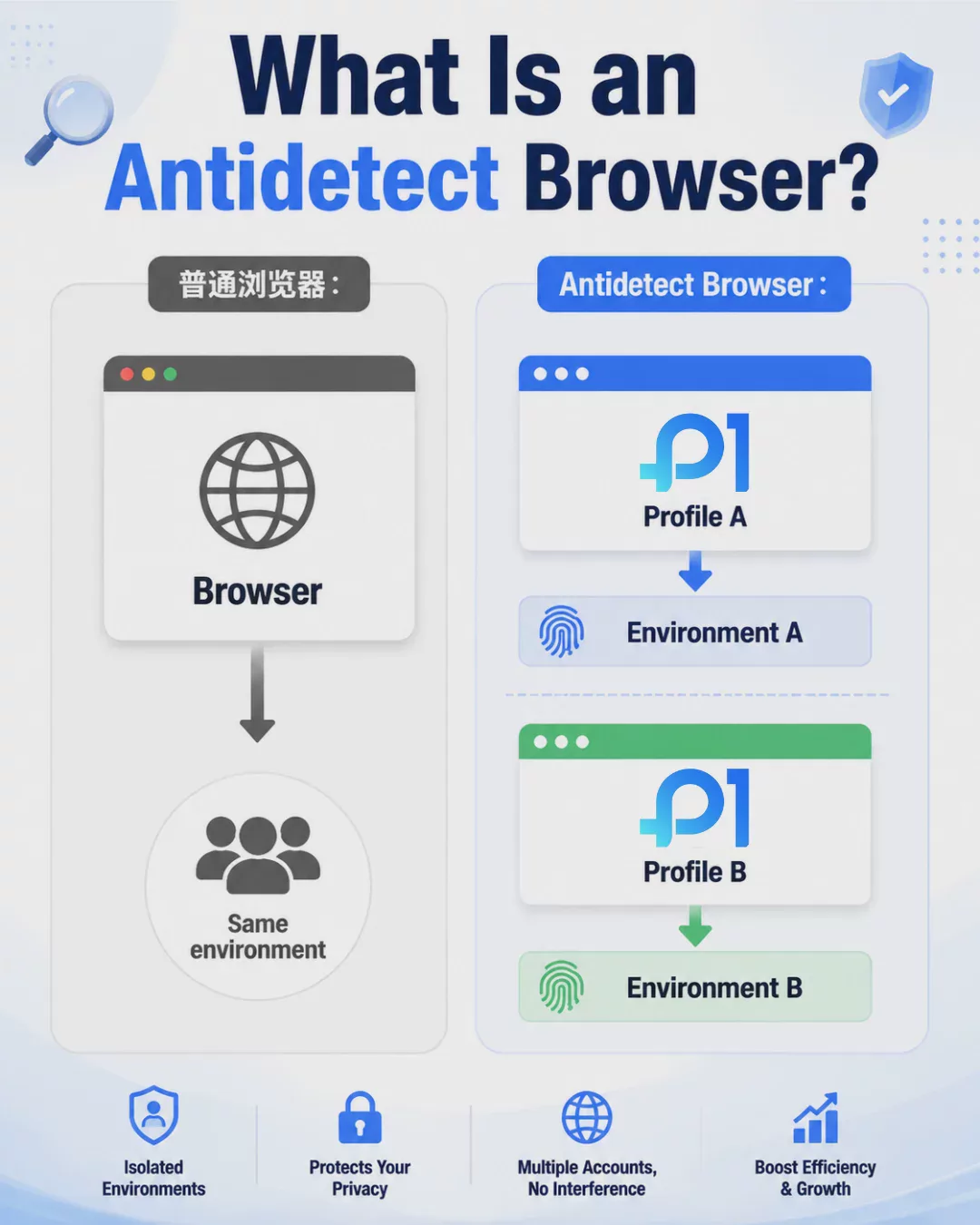
Traditional browsers typically share cookies, caches, and browser environment information. When multiple people operate different accounts, this can easily lead to a disorganized account environment.
Therefore, many professional teams use an Antidetect Browser to create separate browser environments.
What is an Antidetect Browser?
An Antidetect Browser is a tool specifically designed for multi-account management that can create multiple independent browser profiles.
Each Profile can have its own:
- Cookie data
- Browser fingerprint settings
- Device environment
- Login status
- Proxy IP configuration
This allows teams to manage different Facebook accounts more efficiently without requiring multiple people to share the same browser environment.
The best workflow for managing Facebook accounts as a team
First step: Create clear account categories
Businesses should first organize all Facebook assets, such as:
- Official brand accounts
- Accounts for different national markets
- Ad testing accounts
- Client management accounts
Once clear categories are established, teams can create a more efficient management system.
Second step: Assign permissions to different members
Do not let everyone use the same management permissions.
For example:
- The content team is responsible for publishing posts
- The advertising team is responsible for Campaign management
- The customer service team is responsible for handling messages
- The supervisor is responsible for overall management
Third step: Use secure team collaboration tools
When enterprises manage multiple accounts, they can use professional tools to create independent workspaces.
For example, throughP1Browserand other anti-detect browser tools, teams can create different browser environments and assign access permissions according to each member’s role.
This approach is suitable for enterprises that need to manage a large number of community accounts, e-commerce accounts, or overseas marketing assets.
What Situations Are Shared Facebook Accounts Suitable For?
Not every account-sharing method is impractical.
If it is only for:
- Small teams of two or three people
- Short-term project collaboration
- Non-core test accounts
Sharing may still be workable.
But if it involves:
- A company's official Facebook Page
- Large advertising investments
- Multinational market operations
- Multi-brand management
should adopt a more comprehensive account management solution.
New Trends in Enterprise Facebook Account Management in 2026
In the future, businesses will place greater emphasis on security, automation, and team collaboration efficiency when managing social media accounts.
As the demand for cross-border e-commerce and overseas marketing grows, managing multiple accounts has become a routine requirement for many businesses.
Businesses are no longer focused solely on how to create accounts, but also on how to establish more stable and secure management processes while maintaining efficiency.
Conclusion: Sharing Facebook Accounts Is Not the Best Long-Term Solution
Although sharing Facebook accounts is convenient, security risks and management challenges will gradually increase as the team grows.
For individual users or small teams, sharing may still be acceptable; however, for businesses that need to develop overseas markets over the long term, using Facebook Business Manager together with professional account management tools is recommended.
Through independent browser environments, clear permission management, and standardized operating procedures, businesses can manage Facebook accounts more efficiently and improve team collaboration efficiency.

