




According to statistics, Telegram has more than 7.5 hundred million monthly active users worldwide, with active cross-border users and overseas market customers accounting for a significant proportion. This makes it an important platform for cross-border e-commerce customer communication, group marketing, event notifications, and airdrop promotions.
For cross-border sellers, operating multiple Telegram accounts simultaneously has become a common need: different markets may require independent accounts for customer service and marketing, or accounts under the same brand may need to be managed separately by region, language, and business line.
Operating multiple Telegram accounts in bulk can improve efficiency, but it also presents a series of challenges. This article provides beginners in cross-border e-commerce with a practical guide to safe multi-account management.
Challenges of Operating Multiple Telegram Accounts
1. Risk of Account Bans
For operating multiple accounts on the same device, Telegram has strict risk-control mechanisms and is particularly sensitive to abnormal changes in IP addresses and unusual combinations of device environments. When you frequently switch between or log in to multiple Telegram accounts on the same device or within the same network environment, the platform can easily identify associations between these accounts through parameters such as device fingerprints, browser information, and IP addresses. Once an association between the accounts is identified, your accounts may be permanently banned. In other words, without separating network and device environments, it is easy to trigger the platform’s risk-control rules within a short period, especially when performing large-scale bulk messaging or joining multiple groups simultaneously.
2. Complicated Login Process
Registering and logging in to Telegram accounts already requires multiple steps, such as verifying a phone number and entering a verification code. When performing these operations in bulk, using traditional manual methods is not only cumbersome but also prone to issues such as delays in receiving verification codes, input errors, and account confusion. At the same time, Telegram often strengthens verification for suspicious registration activity, such as requiring users to upload a profile picture, complete their profile, or undergo additional two-factor verification. This further increases the difficulty of logging in and is particularly unfriendly to beginners.
3. High Complexity of Managing Multiple Accounts
When the number of accounts reaches a dozen or even hundreds, managing each account in an organized manner becomes a major challenge. Traditional methods such as Excel spreadsheets and notepads are often unable to balance security and efficiency, making it easy to lose account information, forget passwords, or confuse accounts. Even more troublesome, when a team member leaves or the team changes, an unstandardized account handover process may result in the permanent loss of accounts, affecting normal business operations.
4. Information Security and Privacy Risks
Operating multiple accounts means that more customer data and business information are stored across different devices or browser environments. Without proper isolation and management, information leaks or data crossover can easily occur. In particular, when shared computers or networks are used, cookies, cache, or autofill information from one account may be accessed by mistake, increasing security risks.
Technical Reasons Why Telegram Accounts Are Banned
For many beginners in cross-border e-commerce, having an account banned is the problem they most want to avoid and overcome when running multiple Telegram accounts. Understanding the technical reasons behind account bans helps with developing a sound multi-account operating strategy and reducing the risk of triggering risk controls. Telegram's risk control system primarily makes its assessments based on three dimensions: the network environment, device characteristics, and operating behavior. The following are the key factors that can lead to an account ban:
1. IP Address Factors
Telegram monitors login activity from the same IP address. If multiple accounts log in using the same IP within a short period, the system may assume that these accounts belong to the same person or are operated by bots, thereby triggering its risk control mechanisms. This is especially true when using public Wi-Fi or inexpensive shared proxies, where repeated use of the same IP is common and more likely to be identified by the system as suspicious activity.
Therefore, safely running multiple Telegram accounts requires assigning each account an independent, stable static IP. Residential proxies are preferable to shared or data center proxies, as this can reduce the likelihood of being banned.
2. Device Fingerprint Recognition
A device fingerprint refers to identifying a device through the combined characteristics of its browser and operating system, including the browser type, version number, operating system, screen resolution, fonts, plugins, Canvas/WebGL fingerprint, time zone, and language settings. Telegram combines this information to determine whether an account login originates from the same device.
When beginners log into multiple accounts using a regular browser, they often overlook the uniqueness of browser fingerprints. Even if each account uses a different IP address, phone number, and email address to log in, the system may still link these accounts if they share the same device fingerprint, assuming they belong to the same operator and consequently triggering account bans or restrictions.
3. Login and Operating Behavior Patterns
Telegram's risk control system looks not only at where you log in from, but also analyzes your account's behavior patterns. These include:
Login times and frequency: Frequently logging into multiple accounts within a short period
Group activity: Quickly joining a large number of groups or frequently leaving groups
Message-sending patterns: Sending large numbers of messages in bulk, forwarding links, and frequently liking or commenting within a short period
When these behaviors occur together, the system may easily determine that the account is being operated automatically or by a bot. In particular, beginners often log into multiple accounts during the same period to improve operational efficiency, carrying out extensive bulk messaging and group management. This is the behavior pattern most likely to trigger problems.
Core Strategies for Safely Managing Multiple Telegram Accounts
Independent environments: Each account should have its own independent login environment, including a browser, cache, and storage space. If multiple accounts share the same browser or operating system environment, they may still be identified as related because they have the same device fingerprint, even if their IP addresses are different. With independent environments, each account appears to be operated on a different device, which can effectively reduce the likelihood of accounts being linked.
Independent IP addresses: Assigning a separate IP address to each account is a key measure for avoiding account bans. Static residential IP addresses are the safest choice because they are stable and appear to come from real users' networks rather than centralized IP addresses from data centers or shared proxies. Independent IP addresses can effectively reduce the probability that the system will determine an account is abnormal, while also avoiding risk control triggers caused by multiple accounts logging in through the same network at the same time.
Dispersed operations: Managing multiple accounts requires attention not only to the login environment but also to the pace of operations. Avoid logging into all accounts, sending large numbers of bulk messages, or joining too many groups within a short period. Spreading out operations and simulating natural usage patterns can make accounts appear more like those of real users, thereby reducing the risk of being banned.
These strategies may seem simple, but in practice, when managing a dozen or even dozens of accounts at the same time, manual operation is not only tedious but also prone to errors. This is why many cross-border e-commerce businesses choose dedicated fingerprint browsers to safely manage multiple accounts.
What Is a Fingerprint Browser and What Does It Do?
In the secure operation of multiple accounts, a fingerprint browser is an essential tool for efficient management and preventing account bans. Simply put, a fingerprint browser can create an independent environment and assign a dedicated proxy IP to each account. From the system’s perspective, each account appears to be an independent real user, preventing bans caused by identical device fingerprints or multiple accounts logging in from the same IP, and achieving dual isolation of the device and network environments.
At the same time, it supports batch operations and simulates natural usage behaviors, such as batch logins, controlling the frequency of mass messaging, and using random time intervals. This saves significant time on manual operations and makes account behavior more similar to that of real users, preventing the Telegram system from identifying concentrated operations and repetitive behavior as batch operations or bot activity.
Therefore, if you want to safely operate multiple Telegram accounts in bulk, a professional fingerprint browser is essential. Below, we recommend a fingerprint browser that is widely used by cross-border professionals —P1Browser Fingerprint Browser.
Using P1Browser to Operate Multiple Telegram Accounts
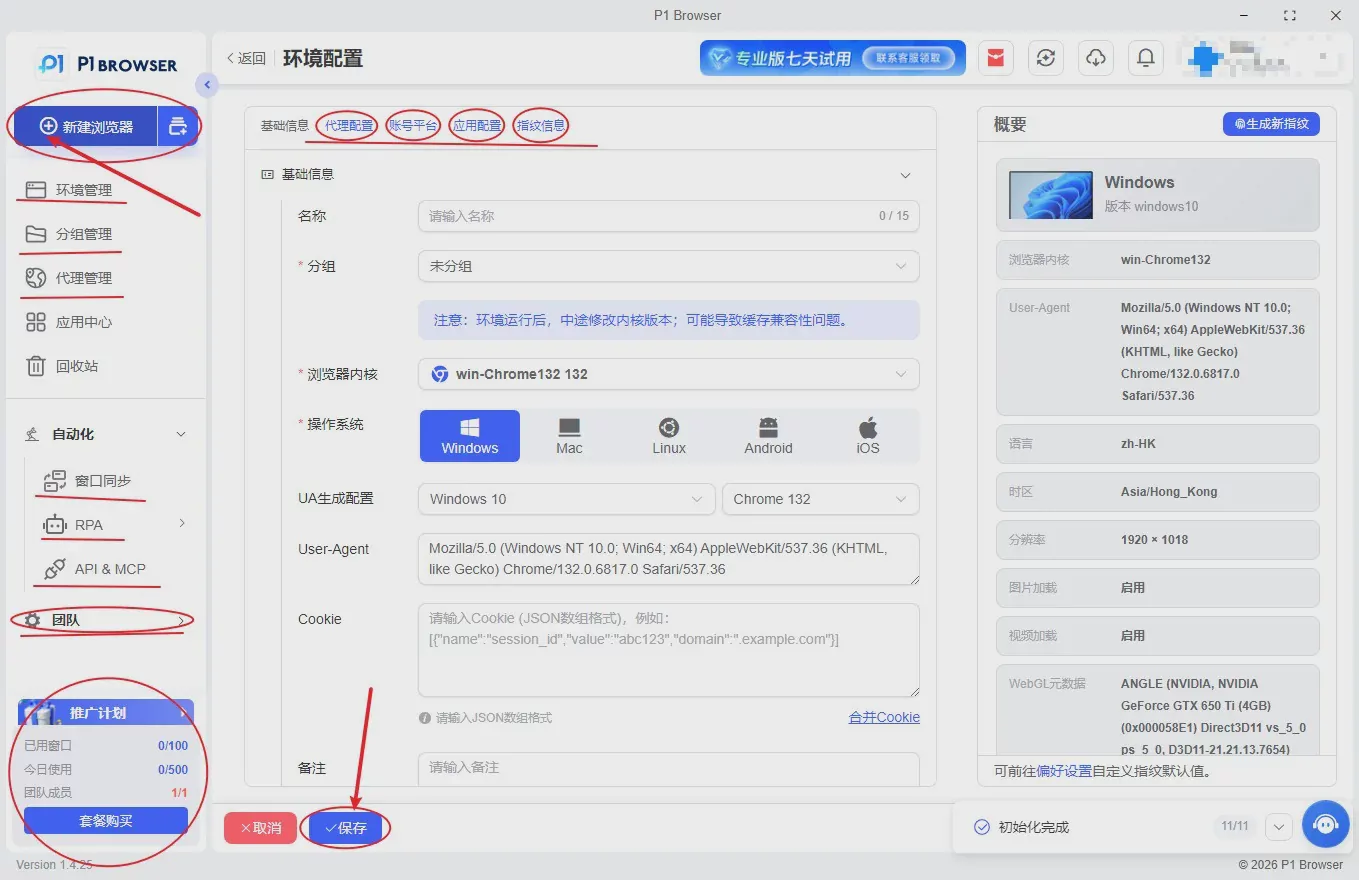
In the secure operation of multiple accounts, a professional fingerprint browser can implement independent environments, IP isolation, and behavior simulation, enabling efficient and secure management.P1Browser Fingerprint Browseris a multi-account isolation tool designed specifically for cross-border professionals. It focuses on scenarios such as social media operations, TG bulk account nurturing, cross-border e-commerce matrix operations, and overseas private-domain marketing. With its powerful kernel-level isolation technology and stable fingerprint spoofing capabilities, it has become the preferred tool for many cross-border teams.
Unique Advantages of the P1Browser Fingerprint Browser
1. Kernel-level independent fingerprint simulation
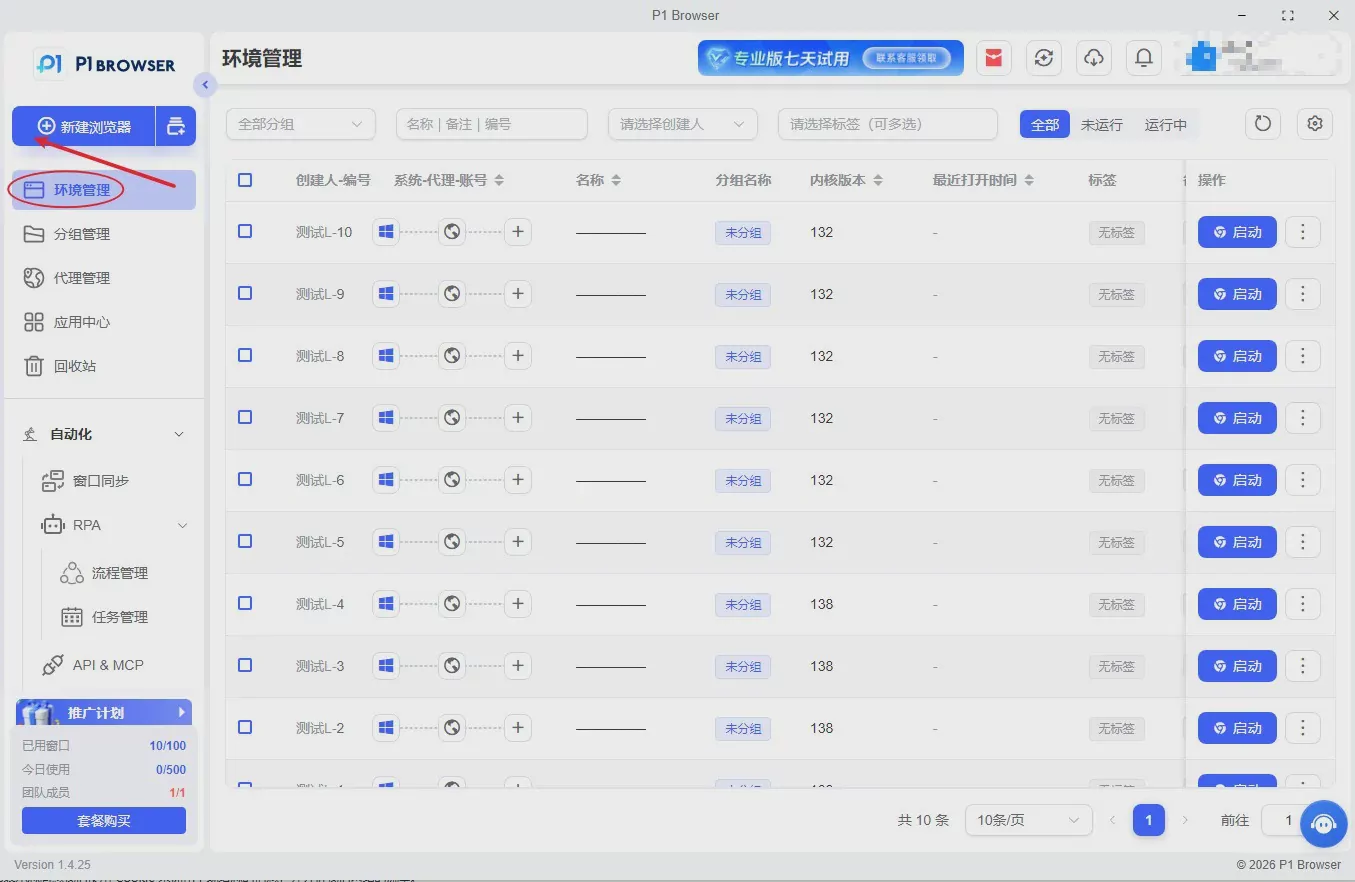
P1Browser is powered by a self-developed virtualization isolation engine that precisely disguises and randomizes the browser fingerprint of each environment, covering core risk-control parameters such as Canvas, WebGL, hardware specifications, system version, font list, time zone and language, and resolution. Each account environment is completely isolated, preventing account association at the source and significantly reducing the risk of Telegram account bans during bulk account management and matrix operations.
2. Dual-engine compatibility for all login scenarios
Fully compatible with the high-performance Chromium engine, Telegram Web, and various overseas social media and cross-border platforms. It adapts to network routes and carrier environments in different regions, maintaining stable access whether for daily account management, bulk logins, or group marketing, and supports all TG operation scenarios.
3. Seamless integration with proxy IPs across all channels
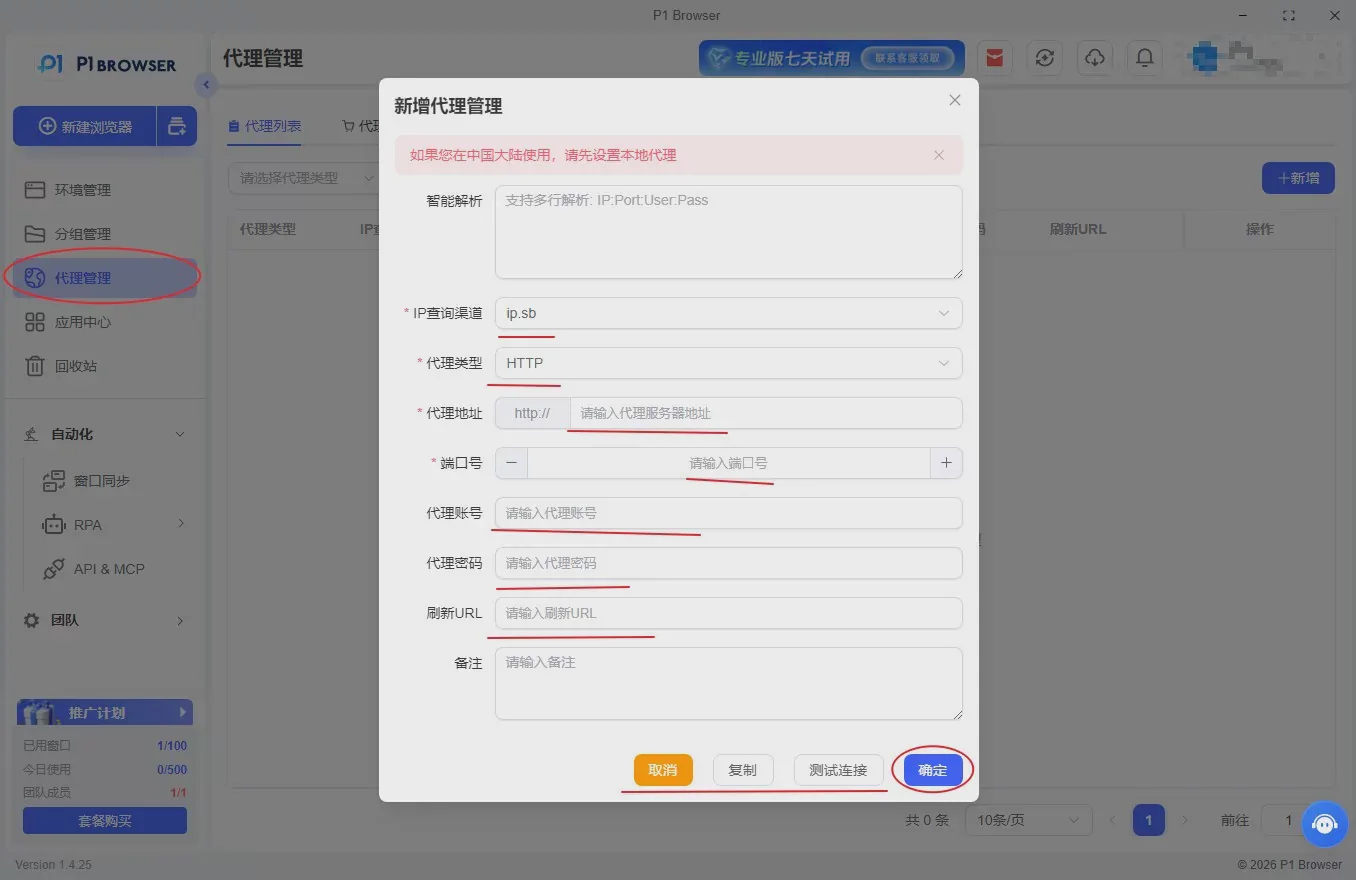
Supports multiple types of IP access, including static residential proxies, dynamic proxies, and dedicated private lines. You can bind an independent IP to each browser environment individually with one click, and switch regions, time zones, and network parameters with one click to achieve complete network isolation and thoroughly resolve the risk-control issue of multiple accounts being associated with the same IP.
4. Efficient bulk automation operations
Built-in visualized bulk management features support bulk account import and export, bulk environment creation, bulk login, scheduled tasks, custom operation intervals, and real-user behavior simulation. These features effectively avoid risk-control detection caused by concentrated operations, significantly reduce repetitive manual work, and improve the efficiency of multi-account operations.
5. Team collaboration and multi-layer security protection
Built-in features include tiered team permissions, operation log recording, encrypted environment storage, encrypted account information management, and protection against remote access. These features are suitable for company teams, preventing account loss, information leakage, and account bans caused by misoperations, while comprehensively protecting TG account assets and business data.
P1Browser helps cross-border operators manage multiple accounts securely and efficiently, making each account appear as an independent, genuine individual user in the platform's risk-control system. It provides isolation and protection across devices, networks, and behavior, steadily reducing the risk of account bans while significantly improving the efficiency of matrix operations.
Conclusion
In conclusion, running multiple Telegram accounts requires isolation at the underlying level. Independent browser environments, exclusive independent IPs, and differentiated device fingerprints, combined with decentralized operations and natural real-human behavior simulation, are the core keys to long-term, stable operations.
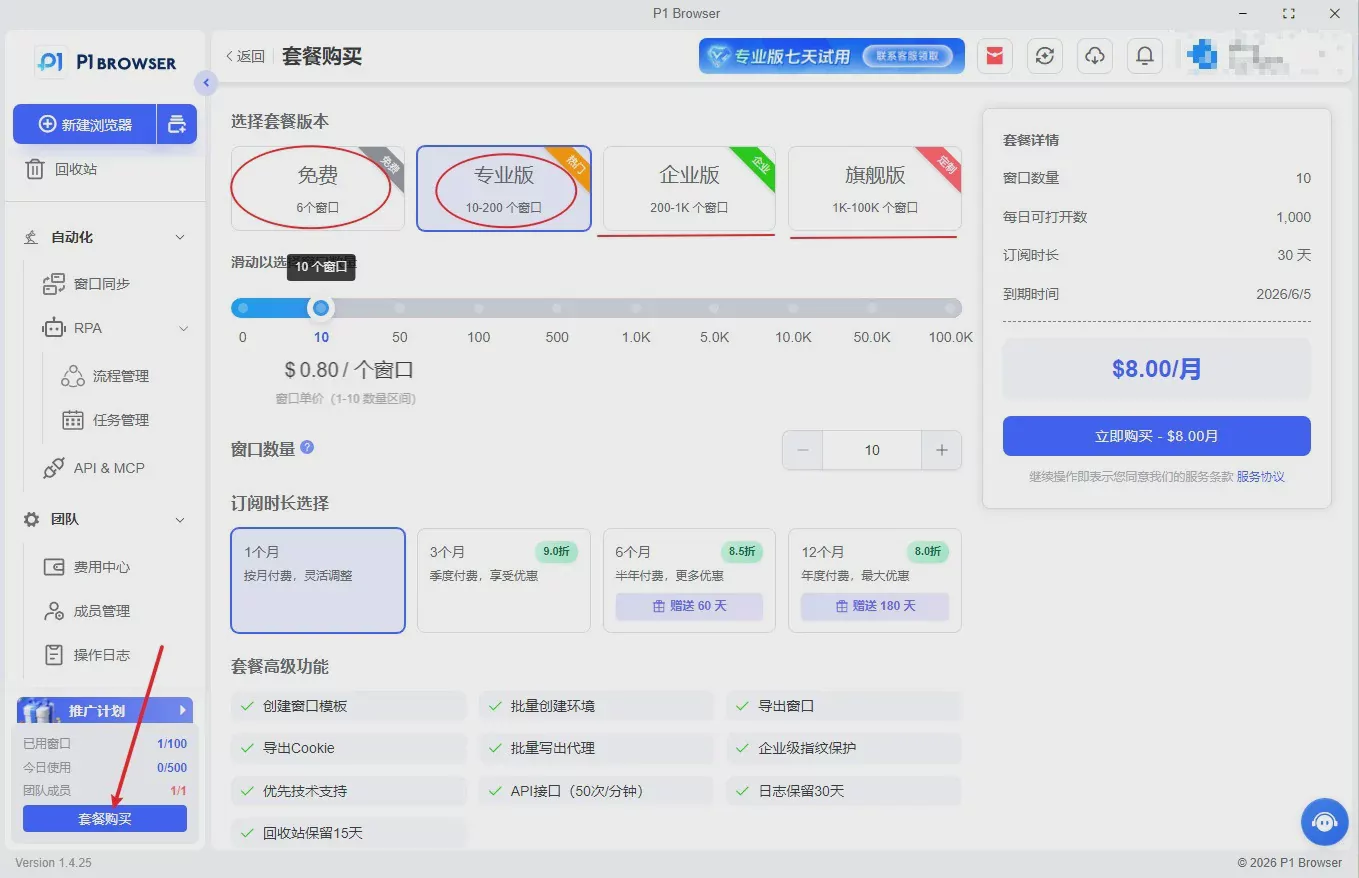
Nowadays, relying on traditional methods such as manual isolation and manually changing IPs is long outdated; professional tools are an essential requirement.P1Browser Fingerprint BrowserWith mature isolation technology, comprehensive batch management capabilities, and high stability, it perfectly addresses common pain points such as linked TG multi-account activity, frequent account bans, and chaotic management.
Replace inefficient manual operations with a professional fingerprint browser and standardize your risk-control evasion strategy, so your Telegram multi-account matrix operations can move beyond relying on luck and achieve stable, secure, and sustainable operation.
Frequently Asked Questions
Why does Telegram ban accounts?
TG account bans usually result from the system detecting abnormal behavior, including logging in to multiple accounts from the same IP, highly identical browser fingerprints, sending large numbers of messages in a short period, joining groups in bulk at high frequency, using low-cost blacklisted proxies, and conducting non-compliant marketing or traffic diversion.
When logging in to multiple accounts, will using the same device be detected?
Yes. Telegram determines whether devices are linked through multiple dimensions, including device fingerprints, cached Cookies, hardware characteristics, and system parameters. Using a regular browser to run multiple accounts on the same device is an extremely high-risk violation.
Is “account nurturing” necessary? How long is considered safe?
Yes. Newly registered accounts should not immediately join groups in bulk, send advertisements, or send mass private messages. It is recommended to first simulate normal daily behavior, browse updates, interact in moderation, and join groups gradually. The recommended account-nurturing period is generally3–7 daysOnce it has stabilized, proceed with marketing activities.
Can a banned Telegram account still be recovered?
Some minor restrictions can be lifted through an official appeal, while bans for bulk violations, associated bans, and serious marketing violations are often permanent and cannot be reversed. Proper environment isolation from the outset is the optimal solution.

