



Quora is a globally renowned question-and-answer community platform where users can build personal influence by answering questions, sharing professional knowledge, and participating in discussions.
In recent years, an increasing number of businesses, content creators, SEO professionals, and marketing teams have begun using Quora to promote their brands and drive more traffic to their websites. However, when multiple Quora accounts need to be managed simultaneously, how to prevent the accounts from becoming linked has become a challenge faced by many users.
Many people simply use a regular browser to switch between different accounts, but this approach may cause multiple accounts to share the same browser data, such as cookies, cache, and device information. If the platform detects that multiple accounts are operating in similar environments, the risk of the accounts being linked may increase.
So, how can multiple Quora accounts be managed effectively? This article will introduce methods for managing multiple accounts, as well as how to use an anti-association browser to create independent operating environments.

Why Do You Need to Manage Multiple Quora Accounts?
For general users, a single Quora account is usually sufficient.
However, for businesses, brand operators, and content marketers, multiple Quora accounts can help them create professional profiles for different fields.
For example:
One account focuses on technology-related content
One account shares e-commerce and business insights
One account represents the brand in content operations
Developing different topics through separate accounts can help reach more target audiences and increase content exposure opportunities.
However, the biggest challenge of managing multiple accounts is ensuring that the different accounts remain independent.
What problems arise when managing multiple Quora accounts with a regular browser?
Currently, many people use regular browsers such as Chrome or Edge to manage multiple Quora accounts by switching between login methods.
Although this method is simple to operate, different accounts may still share the same browser environment.
For example: Cookie data, browsing history, cache information, device parameters, and browser fingerprints
All of this information may become a reference factor the platform uses to determine whether accounts are related.
Even if each Quora account is registered with a different Email, using them over the long term in the same browser environment may still leave traces linking the accounts.
Therefore, for people who need to manage multiple accounts over the long term, relying solely on a regular browser is not the best solution.
What Is an Antidetect Browser?
Antidetect Browser(Antidetect Browser) is a tool specifically designed to manage multiple independent browsing environments.

It can create an independent browser environment for each account, with each environment having different settings, including: browser fingerprint, Cookie, User Agent, operating system information, time zone, language settings, and proxy IP.
Simply put, each account can have its own independent operating environment without sharing the same set of browser data.
These tools are currently widely used for managing multiple accounts in cross-border e-commerce, community and social media operations, advertising campaigns, and affiliate marketing.
How to Safely Manage Multiple Quora Accounts?
1. Create a separate environment for each Quora account
When managing multiple Quora accounts, the first step is to keep the different accounts separate.
For example:
Quora account A
Primarily publishes technology-related content
Quora account B
Shares business and industry analysis
Quora account C
Used for brand content promotion
Using a different browser profile for each account can prevent data from different accounts from being mixed.
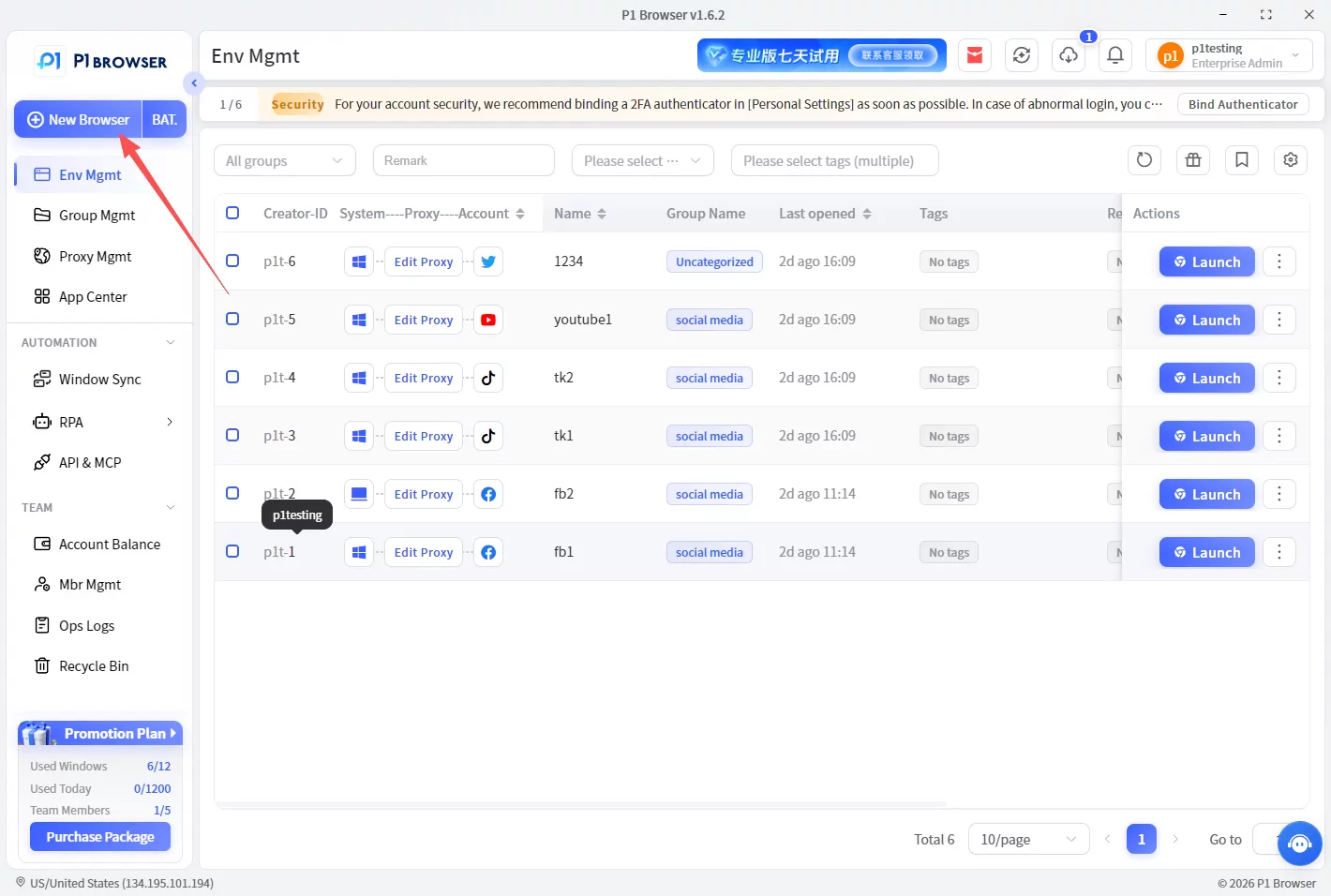
2. Set up a separate browser fingerprint
A browser fingerprint is an important way for websites to identify a user's environment.
In addition to IP addresses, websites may also determine whether accounts are related through data such as device information, browser version, and screen resolution.
Therefore, when managing multiple Quora accounts, you can set up an independent environment for each Profile.
Common settings include: browser version, device type, screen size, language, time zone, and operating system.
By using different environment settings, each account can maintain a more independent operating state.
3. Configure an independent proxy for each account
In addition to the browser environment, the network environment is also an important factor in managing multiple accounts.
If multiple Quora accounts are used to log in with the same IP address over an extended period, the possibility of the accounts being associated with one another may increase.
Therefore, when operating multiple accounts, an independent proxy environment is typically configured for each account, giving each one a clearer management setup.
4. Maintain normal account usage habits
Using anti-association tools does not mean that you can carry out large-scale or abnormal operations.
Quora itself is a community platform that values content quality, so long-term stable operation still requires good usage habits.
Recommendations:
Publish original and valuable answers;
Avoid publishing a large volume of similar content within a short period;
Do not have multiple accounts interact with one another;
Create content directions based on the positioning of different accounts.
A sound content strategy is the key to increasing account value.
Who is suited to managing multiple Quora accounts?
Corporate brands
Businesses can create content for different markets or industries through different accounts, increasing brand exposure.
SEO and content marketing professionals
Quora has a large volume of long-tail search traffic, and high-quality answers can continue to bring visitors to your website.
A multi-account strategy can cover more relevant questions and keywords.
Cross-border e-commerce sellers
Cross-border sellers can use Quora to share product-related knowledge, build brand trust, and explore demand in different markets.
The Best Way to Manage Multiple Quora Accounts
The focus of managing multiple accounts is not simply to increase the number of accounts, but to establish a stable and secure management process.
When using a regular browser, multiple accounts can easily share the same data; with an anti-detect browser, however, an independent environment can be created for each account, improving management efficiency.
Whether for business operations, content marketing, or personal brand building, properly managing multiple Quora accounts can help users expand their online influence more effectively.

