



For cross-border e-commerce sellers, operators of independent websites, and overseas social media marketers, Facebook is a core source of traffic for attracting customers from international markets. However, many professionals expanding overseas encounter obstacles at the very beginning: newly registered accounts are banned before they are officially put into operation, or they frequently trigger verification checks and face feature restrictions, making it difficult to move their business forward.
Facebook account warming is not an esoteric practice, but a scientific operating system based on the platform’s risk-control logic: “environment isolation + simulation of real-user behavior.” Starting with the underlying risk-control rules, this article breaks down the complete account-warming process and multi-account anti-linking solutions to help you build stable, usable, high-trust Facebook accounts from scratch.
Core Value and Underlying Logic of Facebook Account Warming
1.1 What Is Account Warming and Trust Weight?
Account warming refers to the process of simulating the daily operating behaviors of real users and continuously using an account in a stable, consistent environment to gradually improve the account’s trust level in Facebook’s system, also known as its account weight.
Facebook’s risk-control algorithms calculate a “trust score” for each account based on multiple factors, including registration age, login stability, behavioral patterns, and the authenticity of social connections. The higher the score, the greater the account’s weight, the stronger its tolerance for routine operations, and the less likely it is to trigger risk-control restrictions.
1.2 Why Are New Accounts So Prone to Triggering Risk Controls?
Newly registered accounts enter the platform’s “strict review period (sandbox period),” during which risk-control thresholds are at their lowest. Any unusual activity may trigger an account ban or verification.
Mature accounts that have completed an account-aging cycle, backed by long-term stable historical activity data and authentic social traces, have greater tolerance for minor marketing-related activities and can support a wider range of business scenarios.
Commercial activities carried out without first aging the account are highly likely to result in instant account bans, frequent verification requests, restricted advertising accounts, and the inability to add friends or post normally, rendering all initial investment worthless.
1.3 Core Business Value of High-Authority Accounts
Only healthy and stable high-authority accounts can lay a solid foundation for subsequent business operations and meet the needs of going global across all scenarios:
- Advertising:A stable personal account is a prerequisite for opening a Business Manager (BM) and linking an advertising account, helping prevent advertising budget losses caused by account abnormalities
- Marketplace Operations:Marketplace features have extremely high requirements for an account’s geographic location and stability. High-authority accounts can enable these features normally, allowing products to receive more platform recommendations
- Public Page Operations:A healthy personal account can serve as an administrator of a public page (Page), enabling the long-term secure publication of official content and operation of brand accounts
- Group MarketingHigh-authority accounts have a higher approval rate for posting and commenting in groups, which can reduce the likelihood of being identified as spam marketing
- Cross-border e-commerce traffic acquisitionWhether driving traffic to an independent website or managing a private-domain audience, stable accounts are the foundation for ensuring that private messages and comments are displayed normally without being blocked by the platform
II. Essential Preparations Before Warming Up Facebook Accounts
2.1 Set Up an Independent, Clean Device Environment
Consistency in the account environment is the foremost prerequisite for warming up an account. Ideally, use a clean physical device that has never been used to log in to a banned account and log in to only one Facebook account on it, thereby minimizing the risk of cross-environment contamination.
If you operate on a single computer, you should at least create a dedicated operating system user for the account or use the native browser’s “independent user profile” feature to ensure that cookies, cache, and browsing history are not shared with other accounts.
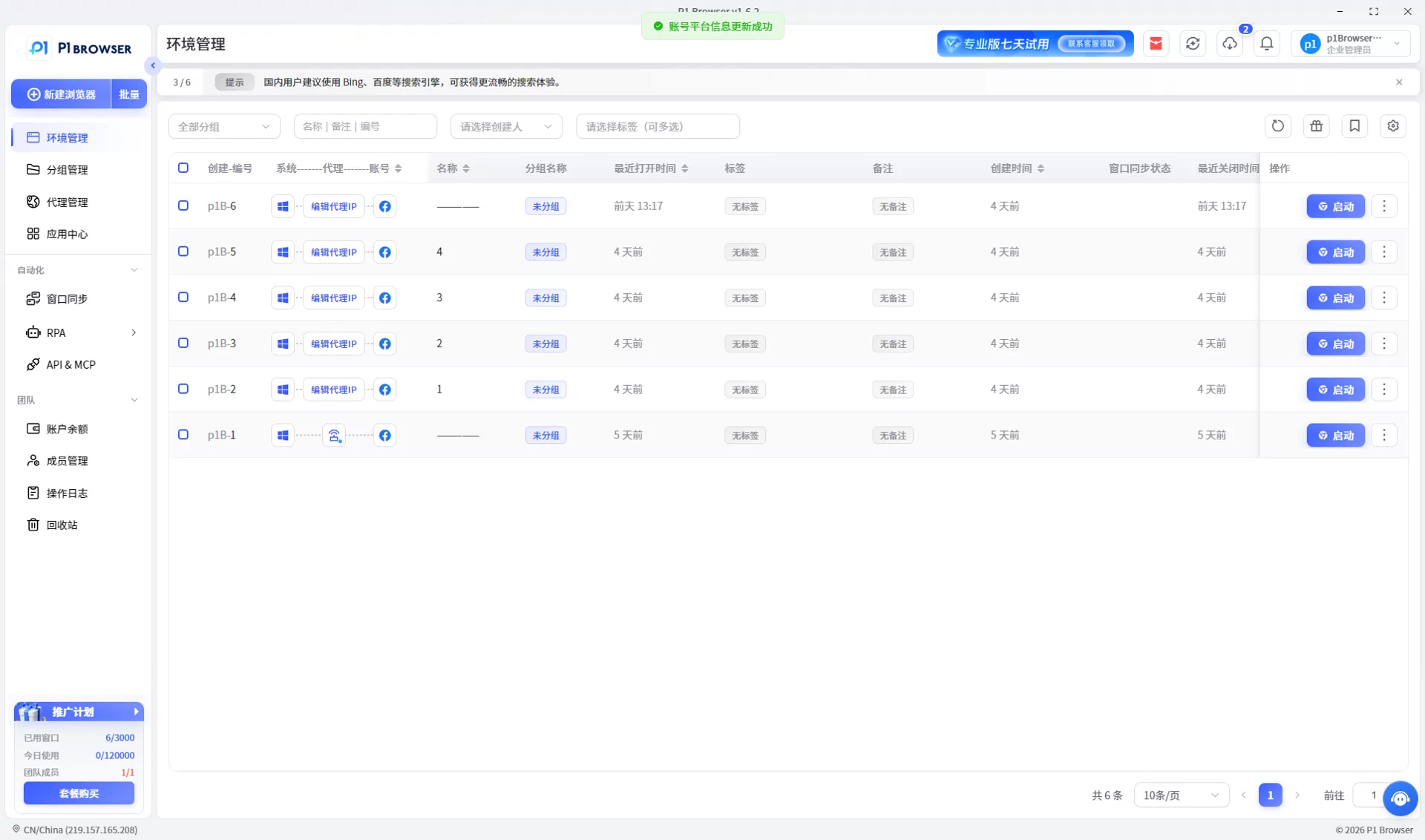
For teams and professionals who need to manage multiple accounts in batches,P1 fingerprint browseris a more efficient solution for environment isolation. It can generate a completely independent virtual browsing environment for each Facebook account, with the browser fingerprint, cookie data, and device parameters of each environment fully isolated from one another. This eliminates the risk of account association at the underlying level, enabling secure operation of multiple accounts on a single device.
2.2 Configure a Stable and Compliant Network IP
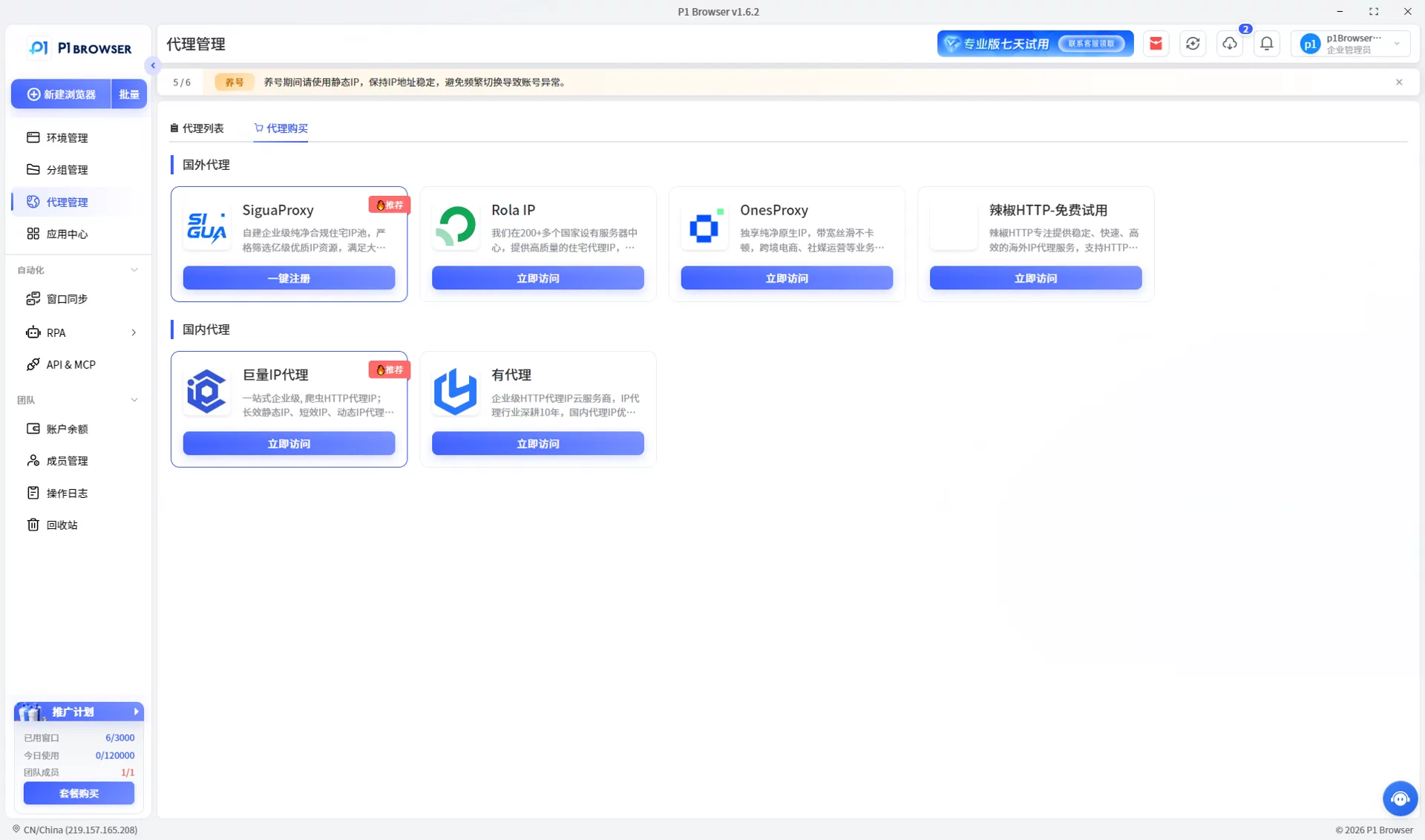
Facebook records the long-term login IP location of an account to determine the user’s actual location. Frequent IP switching or the use of high-risk IP ranges that have already been flagged can cause the system to identify the account as hacked or a marketing account, triggering risk controls.
- Recommended choiceStatic residential IP / ISP residential IP. These IPs are provided by legitimate local operators, have extremely low fraud scores, match the characteristics of ordinary users’ home networks, and remain fixed for long periods, making them the optimal choice for account warming.
- Tip to avoid pitfallsIt is not recommended to use free proxies, public VPNs, or highly contaminated data center IPs. These IPs have typically already been used by numerous marketing accounts, making them highly likely to trigger linked risk controls.
The P1 fingerprint browser supports mainstream proxy protocols across all categories and allows you to bind an independent IP to each browser environment with one click, meeting the need for differentiated network configurations for multiple accounts on a single device.
2.3 Complete authentic basic account information
After logging in to the account for the first time, do not rush to start interacting. First, complete the profile information according to the usage habits of a real user to improve the account’s initial review trust score:
- Authentic profile photoUse a clear, copyright-safe front-facing photo of a real person. Avoid celebrity images sourced online or heavily blurred pictures, as these may reduce the success rate of subsequent face verification
- Compliant nameUse a localized name spelling for the target market that conforms to local cultural customs
- Account binding: Prioritize linking mainstream overseas email services such as Gmail and Outlook, together with an overseas mobile number that can reliably receive verification codes
- Complete personal information: Fill in details such as your hometown, current city, educational background, and employment information. A rich information trail can significantly improve the account authenticity score
III. A phased account-warming process: From a new account to a high-authority account
The core principles of account warming are “gradual progression and simulating real users.” Gradually increase the intensity of operations according to the schedule to avoid triggering risk controls through aggressive activity. The following is the standard 30-day account-warming process:
3.1 First phase: 1-3 days after registration · Cold-start safety period
Core objective: Initially establish a real-user behavior profile and smoothly pass the peak registration risk-control period
- Stay logged in for 10-15 minutes each day, focusing on naturally browsing the homepage feed while simulating real users’ scrolling, pausing, and reading behaviors
- You may lightly like content from mainstream media and official accounts, and watch 1-2 short videos in the Watch section to convey genuine user characteristics
- Prohibited actions: Proactively adding friends, making public posts, publishing content containing external links, or conducting any marketing-related activities. Any aggressive action may trigger the automatic banning of a new account
3.2 Phase Two: Days 4-7 · Activity Enhancement Period
Core objective: Gradually increase account activity and make light social attempts
- Increase daily online time to 30-60 minutes, maintain a regular login frequency, and establish a stable activity pattern for the account
- Publish 1-2 lifestyle-related, non-promotional posts, such as scenery or daily updates, to enrich your personal timeline
- Search for and join 1-2 groups in relevant fields, but only browse without posting or interacting
- Limit daily friend requests to no more than 5, prioritizing contacts recommended by the system; post no more than 10 comments per day to avoid repetitive, mechanical wording
3.3 Phase Three: Days 8-15 · Social Relationship Building Period
Core objective: Build an authentic social network and integrate deeply into the platform ecosystem
- The account has accumulated a certain amount of positive behavioral data, and risk-control thresholds are gradually being relaxed. You can increase the pace of adding friends to 10-20 people per day, prioritizing genuine users in the same field
- Engage in high-quality interactions within the groups you have joined, post meaningful comments on popular posts, and repost high-quality content to your personal homepage
- Positive interactions with high-authority, authentic accounts can indirectly improve the trust score of your own account and strengthen its social authenticity
3.4 Phase Four: Days 16-30 · Weight Consolidation and Commercialization Entry Period
Core objective: Fully consolidate account trust and safely begin commercial operations
- Maintain a regular content publishing schedule and daily interactions. The account will have basically moved beyond the high-risk observation period and entered the ranks of normally active accounts
- You may officially create a brand public page (Facebook Page), complete the page information, and upload product-related content
- You may try light marketing activities, such as answering industry-related questions in groups and publishing product-related content on the page, gradually transitioning into commercial scenarios
After completing the full 30-day account nurturing cycle, the account will have relatively strong risk-control resistance and can stably support a full range of business needs, including advertising, matrix-based traffic generation, and e-commerce operations.
IV. Multi-Account Matrix Nurturing: Anti-Linkage Logic and Efficient Solutions
In large-scale overseas operations, a single account cannot meet diverse business needs. Multi-account matrices have become an industry standard, but they also introduce the core risk of account linkage.
4.1 Core Risk of Multi-Account Operations: Account Linkage
Facebook generates a unique identifier for each device based on its software and hardware characteristics. If multiple accounts log in on the same device, even if their registration information is completely different, the system may determine that they are a marketing matrix operated by the same entity and trigger mass account bans. The main linkage dimensions include three categories:
- IP association:Multiple accounts remain active through the same IP egress over an extended period
- Cookie association:Residual login traces from other accounts in the browser cache lead to data crossover
- Device and fingerprint association:Identical hardware parameters (MAC address, system serial number), along with overlapping high-precision browser fingerprint characteristics such as Canvas, WebGL, and font lists
4.2 Industry-standard anti-association solution
The mature and cost-effective multi-account management solution currently used in the industry is the combination of a fingerprint browser and clean proxy IPs, achieving comprehensive isolation across three dimensions:
- Independent browser fingerprints: Each account corresponds to unique device fingerprint parameters, simulating a different real device
- Independent proxy IP: Each account corresponds to an exclusive, fixed IP that matches the network environment of the corresponding region
- Independent Cookie environment: Each account's cache, browsing history, and local storage are completely isolated, with no data crossover
4.3 P1 Fingerprint Browser: Dual Security and Efficiency Protection for Multi-Account Management
The P1 fingerprint browser is purpose-built for overseas social media multi-account operations. It addresses account association risks at the foundational level while significantly improving the efficiency of large-scale account nurturing through its suite of tools.
4.3.1 Deep Environment Isolation to Build a Strong Barrier Against Account Association
- Comprehensive Fingerprint Spoofing : Supports customized modification of all browser characteristics, including Canvas, WebGL, audio fingerprints, WebRTC, time zone, language, resolution, UA, and hardware parameters. Each environment has a unique and authentic fingerprint and appears to platforms as an independent physical device from a different region
- IP and Environment Intelligent Matching : Each virtual environment can be bound to an exclusive proxy IP. The system automatically synchronizes and matches parameters such as time zone, language, and geographic location based on the IP location, creating a closed loop of “one environment = one independent device = one fixed IP” to avoid risk controls triggered by logins from different locations
- Independent Cookie Sandbox : Each environment’s cookies, cache, and local storage data are stored in an independent sandbox, preventing any data crossover. Even if a single account is restricted due to policy violations, it will not contaminate the environments of other accounts, safeguarding the overall security of the account matrix
- Multi-Engine Architecture Support : Multiple browser engines can be deeply customized, allowing different accounts to be assigned different engine environments and further strengthening environment isolation at the underlying code level
4.3.2 Efficiency-Enhancing Tools to Reduce the Cost of Large-Scale Account Nurturing
- Synchronized Multi-Window Operations: Repetitive operations such as basic browsing and engagement during the early account-warming stage can be carried out through the window synchronization feature. Operate one primary window, and all other account environments will synchronize and perform the same actions, significantly reducing repetitive manual work.
- Automated Operations Process: Built-in automated operations tools allow you to customize account-warming actions such as logging in, browsing, liking, and watching videos, enabling accounts to automatically complete daily activity tasks and reducing labor costs.
- Batch Account Management: Supports batch account importing and environment group management. Accounts can be categorized and managed by business line, region, and account type. Switching accounts does not require repeated logins and logouts, improving operational efficiency.
- Cloud Synchronization and Team Collaboration: Account environment data supports cloud synchronization. Team members can share account environments within the scope of their permissions, and cross-device handoffs will not trigger out-of-location reviews, meeting the needs of team-based and large-scale operations.
V. Summary of the Core Principles of Facebook Account Warming
The essence of Facebook account warming is not to circumvent platform rules, but to make an account exhibit the characteristics of a real, stable, long-term user and gradually build platform trust. The three core principles of successful account warming are:
- A Stable and Consistent Environment Foundation: Maintain an independent, clean, and consistent device fingerprint and IP network throughout the process. This is the foundation of account stability.
- Realistic and Natural User Behavior: Reject bulk scripts, spam distribution, and aggressive operations; conduct social and browsing activities in accordance with the habits of real users
- A Gradual Growth Pace: Follow the account growth cycle and gradually increase the intensity of operations and level of commercialization without rushing for results
Section Six: Frequently Asked Questions (FAQ)
What is Facebook account nurturing?
Facebook account nurturing refers to continuously operating an account in a stable environment by simulating the behavior of real users, gradually improving the account’s trust level and standing on the platform. Scientific account nurturing can reduce the likelihood of account bans and restrictions, ensuring the stable execution of business activities such as advertising, content operations, and traffic acquisition.
How do you nurture a Facebook account from 0?
The first step in nurturing an account from scratch is to create an account with complete information and authentic details, paired with an independent, clean device and IP environment. Then, gradually increase activity in stages according to a set schedule, progressing from browsing to light interaction, then to building social relationships and moving into commercial operations. The key is to maintain authentic behavior and a gradual pace while avoiding aggressive marketing operations.
How long does it take for account nurturing to show results?
There is no single fixed cycle for account nurturing. Generally, a complete basic account-nurturing cycle takes around 30 days, which can help the account move beyond the high-risk period for new accounts and support basic commercial operations. Account standing is built over the long term. Consistent, stable, and authentic operation will continuously improve the account’s tolerance. It is recommended to incorporate account nurturing into daily operations and maintain the account’s health over the long term.
How can you determine whether a Facebook account’s standing has improved?
This can be assessed from several dimensions: First, there are fewer feature restrictions, such as friend requests, posts, and group joining no longer frequently triggering verification. Second, content interaction data remains stable, with normal growth in post reach, likes, shares, and other metrics. Third, commercial features can be used normally, such as setting up BM, running ads, and enabling Marketplace without unusual restrictions.
What are some common mistakes to avoid when building account credibility?
Common mistakes include publishing large amounts of low-quality marketing content in a short period, frequently adding friends in bulk without meaningful interaction, registering accounts with false information, frequently changing IP and device environments, and using scripts to perform repetitive operations in bulk. Such behavior is highly likely to cause the platform to classify the account as a marketing account, resulting in reduced account visibility or suspension. The key to building account credibility is maintaining a genuine identity, engaging in natural interactions, keeping a stable environment, and consistently producing valuable content.

