



The key to efficient multi-store operation management lies in simultaneously solving isolation security and operational efficiency
Efficient management of multiple stores can be achieved throughP1Browser's one-click isolation and batch operationfeatures. P1Browser helps teams solve both core issues—isolation security and operational efficiency—simultaneously, making multi-store management more efficient. Specifically, teams can achieve efficient management through the following methods and features.
Many teams operating more than 3 stores fall into the same dilemma: every account must use an independent browser environment, or it will trigger association detection; but switching between stores requires opening different windows, accounts, and environments each time, resulting in extremely low operational efficiency.
Conversely, using the same browser with multiple tabs to handle different accounts makes switching convenient, but environment signals such as Cookie, localStorage, and Canvas fingerprints are highly overlapping. Once the platform's risk control detects anomalies, multiple accounts may be throttled or banned simultaneously.
This is the real contradiction in multi-store operations—isolation and efficiency are naturally mutually exclusive. Many teams do not lack tools; rather, their approach to tool selection is flawed: they treat "security" and "efficiency" as a either-or choice, ignoring solutions that can resolve both contradictions simultaneously.
Why Traditional Multi-Opening Methods Are Failing
The commonly used multi-store management methods in the past generally include the following, but under current platform risk control logic, they all have obvious association risks:
- Chrome Multi-Opening Profiles:Each Profile has its own independent Cookie and cache, but device hardware information (such as screen resolution, font list, GPU model) is completely identical on the same machine. The platform can easily identify that multiple accounts come from the same device through device fingerprints.
- Manually Switching Browser Accounts:Frequent login and logout will trigger the platform's risk control strategies such as abnormal location login and environment anomalies, especially when different accounts are switched within a short period of time, which carries higher risk.
- Virtual Machine / Multi-OS Solutions:Although they can isolate the environment at the system level, they have high deployment costs, complex maintenance, and operational interference still occurs when multiple team members collaborate.
- Sharing the Same Device and Network:Device fingerprints and IP addresses are completely identical. When multiple stores log in simultaneously, the probability of association increases significantly.
The common problem with these approaches is:they only solve superficial isolation without addressing the core dimensions of browser fingerprints. True multi-account secure isolation requires simultaneously managing device fingerprints, proxy IPs, Cookies, storage, and multiple other signals. This is why more and more teams are shifting toward professionalbrowser fingerprint isolation technologyinstead of relying on traditional multi-opening solutions.
One-Click Isolation: One Window Corresponds to One Truly Independent Digital Identity
P1Browser's core capability is "one-click isolation"—when opening each store window, the system automatically generates an independent browser environment, including independent device fingerprints, Cookies, LocalStorage, User-Agent, timezone, language preferences, and other parameters, with no interference between them.
This means that every store window you open appears to the target platform as an independent, real access device, rather than multiple tabs on the same machine. Each window can also be individually bound to a different proxy IP, forming a completemulti-account operation environment managementsystem, reducing association risks at the source.
Batch Operations: Execute Simultaneously Across Different Environments and Different Stores at the Same Time
Isolation solves the security problem, and the efficiency problem can also be resolved through batch operations—this is exactly the key capability that enables P1Browser to achieve efficient management.
P1Browser supports batch operation functionality—you can select multiple store windows and simultaneously perform operations such as product uploads, order queries, and account view switching on them. Each operation is executed in its own independent environment without affecting others, and no Cookies or session data are shared.
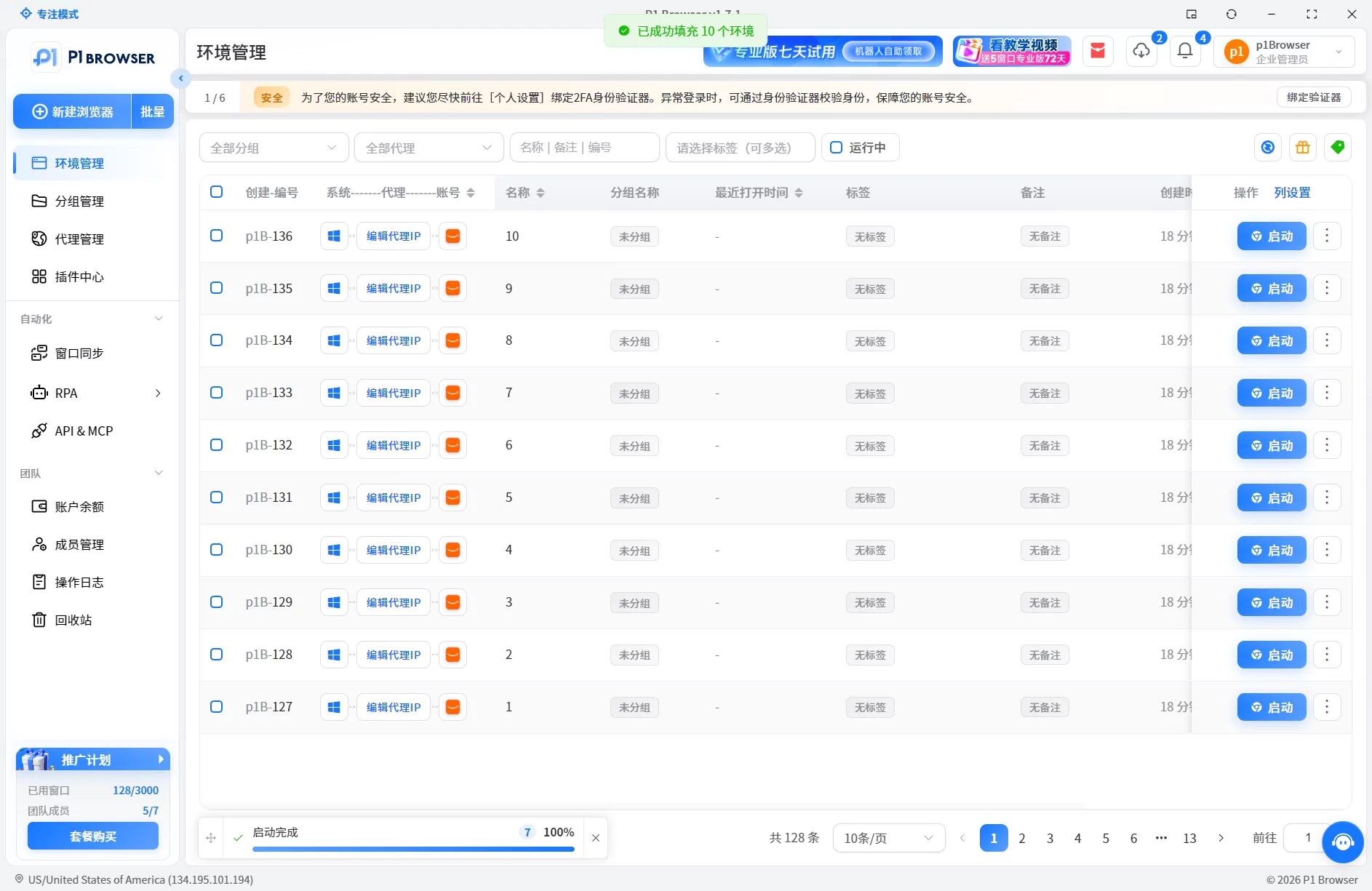
Each Store Window is Independently Isolated, Operations Do Not Interfere with Each Other
For example: if you have 5 Amazon stores that need to list new products simultaneously, the traditional approach requires opening each store one by one, copying and pasting product information, which is time-consuming; using P1Browser's batch operations, you can push product information to all 5 store windows at once, with each window executing the upload under its own independent login state, completing the entire process automatically.
This approach preserves the environmental isolation of each store while eliminating the labor cost of repetitive operations—it is a true solution that resolves the isolation-efficiency contradiction simultaneously.
Frequently Asked Questions
Frequently Asked Questions
Q1: Will P1Browser's batch operations cause account association?
No. Batch operations simply send the same command synchronously to multiple independently isolated windows. Each window has its own independent device fingerprint and proxy IP, and operations are executed in their respective independent environments without sharing any sessions or environment signals.
Q2: I already have Chrome Profiles, do I still need P1Browser?
If you have only a small number of stores (2–3) and do not have high risk control requirements, Chrome Profiles can serve you temporarily. However, when the number of stores increases to more than 5, or when dealing with strict platforms such as Amazon and TikTok, Chrome Profiles lack sufficient fingerprint dimensions, and association risks increase significantly.
Q3: Can P1Browser be used together with proxy IPs?
Yes. Each store window can be individually bound to a different proxy IP, forming a dual isolation of "independent device fingerprint + independent proxy IP," which is the most recommended combination for multi-account operations currently.
Q4: Does team permission management support fine-grained control?
Yes. Administrators can assign access permissions by store, setting team members' operation scopes (e.g., read-only, editable, no access) to prevent data interference when multiple people operate the same window simultaneously.
Q5: How can beginners quickly get started with P1Browser?
You can start from theP1Browser Beginner's Guideto learn basic operations such as browser environment creation, proxy configuration, fingerprint settings, and multi-account management. You can set up an independent store operation environment in just 5 steps.

