



As ChatGPT is increasingly used for AI-powered office work, content creation, software development, data analysis, and enterprise automation, more and more users are beginning to use ChatGPT over the long term.
However, during use, some users may encounter issues such as being unable to log in, having their accounts restricted, or having their accounts deactivated.
Many users immediately wonder:
- Why was my ChatGPT account banned?
- Can the account still be recovered?
- How can I avoid similar issues in the future?
In fact, ChatGPT account issues are usually not caused by a single factor, but are related to multiple factors, including account security, the login environment, and usage methods.
This article provides a detailed overview of the common reasons why ChatGPT accounts are banned, possible solutions, and how businesses and individual users can manage their ChatGPT accounts more reliably.
Why Are ChatGPT Accounts Banned?
When a ChatGPT account is restricted, it generally means that the platform has detected unusual activity or a security risk associated with the account.
To protect service security, the platform typically evaluates multiple factors, including:
- Account login activity
- Changes in the device environment
- Account usage behavior
- Payment and subscription status
- Whether the service rules have been violated
It is important to note that an account being flagged as abnormal does not necessarily mean that the user has violated any rules.
For example, regular users may also trigger security verification in the following situations:
- Logging in from multiple devices within a short period of time
- Frequently switching network environments
- Multiple people sharing one account
- Logging in from different locations for extended periods
Therefore, understanding the sources of account risks and establishing reasonable account management practices are important steps in reducing the likelihood of problems.
II. What Are the Signs That a ChatGPT Account Has Been Banned?
The abnormal behavior of a ChatGPT account may vary depending on the circumstances.
1. Unable to log in normally
Even after entering the correct account credentials, the user still cannot access the ChatGPT page.
Possible indications include:
- Login failure message
- Account does not exist
- Access is restricted
2. Receiving an account restriction notification
In some cases, users may receive a related email notification.
The notification will usually explain why the account has been restricted.
3. Features not working properly
Some accounts may not be completely unable to log in, but may have certain features restricted.
For example:
- Unable to use certain models
- Unable to complete a subscription
- Frequent verification requests
If any of the above occurs, it is recommended to first check the account status and then analyze the specific cause.
III. Common reasons why a ChatGPT account is banned
Understanding why an account has become abnormal is the first step toward resolving the issue.
In general, ChatGPT account restrictions are mainly related to the following factors.
1. Frequent changes in the login environment
Many users overlook one issue:
Account login depends on more than just a username and password; the platform also monitors changes in the environment in which the account is used.
For example:
- Frequently logging in from different devices
- Switching between different network environments within a short period
- Using the account in different regions over an extended period
- Significant changes in the browser environment
When the system detects a significant difference between the account's behavior and its historical usage patterns, it may trigger a security verification.
For individual users, maintaining consistent login habits is very important.
For enterprise teams, if multiple people share one account, it is even more important to consider account environment management.
2. Multiple people sharing the same ChatGPT account
This is a common problem for many teams.
For example:
- A company purchases one ChatGPT Plus account for multiple people to share
- Different employees log in to the same account on different devices
- Team members frequently switch the account password
Although this approach may seem convenient, it can create many problems with long-term management.
These include:
- It is impossible to clearly identify who is using the account
- Frequent changes in the login environment
- Disorganized account management
- Difficulty transferring account access after an employee leaves
For enterprise teams, it is generally recommended to establish an independent account management system based on business needs.
3. Creating a large number of accounts within a short period
Some users need to create multiple ChatGPT accounts due to business requirements.
For example:
- AI content teams
- Overseas marketing teams
- Multiple departments within an organization
However, creating a large number of accounts within a short period, especially when their activity is highly similar, may make account management more difficult.
Properly planning the purpose of each account and establishing standardized management processes is more suitable for long-term operations.
4. Abnormal usage behavior
ChatGPT users must comply with the platform's usage rules.
The following behaviors may result in account restrictions:
- Violating the Terms of Service
- Abusing platform features
- Performing abnormal automated operations
- Making a large number of repeated requests to the service
Therefore, normal and stable usage is an important factor in keeping an account available for long-term use.
5. Account Subscription or Payment Issues
Some account issues may also be related to subscription services.
For example:
- Payment failed
- Payment method issues
- Changes in subscription status
If you encounter such issues, you can check your account payment information and address them according to the platform's instructions.
Why Do Multiple ChatGPT Accounts Require More Management?
As the use of AI tools in businesses increases, more and more teams are beginning to manage multiple ChatGPT accounts.
For example: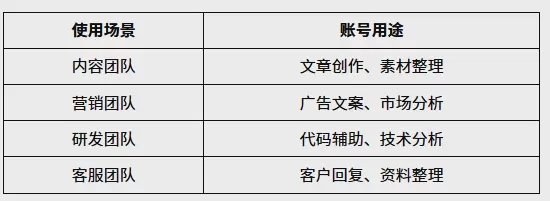
As the number of accounts increases, simply switching between browser tabs can no longer meet the needs of team management.
Businesses are more concerned about:
- Whether different accounts are clearly distinguished
- Whether members can quickly use the appropriate account
- Whether account information is easy to manage
- Whether project handovers proceed smoothly
Problems with Using an Ordinary Browser to Manage Multiple ChatGPT Accounts
Regular browsers such as Chrome and Edge can meet everyday ChatGPT usage needs.
However, you may encounter some limitations when using multiple accounts.
1. Cookies and login states can easily become confused
Browsers store account-related data.
Including:
- Cookies
- Cache
- Login states
Using multiple accounts together over an extended period increases the cost of switching between accounts.
2. Lower team collaboration efficiency
Regular browsers cannot adequately meet the account allocation needs of enterprise teams.
For example:
- Who is responsible for which account
- Which account corresponds to which project
- How to quickly switch work environments
These are all common challenges encountered when managing multiple accounts.
How to Resolve a Banned ChatGPT Account?
When a ChatGPT account encounters an issue, users should first determine which situation the account falls into.
Problems caused by different reasons require different approaches.
1. Check account email notifications
If an account is restricted, you can usually view the notification in the email address used for registration.
Pay close attention to:
- Reason for the account restriction
- Whether identity verification is required
- Is it possible to submit an appeal?
Following the instructions in the email can improve the efficiency of resolving the issue.
2. Submit an account appeal
If you believe your account was restricted by mistake, you can submit an appeal through official channels.
When submitting an appeal, it is recommended to provide:
- Basic account information
- An explanation of how the account is used
- Screenshots of the issue encountered
At the same time, avoid submitting a large number of duplicate requests to prevent affecting the review process.
3. Check how the account is used
After the account is restored, it is recommended that you review your previous usage habits.
For example:
- Whether the account is shared by multiple people
- Whether devices are switched frequently
- Whether there are any unusual operations
Only by identifying the source of the problem can you reduce the likelihood of restrictions occurring again.
How to Reduce the Risk to Your ChatGPT Account?
Compared with resolving account issues after they occur, proactive account management is more important.
The following methods can help users improve account stability.
1. Maintain a Stable Usage Environment
When using the same account over an extended period, it is recommended to maintain a relatively stable login environment.
Avoid:
- Frequently changing devices
- Switching environments extensively within a short period
- Multiple people logging into the same account
2. Organize accounts by category
For users with multiple ChatGPT accounts, it is not recommended to use all accounts interchangeably.
They can be categorized according to business needs: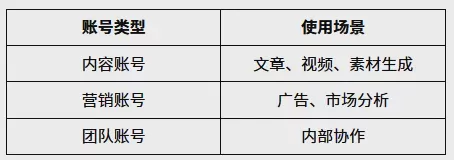
Clear account categorization can reduce management difficulties and improve team work efficiency.
3. Avoid account sharing
If multiple members need to use AI tools, adopting a team-based management approach is recommended.
Having different members use different accounts can prevent management confusion caused by too many people operating the same account.
VIII. How Should Businesses Manage Multiple ChatGPT Accounts?
For individual users, one ChatGPT account is usually sufficient.
However, for enterprise teams, AI has become a daily work tool, and the number of accounts may continue to grow.
For example:
- The operations department needs multiple AI accounts
- The content team needs different accounts for collaboration
- Marketers need to manage accounts for different projects
At this point, enterprises need more than just a certain number of accounts—they need a clearer management approach.
Including:
- Independent account management
- Project categorization
- Member permission allocation
- Unified management of usage environments
IX. How Does the P1 Fingerprint Browser Help Manage ChatGPT Accounts?
P1 Fingerprint Browser is a browser tool designed for multi-account management scenarios.
It helps users create different browser environments to manage different business accounts.
1. Manage different accounts with independent browser environments
Each browser environment can store account information independently.
Users can create different environments based on different purposes:
- ChatGPT content creation accounts
- Enterprise office accounts
- Marketing project accounts
- Accounts for team members
Compared with repeatedly logging in and out of a regular browser, managing accounts with independent environments is more convenient.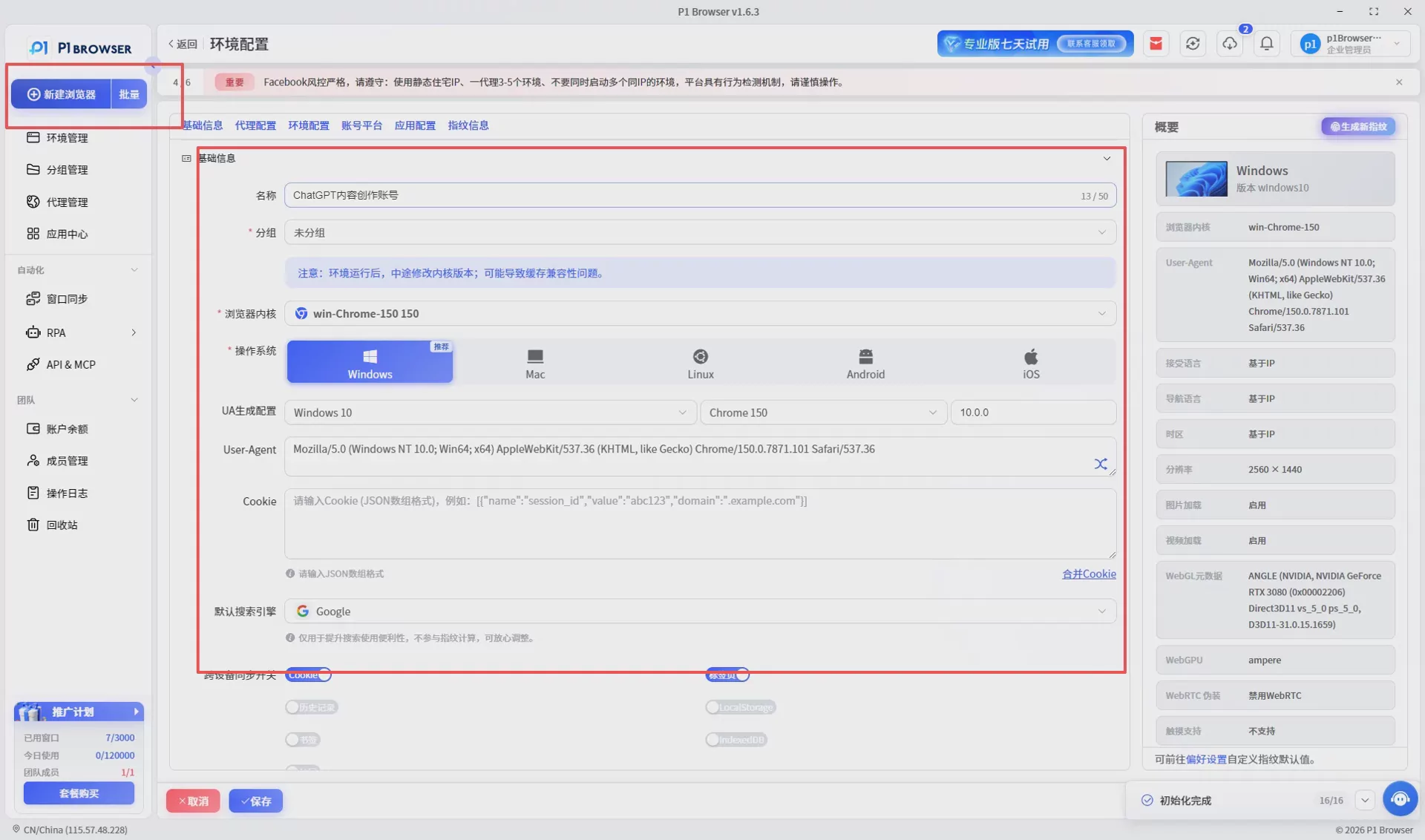
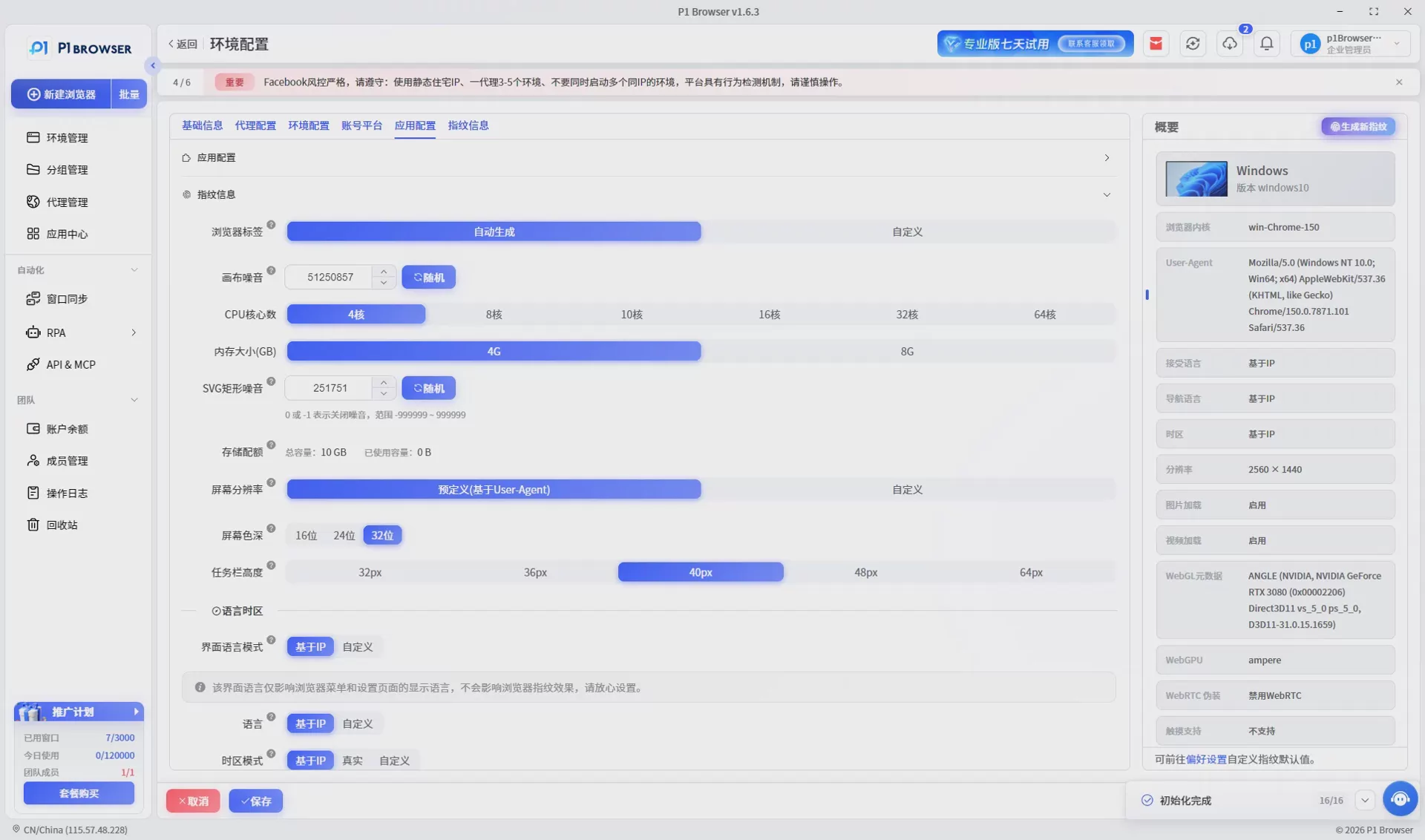
2. Improve Team Account Management Efficiency
Businesses can create different environments based on projects.
For example:
- Project A uses Environment A
- Project B uses Environment B
- Different members are assigned to different work environments
This can reduce account confusion and improve daily operational efficiency.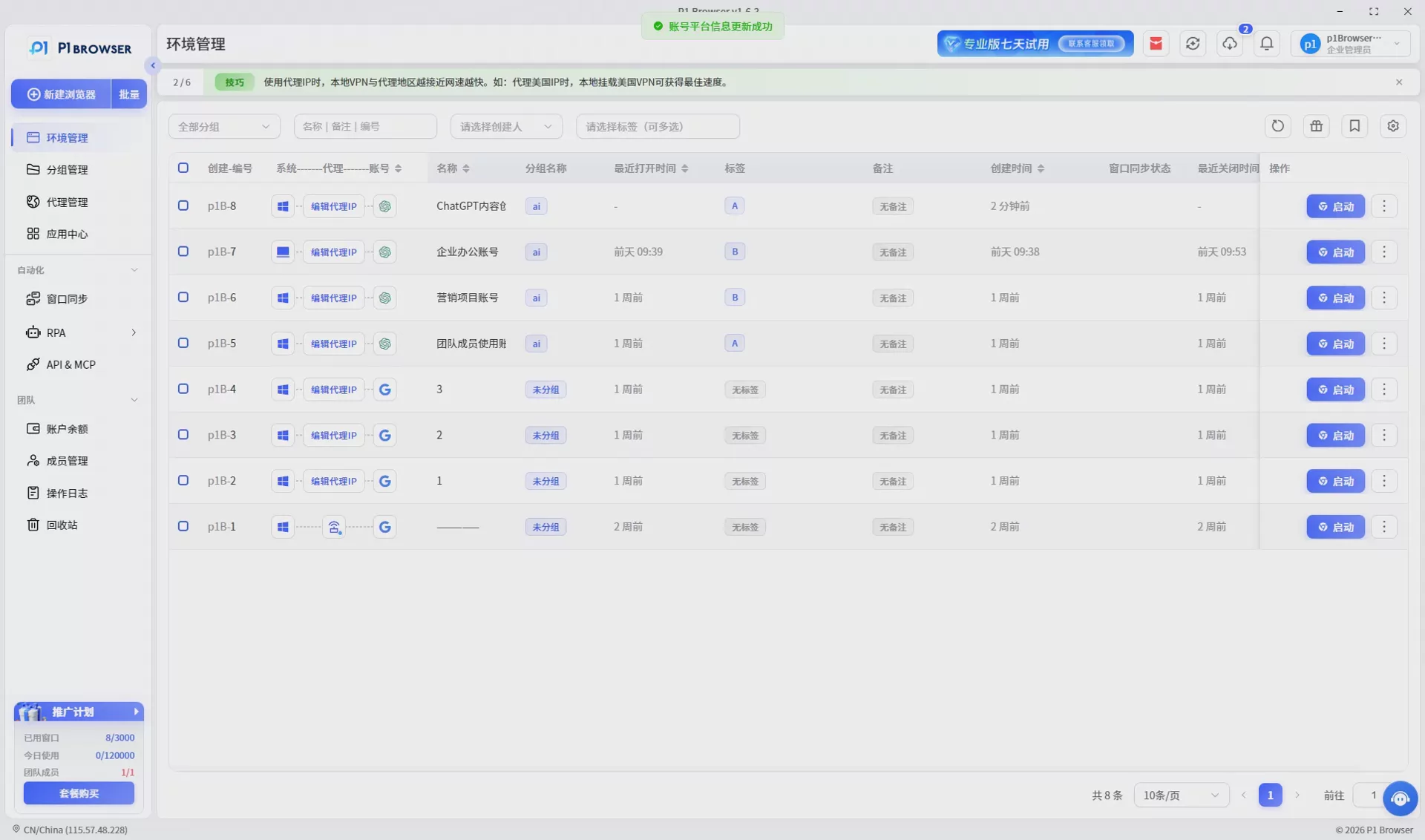
3. Reduce Account Management Complexity
As ChatGPT becomes increasingly widely adopted by businesses, the number of accounts will continue to grow.
Managing a large number of accounts with traditional browsers can easily lead to:
- Account mix-ups
- Loss of login information
- Difficulties with team collaboration
- Reduced work efficiency
P1 fingerprint browsers manage different accounts in separate browsing environments, allowing users to organize their AI workflows more clearly.
Ten. Best Practices for Managing ChatGPT Accounts
Whether for personal or business use, it is recommended to establish standardized management practices when using multiple ChatGPT accounts.
1. Clarify the purpose of each account
Do not assign the same tasks to every account.
It is recommended to plan in advance:
- Content creation account
- Data analysis account
- Marketing and operations account
- Team collaboration account
Clearly defining each account’s purpose makes subsequent management easier.
2. Keep thorough account information records
It is recommended to record the basic information for each account:
- Account purpose
- Person responsible
- Creation date
- Corresponding project
This can prevent account confusion when team members hand over responsibilities.
3. Establish a Long-Term Account Management Process
For individual users, one account may be sufficient.
However, for enterprise teams, as AI tools become more deeply integrated into business processes, account management will become a long-term requirement.
Establishing standardized processes in advance can help teams use ChatGPT more efficiently.
XI. Frequently Asked Questions (FAQ) About ChatGPT Account Bans
Q1: Why might a ChatGPT account be banned?
Common reasons include unusual account logins, violating the terms of use, sharing an account with multiple people, and frequently switching usage environments.
Q2: Can a banned ChatGPT account be restored?
In some cases, you can try to restore it through the official appeal channel. The outcome depends on the specific circumstances of the account.
Q3: Can multiple ChatGPT accounts be used together?
Yes, but it is recommended to categorize and manage them appropriately to avoid using multiple accounts in a mixed manner over an extended period.
Q4: Why do enterprises need to manage multiple ChatGPT accounts?
Businesses typically need to create different accounts based on departments, projects, and business requirements to improve team collaboration efficiency.
Q5: Which users is the P1 fingerprint browser suitable for?
It is suitable for users who need to manage multiple online accounts, such as cross-border e-commerce teams, overseas marketing teams, AI content teams, and corporate operations personnel.
Conclusion: Manage ChatGPT accounts properly to improve AI usage efficiency
ChatGPT has become an important productivity tool for an increasing number of individuals and businesses.
However, as the number of accounts increases, account management, secure usage, and team collaboration all become new challenges.
The key to reducing account risks is not only resolving account anomalies, but more importantly, establishing a long-term, stable management approach.
By properly planning account purposes, maintaining consistent usage habits, and adopting professional account management tools, users can use ChatGPT more efficiently.
With separate browsing environments, account categorization and management, and team collaboration features, the P1 fingerprint browser helps users manage multiple business accounts more conveniently, making AI workflows simpler and more efficient.

