


Many users encounter tricky problems when using YouTube. For example, they cannot access their home country's YouTube content while traveling abroad; interesting content is unavailable in their region; some users even cannot use YouTube normally because their IP address has been blocked. These problems bring great inconvenience to users.
YouTube proxies can provide effective solutions to these problems. This article will give you a detailed tutorial so that you can smoothly use YouTube proxies and enjoy an unrestricted YouTube experience.
What is a YouTube Proxy?
A YouTube proxy acts as an intermediary between your device and YouTube. Simply put, when you use a YouTube proxy, your network requests are first sent to the proxy server, and then the proxy server forwards them to YouTube. During this process, the proxy server replaces your IP address with its own IP address, making YouTube think you are in another region.
Here are several types of YouTube proxies:
-
VPN Proxy: Hides your IP address through an encrypted connection, providing comprehensive privacy protection.
-
HTTP Proxy: Based on the HTTP protocol, suitable for fast access to web content. It is simple to operate but has relatively lower security.
-
Smart Proxy: Automatically selects the best proxy server, optimizing network speed and stability.
-
Dedicated Proxy: Provides exclusive proxy services for a single user with stronger privacy protection.
-
Shared Proxy: Allows multiple users to share the same proxy server at a lower cost.
Why Do You Need a YouTube Proxy?
Break Through Geographic Restrictions
Due to copyright or regional policy restrictions, many excellent contents on YouTube may not be accessible in certain regions. By using a YouTube proxy, you can mask your IP address as being located in a region that allows access to this content, thereby unlocking global video resources.
Protect Privacy and Security
In the internet age, leaking your IP address can lead to privacy breaches and security risks. YouTube proxies add an extra layer of protection to your online activities by hiding your realIP address. This not only prevents others from stealing your personal information but also avoids malicious attacks, ensuring you can browse the web safely and worry-free.
How to Access YouTube Through a Proxy?
1. Choose a Proxy Method
Before configuring the proxy, you need to choose the appropriate proxy method based on your usage needs and device type. VPN proxies and HTTP proxies are two common choices.
Additionally, there are some specialized proxy apps and services that provide a more optimized YouTube proxy experience, such as automatically selecting the best server, optimizing video loading speed, and other features.
2. Detailed Tutorials for Different Configurations
PC Configuration
-
Install Proxy Software:Download the client software > Follow the installation wizard prompts > Launch the software and log in
-
Set Up the Proxy Server:Select the proxy server > Enter the server address and port number > Save settings
-
Choose the Protocol Type:When watching YouTube videos, HTTPS or SOCKS protocol is usually the better choice, as they can provide better security and compatibility.
Mobile Configuration
-
Install Proxy App:Search and download the proxy app through the app store.
-
Set Up Proxy Parameters:Install and open the proxy app > The app automatically recommends or you manually select > Enter the server address and port number (can be found in the app's settings) > Save settings
-
Connect the Proxy:Click the connect button > Check if the IP address has changed
3. Connect and Test
Access YouTube:Open the YouTube app or YouTube website and try to access the content that was previously unavailable. If the proxy is set up correctly, you can watch videos normally. You can try playing videos from different regions to check if they load successfully.
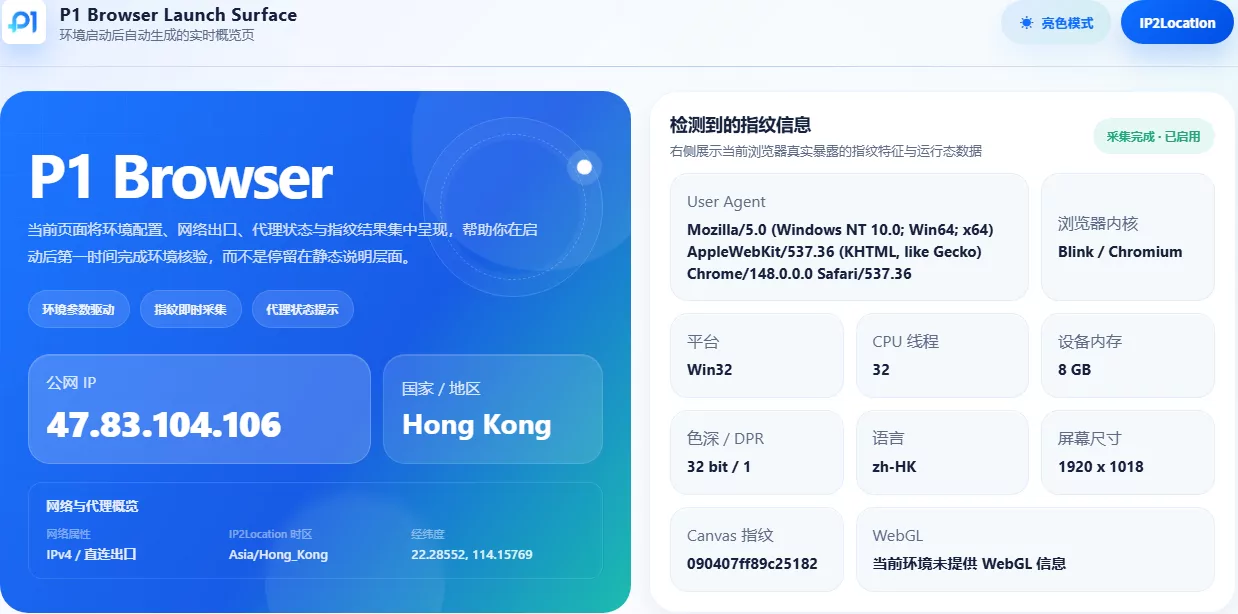
Troubleshooting:When using a proxy to access YouTube, you may also encounter issues such as connection failures or slow video loading, which may be caused by the proxy server being unavailable or network problems. In such cases, you can use anIP address lookuptool to check whether the IP address after the proxy is correctly hidden, to ensure the proxy tool is working properly.
If the proxy is set up correctly, the proxy server's IP address will be displayed. If the displayed IP address is the same as your real IP address, it means you need to recheck the proxy settings or change the proxy server.
Many users encounter tricky problems when using YouTube. For example, they cannot access their home country's YouTube content while traveling abroad; interesting content is unavailable in their region; some users even cannot use YouTube normally because their IP address has been blocked. These problems bring great inconvenience to users.
YouTube proxies can provide effective solutions to these problems. This article will give you a detailed tutorial so that you can smoothly use YouTube proxies and enjoy an unrestricted YouTube experience.
What is a YouTube Proxy?
A YouTube proxy acts as an intermediary between your device and YouTube. Simply put, when you use a YouTube proxy, your network requests are first sent to the proxy server, and then the proxy server forwards them to YouTube. During this process, the proxy server replaces your IP address with its own IP address, making YouTube think you are in another region.
Here are several types of YouTube proxies:
-
VPN Proxy: Hides your IP address through an encrypted connection, providing comprehensive privacy protection.
-
HTTP Proxy: Based on the HTTP protocol, suitable for fast access to web content. It is simple to operate but has relatively lower security.
-
Smart Proxy: Automatically selects the best proxy server, optimizing network speed and stability.
-
Dedicated Proxy: Provides exclusive proxy services for a single user with stronger privacy protection.
-
Shared Proxy: Allows multiple users to share the same proxy server at a lower cost.
Why Do You Need a YouTube Proxy?
Break Through Geographic Restrictions
Due to copyright or regional policy restrictions, many excellent contents on YouTube may not be accessible in certain regions. By using a YouTube proxy, you can mask your IP address as being located in a region that allows access to this content, thereby unlocking global video resources.
Protect Privacy and Security
In the internet age, leaking your IP address can lead to privacy breaches and security risks. YouTube proxies add an extra layer of protection to your online activities by hiding your realIP address. This not only prevents others from stealing your personal information but also avoids malicious attacks, ensuring you can browse the web safely and worry-free.
How to Access YouTube Through a Proxy?
1. Choose a Proxy Method
Before configuring the proxy, you need to choose the appropriate proxy method based on your usage needs and device type. VPN proxies and HTTP proxies are two common choices.
Additionally, there are some specialized proxy apps and services that provide a more optimized YouTube proxy experience, such as automatically selecting the best server, optimizing video loading speed, and other features.
2. Detailed Tutorials for Different Configurations
PC Configuration
-
Install Proxy Software:Download the client software > Follow the installation wizard prompts > Launch the software and log in
-
Set Up the Proxy Server:Select the proxy server > Enter the server address and port number > Save settings
-
Choose the Protocol Type:When watching YouTube videos, HTTPS or SOCKS protocol is usually the better choice, as they can provide better security and compatibility.
Mobile Configuration
-
Install Proxy App:Search and download the proxy app through the app store.
-
Set Up Proxy Parameters:Install and open the proxy app > The app automatically recommends or you manually select > Enter the server address and port number (can be found in the app's settings) > Save settings
-
Connect the Proxy:Click the connect button > Check if the IP address has changed
3. Connect and Test
Access YouTube:Open the YouTube app or YouTube website and try to access the content that was previously unavailable. If the proxy is set up correctly, you can watch videos normally. You can try playing videos from different regions to check if they load successfully.
Troubleshooting:When using a proxy to access YouTube, you may also encounter issues such as connection failures or slow video loading, which may be caused by the proxy server being unavailable or network problems. In such cases, you can use anIP address lookuptool to check whether the IP address after the proxy is correctly hidden, to ensure the proxy tool is working properly.
If the proxy is set up correctly, the proxy server's IP address will be displayed. If the displayed IP address is the same as your real IP address, it means you need to recheck the proxy settings or change the proxy server.
In Conclusion
YouTube proxies are important tools for us to break through restrictions and enjoy a more free and secure YouTube experience. Learning how to use a proxy to access YouTube can help you better explore the internet and discover more interesting content. But please remember to abide by relevant laws and regulations and service terms when using proxy tools, ensuring legal and compliant use of online resources.
FAQ
Will using a proxy affect video playback quality?
Factors that proxy tools use to affect video playback quality include server distance, bandwidth, etc. Choosing a proxy server close to the target server can reduce latency and improve video loading speed. If video loading is slow, you can try switching servers or using the proxy during off-peak hours.
How to choose a suitable YouTube proxy?
When choosing a proxy server, factors such as server location, speed, and stability need to be considered. It is recommended to choose a proxy server close to the target server to optimize network speed and stability. At the same time, choosing a reputable proxy service provider can improve the security and reliability of the proxy.
Is a YouTube proxy safe?
Choosing a reliable proxy tool is very important. Free proxy tools may have security risks, such as privacy leaks and malicious attacks. It is recommended to choose a reputable paid proxy service to ensure the security of data transmission.

