


Rejected in Review? Start with These 3 Most Common Causes
When your TikTok Shop onboarding application is rejected, the first thing to do is not to resubmit repeatedly, but to match the rejection reason against your application to pinpoint the issue. In practice, the vast majority of rejections fall into three categories: non-compliant or defective qualification documents, multiple-account associations that trigger risk controls, and past violation records or abnormal behavior. Below, we break down the typical signs and corresponding solutions for each category.
Cause One: Non-Conforming or Defective Qualification Documents
- Business License Information Mismatch: The legal representative's name, company name, or registered address on the business license differs from the documents actually submitted, or even from the ID information submitted later.
- Improper ID Card Photography: The image is blurry, the edges are cropped incompletely, reflections obscure key details, or the four corners are not fully visible in frame.
- Business Address Does Not Match Registered Address with No Reasonable Explanation: Some sellers' registered addresses differ from their actual office/warehouse locations, with no prior explanation provided or supporting documentation submitted.
- Incorrect Bank Account Information: The name of the account-opening bank is incomplete, the account type is entered incorrectly, or the legal entity on the receiving account does not match the legal entity on the business license.
When you encounter this type of issue, re-check the official requirements checklist, compare item by item, and submit clearer and more complete supplementary materials. The review notice typically specifies exactly which item has the problem—just supplement that specific item directly.
Reason Two: Multiple Account Association Triggers Risk Control
The TikTok Shop review stage also checks whether the account environment is independent. If your device, browser fingerprint, or IP address has previously logged into other penalized or already-associated TikTok store accounts, your new application is very likely to be flagged by the system as an associated account and rejected. This is especially common among sellers who already have multi-store operations experience on Amazon or other platforms—login traces from different platforms may cross-contaminate through residual device fingerprints or shared IPs.
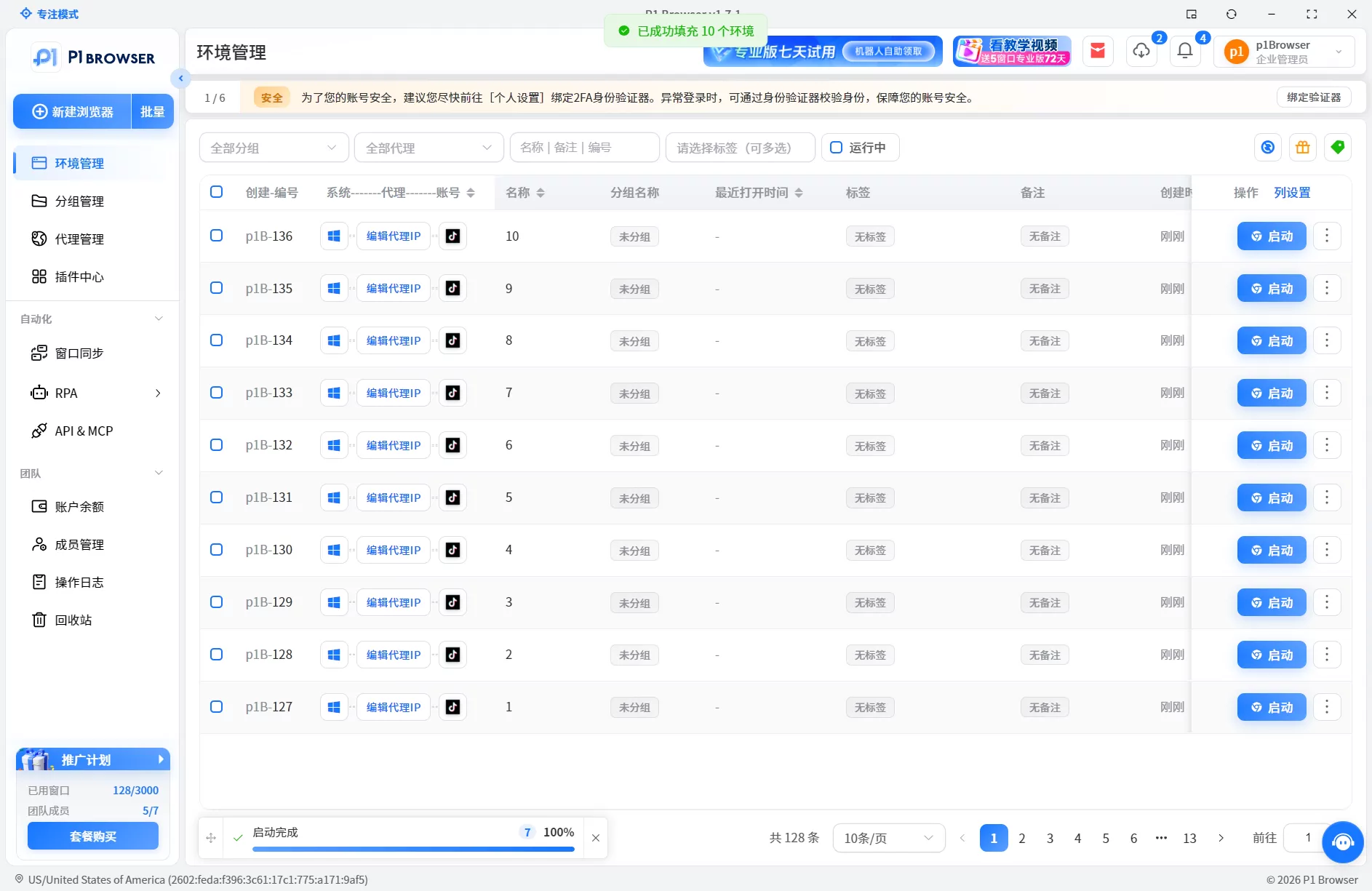
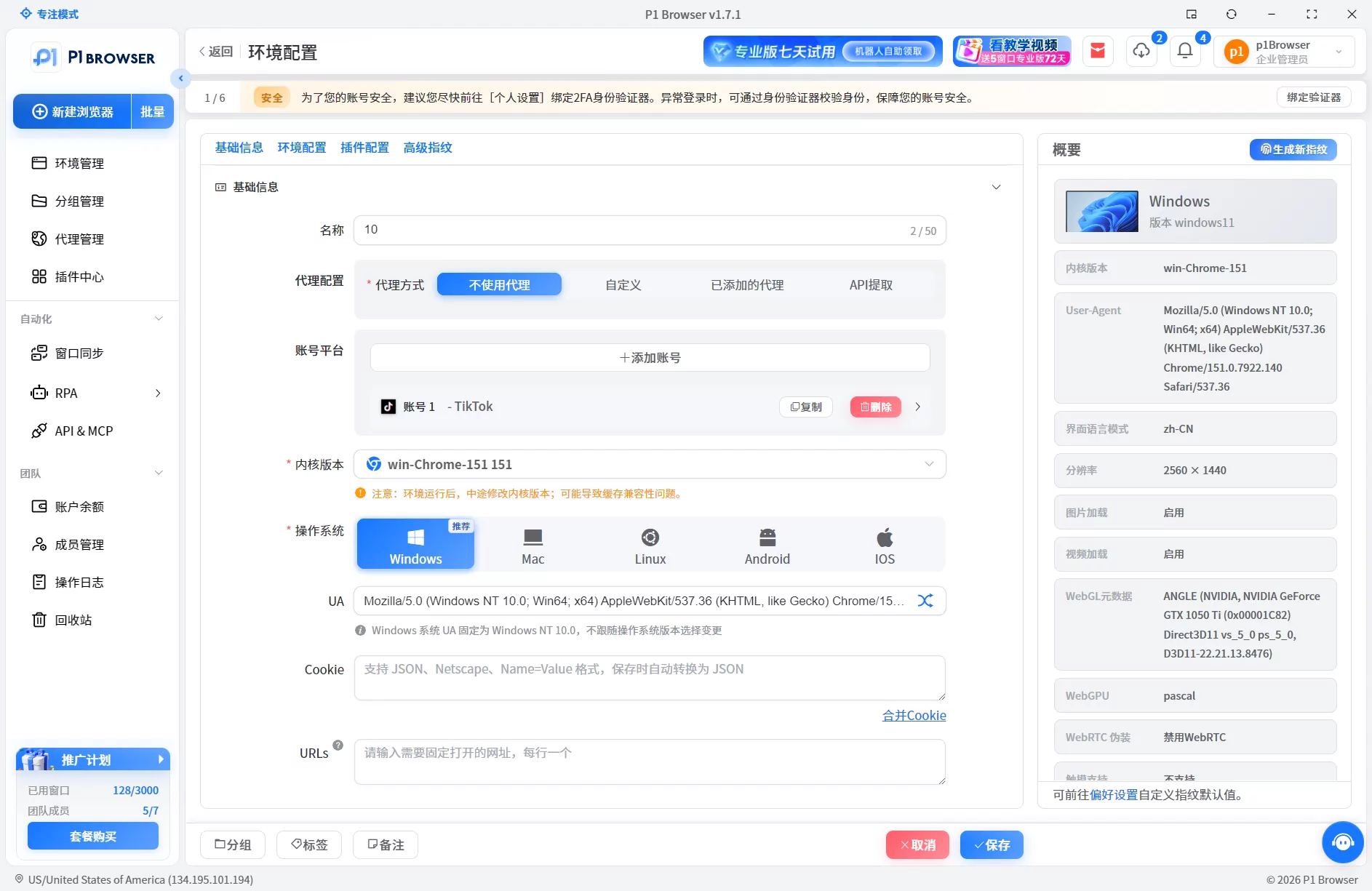
The core of the solution is environment isolation: use the professional p1 fingerprint browser to create an independent browser environment for each TikTok store account, paired with a dedicated residential IP, to avoid sharing any identifiable signals with existing violating accounts. Learn more TikTok Multi-Account Environment Management Guide, and Anti-Association Isolation Solution Reference, which can help you establish a more standardized store-opening process.
Reason Three: Historical Violation Records or Abnormal Behavior
- The email address or phone number was previously used by a violating account: Accounts linked to the same contact information that have violation records such as selling counterfeit goods, intellectual property infringement, or fake order generation will affect the review of new accounts.
- Abnormal Login Behavior: Frequently switching login locations within a short period, or using VPNs or proxy IPs that cause noticeable IP jumps, will be flagged by the system as risk operations.
- Historical Violations on the TikTok Platform: The same entity or associated accounts have violation records in other TikTok business lines (such as creator accounts or ad placement accounts).
These situations require differentiated handling: if the contact information has been compromised, switch to a clean email address and phone number and reapply; if caused by abnormal behavior, wait until the IP stabilizes before resubmitting; if historical violations are involved, resolve the original violation issues first before considering a new onboarding application.
Correct Remedial Steps After a Review Rejection
- Carefully Read the Rejection Notice: TikTok officially sends review results via in-site messages or email, specifying the exact reasons. This is the starting point for all subsequent actions—do not skip this step and resubmit directly.
- Address and Fix Each Cause One by OneFor document issues, supplement the required materials; for association issues, switch to a new environment and IP; for violation issues, wait or file an appeal. Each type of issue requires a different approach—addressing the root cause is key to improving your approval rate.
- Wait for the official resubmission cycleSome rejection reasons come with a defined cooling-off period before reapplying. Submitting too early may actually trigger stronger system flags.
- Run an environment self-check before resubmittingMake sure the new environment is clean and isolated, with no residual cookies, LocalStorage, or fingerprint traces. This step determines whether your second submission will succeed.
If you are a seller already managing multiple TikTok accounts, it is recommended to build a stable multi-shop operation system in advance. Learn about an efficient multi-shop management solution, which can help you reduce association risk at the source.
Targeted handling after multi-shop rejections
If you already have multiple TikTok Shop accounts and some have been rejected, you need to address each account's rejection reason individually: accounts with document issues should supplement materials before resubmitting; accounts rejected for environment association should reapply using a clean browser environment and a dedicated residential IP; accounts with a history of violations should file an appeal or wait out the cooling-off period before retrying.
Establishing a standardized isolation process helps improve the success rate of resubmissions: each shop account should have its own dedicated browser environment, each environment should be bound to a stable residential IP, and login behavior should maintain consistent timing and frequency.
The one-click isolation and batch operation capabilities provided by P1Browser can help teams manage multiple accounts within a single tool. For more details, refer to TikTok Multi-Account Environment Management Guide, or go to P1Browser download page to learn about product features.
Frequently Asked Questions
Will resubmitting documents immediately after a review rejection lead to faster approval?
No. If the root issue has not been resolved, simply resubmitting will most likely result in another rejection and may even intensify the risk flags the system places on your account. First identify the cause, complete the fix, and then resubmit once the allowed time window has passed.
Can the same business license be used to apply for multiple TikTok Shop accounts?
Policies vary across different sites. On TikTok Shop US, one business license typically corresponds to one store. If you need to run multiple stores, you will need to familiarize yourself in advance with the TikTok Multi-Account Environment Management requirements and confirm the specific policy restrictions for each site.
Does using a proxy IP guarantee that your accounts will not be linked?
A proxy IP is only one dimension of environment isolation, and using it alone cannot fully eliminate association risks. Multiple signals—including IP quality, browser fingerprints, device information, and login behavior—all influence the platform's assessment. It is recommended to pair a professional environment management tool with a stable residential IP to build a complete isolation setup.
Are the review standards the same for TikTok Shop US and TikTok Shop Southeast Asia?
No. The US site imposes stricter requirements on the completeness of qualification documents and the authenticity of business addresses, while some requirements on the Southeast Asia site are relatively more lenient. Regardless of which site, multi-account association is a universal review risk.
Can an appeal be filed after an account is rejected?
Some rejection reasons do allow appeals, but the key to a successful appeal is whether you can provide more compelling supporting evidence than in the original submission. If the rejection is caused by association issues, the appeal success rate is low. A more practical approach is to switch to a clean environment and updated documents and reapply.

