



Wiring up three stores into a single ERP within two weeks of registering a TikTok Shop seller account is a common pitfall. The admin dashboard starts throwing up frequent verification code alerts, orders start landing in the wrong store, and a former operations manager who left two months ago still has active login access to the main account. Most people's first reaction is that their tools lack features, but the real issue lies in these four layers—account entity, Seller Center roles, login environment, and tool data input scope—failing to maintain a fixed correspondence. Features are part of the fourth layer. If the first three layers aren't clearly defined, adding more features just amplifies the chaos.
Draw the Four-Layer Mapping First After Registration, Not a Tool Comparison
Before choosing an ERP or browser environment, create a store profile sheet. Each store gets one row, recording six items: the registration entity (business license or individual), the site region, store ID, store principal, the fixed login environment (which device, which browser profile, and which network exit point), and the tool account along with the specific modules it can write to (orders, inventory, pricing, and customer service). This sheet is the judgment basis for all subsequent tool selection—whether a tool can be imported by row and whether data inputs can be restricted by row can be identified at a glance.
There is a common source of confusion: the member roles in the TikTok Shop seller backend, and the roles and permissions in TikTok Business Centerare two separate systems. The latter is used to centrally manage ad accounts, business assets, and team collaboration, and the official guidance requires matching access scope to job positions and prohibiting the sharing of login credentials. However, it is not equivalent to the store permission settings in Seller Center. When configuring store operational permissions, base your decisions on the roles that actually exist in Seller Center, and do not directly apply the role descriptions from Business Center.

Which features are required at minimum for multiple stores: sorted by must-have and can-come-later
Features can be split into two batches. The first is the foundation that keeps multi-store operations "error-free"; missing any one item leads to ongoing rework. The second is efficiency tools, added later as order volume and headcount grow. Purchasing a one-size-fits-all bundle up front often pushes unvalidated write capabilities into every store all at once.
| Feature module | What it solves | Minimum acceptance criteria | Priority |
|---|---|---|---|
| Account profiles and entity mapping | Cannot tell which store belongs to whom or who is responsible | Import and export each store's entity, site, store ID, owner, and environment | Must-have |
| Roles and permissions management | Shared account across multiple users, lingering access permissions after employee departure | Role-based least-privilege access, instant deactivation, and retained operation logs | Must be in place first |
| Login Environment Management | Chaotic multi-store switching and mutual login-state interference | Fixed environment and designated owner per store; exportable environment list for verification | Must be in place first |
| Order Synchronization | Orders cross-assigned between stores; incorrect shipping addresses used | Every order carries a store-attribution field; anomalies can be rolled back | Must be in place first |
| Inventory Synchronization | Overselling and inventory written to the wrong store | A clear primary ledger with auditable SKU-to-store mapping | Must-have |
| Customer service message aggregation | Constantly switching between multiple stores and replying to the wrong one | Messages tagged with store identifiers, allowing agents to be routed by store | Nice-to-have |
| Data dashboards | Inconsistent aggregation logic across stores | Statistical metrics that reconcile with each store's backend financial statements | Nice-to-have |
How to verify login environments and permission features so it's not just 'can log in' but fully compliant
"Being able to log in" is not the acceptance criterion; the following four points are:
- Whether the environment is fixed for each store:Each store must have a unique login environment and a primary point of responsibility. When switching devices, records must be kept rather than allowing anyone to log in on whatever device is convenient.
- Whether roles are granted with least privilege based on job position:Customer service should only have read access to messages and orders; write permissions for price changes and inventory must be granted separately; finance must not have access to products.
- Whether accounts can be disabled the same day upon role change or resignation:After deactivation, whether the account, environment, and tools are all invalidated simultaneously, and how long the residual login session remains valid.
- Whether operation logs are traceable:A single price change record must be locatable to the specific store, personnel, time, and action. If any one of these is missing, it is impossible to review cross-store incidents.
It is necessary to clarify the boundaries: environment isolation addresses operational hygiene and internal compliance, reducing errors and permission overflow. How the platform determines relationships between accounts is determined by platform rules; tool providers should not promise "absolute security" or "bypassing audits.".TikTok advertiser account policiesalso explicitly require compliance with platform processes and local laws, and prohibit bypassing or interfering with audit processes.
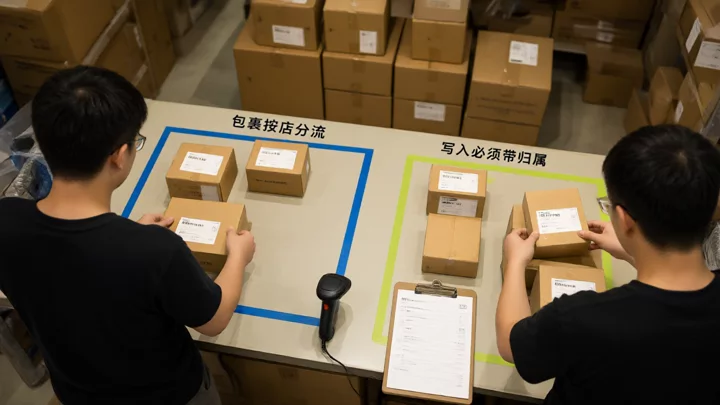
What to configure first when syncing orders and inventory: master ledger, SKU mapping, and rollback steps.
- Define the master ledger first.Decide whether to use a shared inventory pool or independent store-specific pools: use a shared pool if stores have highly overlapping product assortments or identical hit items; use independent pools if stores have significantly different positioning or separate warehouses. This decision must be documented in the configuration, not left as a verbal agreement, otherwise every new store addition will require a new round of discussion.
- Then establish the SKU and store mapping.Ensure that the same product's codes, prices, and shipping warehouses across different stores can be mapped one-to-one. The mapping table is maintained by the product owner, and new SKUs must complete the mapping before being allowed to enter the sync queue.
- Finally, set up sync windows and rollback procedures.Specify latency tolerance, alert recipients for exceptions, and how rollback records are retained. When order volume is not high, keep a manual review step; do not jump straight to full automation.
When sync issues arise, most cases are not simple delays but a mix of three causes: concurrent deduction conflicts, SKU mapping misalignments, and inconsistent safety stock criteria. The troubleshooting order can refer totroubleshooting approaches for multi-store inventory overselling issues.Remember: tool synchronization does not prevent cross-store errors; the key is whether the store attribution field is forcibly included during write operations.
Selection acceptance checklist: verify claimed tool features in this manner
Skip brand rankings and use this checklist to demand a live demonstration from the vendor:
- Can the store profile table be imported as-is, and a mapping table containing entities, roles, and environments be exported?
- When bulk updating prices or inventory, does the system force selection of the store scope rather than defaulting to select all?
- Does it support permission auditing and handover workflows, and can the offboarding checklist be exported in one go?
- Are there rollback entry points and corresponding operation logs for order and inventory anomalies?
- Are customer service messages tagged with store ownership, and can they be assigned to different agents by store?
- When integrating Amazon, Shopify, or Shopee in the future, can the account entity and role layers be reused.
The three layers of account entity, role, and environment are typically reusable across platforms, but write rules must be reconfigured per platform. Specific differences can be compared againstOperational differences of multi-platform seller account management tools. If you plan to put TikTok Shop and Amazon stores into the same tool, note Amazon's explanation of multiple selling accounts: Typically, one account is operated per region. Multiple accounts can be held when reasonable business needs arise, and their statuses will affect each other. This is precisely why “filing by entity” is more reliable than “grouping by tool.”
At the initial stage with only two stores, the minimal closed loop is: store profile table + job roles + fixed login environment + order and inventory synchronization with attribution fields. Once these three acceptance criteria are met, consider customer service aggregation and dashboards. For the complete chain from registration to tool selection, you can read further inTikTok Shop Multi-Account Operations and Store Management Tool Selection; For those preparing to build an independent site to capture traffic, refer toTool List for TikTok Shop Seller Accounts to Shopify Independent Sites.
FAQ
I just registered with only two stores. Should I immediately adopt an ERP?
There is no need to rush into a full suite. First, establish the store profile table, job roles, and fixed login environment. When order volume is manageable, manual verification can handle order and inventory processes. Introduce a synchronization tool with store attribution fields only when SKUs from the two stores overlap and prices or inventory need to be adjusted simultaneously.
The team is small. Can we share one set of login credentials?
It is not recommended. Shared credentials eliminate the ability to trace operations in logs and prevent deactivating only one person’s permissions during personnel changes. The correct approach is to give each person an individual account, granting the minimum roles within the store based on their job position, and deactivating the personal account upon departure rather than changing a shared password.
Which should be done first: order synchronization or inventory synchronization?
Establish the inventory master ledger before implementing order synchronization. Inventory determines whether overselling occurs, which is a preventive control; order attribution determines shipping errors, which is a concurrent control. Starting order synchronization without a clear master ledger will only amplify errors into the shipping process.
When tools advertise "anti-association" features, which verifiable functionalities should you look for?
Focus on verifiable elements: Can you fix login environments per shop and export lists? Can you isolate write operations by shop? Can you trace operation logs by person and shop? Can you disable all access points at once upon resignation? These are features that can be demonstrated and accepted. As for how the platform determines account relationships, this falls under platform rules and should be guided by account notices and official policies; absolute guarantees are not accepted.
When expanding to Amazon, Shopify, or Shopee in the future, which configurations can be reused?
The four layers of account entities, shop profiles, role assignments, and login environments are largely reusable, requiring only adjustments for platform-specific role differences. Write rules for orders and inventory, SKU coding conventions, and rollback processes must be reconfigured for each platform and cannot be directly applied from TikTok Shop settings.

