



A Ban That Started with a Business License Photo
A seller registered three Temu stores using the same computer and the same IP. The business license photo was shot at a slightly off angle, and the front and back of the legal representative's ID card were merged into a single image before uploading. After the review was rejected, he switched to a different agent and resubmitted—only for all three accounts to be flagged as associated, with the stores left unrecoverable.
The core issue in this story is not product selection or pricing, but document consistency and environment independence. Temu's risk-control system is extremely sensitive to both: mismatched documents or overlapping device and network traces will get you flagged at the review stage and may later trigger association penalties.
This article breaks down Temu onboarding requirements, seller document standards, common bottlenecks in the registration process, and isolation configuration for multi-store registration. The content follows the actual registration sequence, with the most common pitfalls highlighted at each step.
Temu Onboarding Requirements: First, Confirm Whether You Qualify
Temu currently accepts two entity types for onboarding: corporate sellers and individual sellers. The core difference between the two lies in qualification requirements and operating permissions.
Corporate SellersA valid business license is required. The license status must show normal operations (not revoked, cancelled, or flagged for operational anomalies), and the registered business scope must align with the categories you plan to operate in. The legal representative's ID card must be complete and clear, and the linked bank account must be either a corporate account or a personal account under the legal representative's name.
Individual SellersThis track is primarily for individually-owned businesses or natural persons. Applicants must provide an individually-owned business license or relevant business proof documents. Some categories have restrictions on individual sellers, so verify whether your target category is open before onboarding.
In addition, Temu sets basic requirements for seller location: sellers based in mainland China can apply directly to domestic sites, while overseas sellers must apply through Temu's cross-border site portal. All sellers' contact information (email address, mobile number) must be authentic and valid, and must not have been linked to another store.
Seller Document Preparation Checklist: Every Detail Could Be a Reason for Store Closure
Document review is the first gate in the Temu registration process and also the most error-prone step. The following outlines the requirements item by item.
Business License
The photo must fully cover all content on the license, with all four corners clearly visible. No occlusion, glare, or cropping is allowed. For e-licenses, the original file downloaded from the official channel is required; secondary screenshots or Photoshop edits are not accepted. The unified social credit code, legal representative name, and registered address on the license must exactly match the actual information.
Common errors: expired license not renewed, failure to obtain a new license after an address change, and mixing branch licenses with the head-office license.
Legal Representative's ID Card
The front and back sides must be uploaded separately and cannot be combined into a single image. The photo must clearly show the name, ID number, address, and validity period. The ID card must have more than six months remaining in its validity period; for documents nearing expiration, it is recommended to renew them before submitting.
Common errors: blurry photos, corners being cut off, and hand-held ID photos being mistakenly used (Temu does not accept hand-held photos as a substitute for front-facing photos).
Bank Account Information
Corporate sellers should prioritize the use of business accounts, where the account name must match the entity on the business license. Personal accounts must use a bank card registered under the legal representative's name, and the card number and issuing bank details must be accurate. Support levels vary across banks, so it is recommended to prioritize business accounts at major commercial banks.
Contact Information
The registered email must be one actually controlled by the seller; it is recommended to use a long-term email and avoid frequent changes. The phone number must be registered in the real name of the legal representative or the primary contact person, and is used to receive review notifications and store verification codes. Contact information must remain logically consistent with the registered details on the business license.
Temu Registration Process: The Complete Path from Account Creation to Store Review
The Temu registration process consists of four stages: account creation, document submission, qualification review, and store activation. Each stage has specific considerations.
Step One: Account Creation
Access the official entry point of the Temu Seller Center and register a seller account using an email address. The registered email will serve as the unique identifier for your store, and all subsequent logins, notifications, and fund settlements depend on this email. It is recommended to create a dedicated email for Temu operations and avoid mixing it with personal daily-use email addresses.
When setting a password, avoid using the same password combination as previous stores. Credential systems across different platforms should be kept independent.
Step Two: Select Onboarding Type and Submit Basic Information
The system will require you to select either a corporate or individual type, and to fill in basic information such as store name, primary category, and contact details. The store name must comply with the platform's naming conventions and must not contain prohibited words or misleading brand names.
The primary category selection directly affects subsequent qualification requirements. It is recommended to select categories based on actual supply chain capabilities to avoid choosing too many categories initially, which could increase the complexity of the qualification review.
Step Three: Upload Seller Documents
Follow the system prompts to upload your business license, legal representative's ID card, bank account information, and other required documents. Each file must be uploaded individually and cannot be combined. The system will perform an initial check on image clarity and completeness; any documents that fail inspection will prompt you to re-upload.
Step Four: Qualification Review
After submission, the process enters the review stage. The review period typically takes 1-3 business days. During this time, ensure your registered email address and phone number remain accessible, as reviewers may request additional documents via email or SMS.
If the review is not approved, the system will specify the exact reasons. Common reasons include: unclear documents, inconsistent information, and non-conforming entity qualifications. Address each issue individually before resubmitting, and avoid repeatedly submitting the same problematic documents.
Step Five: Store Activation and Initial Product Listings
Once approved, sellers can access the store backend to list products, configure logistics settings, and bind receiving accounts. It is recommended to complete basic store setup before your first product listing, including shipping templates, return and exchange policies, customer service response times, and more.
Multi-Store Registration and Anti-Association Configuration: Avoiding One Store's Issues Affecting All
Temu's detection logic for multi-store association is similar to other major e-commerce platforms: device fingerprints, network environments, and operational behavior data are the primary detection dimensions. Logging into multiple accounts on the same device, registering multiple stores within the same IP range, or using similar operational information may all trigger an association determination.
Device-Level Isolation
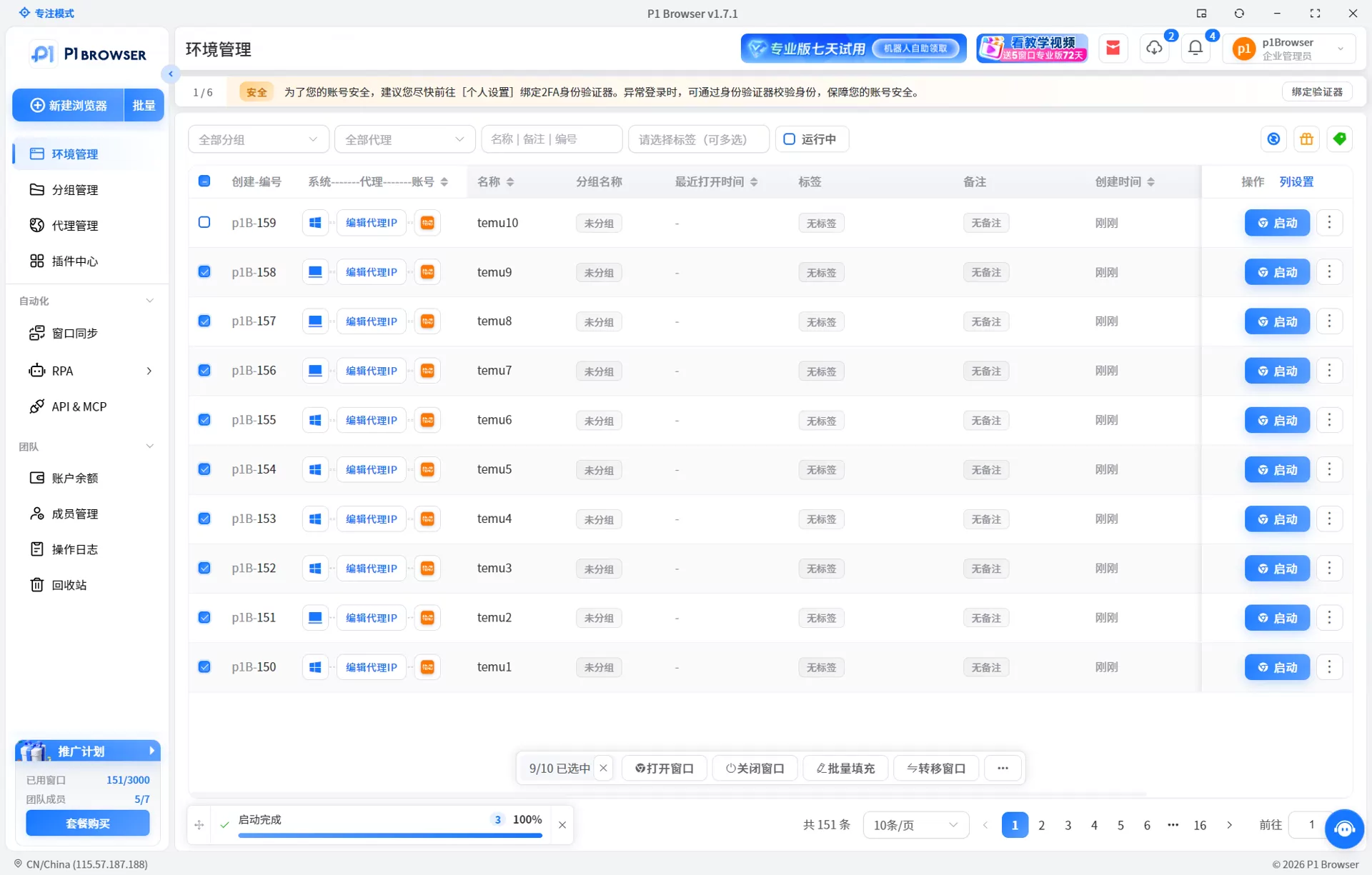
It is recommended to use an independent browser environment for each Temu store. Multiple profiles in standard browsers (Chrome Profile) share partial hardware information at the fingerprint level, posing an association risk. Professional fingerprint isolation tools can generate independent browser fingerprints for different stores, covering dimensions such as Canvas, WebGL, font lists, timezone, and language.
Specific configuration principles: Each store window should use an independent device fingerprint, an independent Cookie storage space, and an independent local storage. No environment parameters should be shared between windows.
For more technical approaches to browser isolation and fingerprint management, refer toHow to Efficiently Manage Multi-Store Operationsfor tool configuration recommendations.
Network-Level Isolation
Each store must use a dedicated static residential IP or high-quality proxy, ensuring the IP geolocation matches the store's target market. It is prohibited to log into multiple store accounts from the same IP, even at different times.
IP and device fingerprint must be used as a paired set: when switching IPs, the corresponding browser environment must also be switched; otherwise, the platform can still identify associations through other fingerprint dimensions.
Behavioral-Level Isolation
Operational behaviors across multiple stores must remain independent: product upload timing, editing frequency, price adjustment cadence, customer service response patterns, and similar factors should not exhibit high similarity. Batch operations should be executed separately per store using professional tools, avoiding the same operation sequence being applied to multiple accounts simultaneously.
For detailed principles of association detection and isolation configuration checklists, refer toSolving Account Association Risks in Multi-Store Operationsthe article.
Account Management: Compliant Practices from Registration to Daily Operations
Registration is just the beginning; operational habits during daily running also affect account security. The following lists high-frequency risk points.
Login Standards
Each store account should be accessed from an isolated browser environment. Avoid logging into multiple stores on shared devices or public computers. Log out promptly after a session, and do not log into the next account without clearing the cache and cookies.
Profile Updates
Once a store's core information (business license, legal representative, bank account) has been submitted, frequent changes are not recommended. Modifications trigger a secondary review by the platform, and repeated changes may be flagged as abnormal behavior. If a change is necessary, prepare all updated documents in advance and submit them in a single batch.
Store Authorization & Team Management
When multi-store operations involve team collaboration, it is recommended to assign permissions through the platform's official sub-account system rather than sharing the main account password. The IP addresses and device environments of sub-accounts also require isolated management.
Multi-account environment management for cross-border sellers has evolved into a complete methodology, from fingerprint isolation to team collaboration,see this strategy guide for details.
Funds & Settlement
Each store should be linked to a dedicated receiving account; multiple stores must not share the same receiving account. The correspondence between fund transactions and store identity is a key verification dimension for the platform's risk control.
Frequently Asked Questions
Can the same phone number be used to register multiple Temu stores?
No. Each phone number can only be linked to one Temu seller account. Reusing a phone number will result in a failed review or account association. For multi-store operations, you must prepare a separate phone number and email address for each store.
Will a mismatch between the address on the business license and the actual operating address affect registration?
Yes, it will. Temu's review process compares the address on the business license with the operating address entered in the system. A mismatch may trigger a request for supplementary materials or be flagged as providing inaccurate information. It is recommended to use the address registered on the business license, or to complete an address change in advance.
How long after a review rejection can I resubmit?
After a review rejection, you can resubmit once the documents are corrected—there is no mandatory waiting period. However, it is recommended to address the specific issues before resubmitting. Avoid submitting the same problematic documents repeatedly in a short period, as this may affect the efficiency of subsequent reviews.
What are the differences in permissions between individual sellers and enterprise sellers on Temu?
Enterprise sellers have access to a wider range of categories, support brand store features, and certain marketing tools and advertising privileges are exclusive to enterprise sellers. Individual sellers face restrictions on certain categories and operational tools. Before onboarding, you should confirm whether your category falls within the scope available to individual sellers.
What should I do if the system displays "This email is already in use" during registration?
This indicates that the email has already been linked to a Temu account or another sub-account. It is recommended to use a different email to register, or log in with that email to an existing account to check its status. Do not attempt to register multiple times with the same email, as this will directly trigger an association.

