



A Seller's Late Night: Is Opening Multiple Stores Really a Violation?
Seller A used one computer and one Chrome browser to open three Temu backend pages simultaneously. The next day, all three stores received abnormal notifications—traffic was restricted, and they faced the risk of association-based account suspension. With the same setup, some sellers run multiple stores smoothly while others keep hitting issues. Where is the problem?
The answer is: multi-stores themselves are not a violation, but the operation method triggered the platform's association detection. Temu does not impose a blanket ban on multi-stores. The real risk lies in environmental signals being identified as belonging to the same actual controller. Understanding this is the key to finding a path for compliant expansion.
The True Policy Boundaries of Temu Multi-Store Operations
Temu's official platform has not explicitly stated that one entity can only open one store. In practice, as long as the materials are independent and the operations are legitimate, multi-stores are feasible on the platform. The issue is not 'how many stores to open' but 'how to open them'.
The essence of association penalties is that the platform believes multiple accounts are operated by the same controller, which could lead to price manipulation, duplicate product listings, or resource monopolization. Therefore, Temu's risk control focuses on the repetition of environmental signals rather than the absolute number of stores. This is why compliant isolation is a prerequisite for multi-store operations.
Temu Account Association Detection Dimensions: Three Easily Overlooked Signals
Temu's risk control detection revolves around three dimensions. Repetition in any one of them may trigger an association judgment.
- Device Fingerprint: Browser engine version, operating system, screen resolution, font list, Canvas rendering characteristics, etc. Logging into different accounts under the same computer or the same browser profile will be identified as coming from the same device source.
- Network IP: The reputation of the outbound IP address, geographical location, and whether it is a data center IP. Using the same broadband or proxy exit to manage multiple stores is the most common cause of association.
- Registration Materials: Reuse of legal representative ID, business license, payment accounts, and contact information. Repetition at the material level will almost certainly trigger manual review.
These three dimensions overlap, and isolation in a single dimension is not enough to ensure safety. This is why simply using multiple Chrome profiles or multi-opening windows cannot solve the multi-store problem—it only isolates cookies and some configurations, while device fingerprints and network environments remain shared.
If you want the system to understand why ordinary browser multi-opening carries risks, you can refer toThe Essential Difference Between Fingerprint Browsers and Ordinary Browsers.
P1Browser achieves complete isolation of Temu multi-store environments through three dimensions: fingerprint layer, network layer, and behavior layer.
P1Browser Isolation Solution: Three-Dimensional Configuration of Fingerprint Layer, Network Layer, and Behavior Layer
P1Browser's design philosophy is to establish independent environments for each Temu store across three dimensions, making it impossible for the platform to make association judgments through conventional signals.
Fingerprint Layer Isolation
Each browser profile can independently set User-Agent, Canvas hash value, WebGL renderer, system font list, resolution, time zone, language, and other parameters. This means each store appears to be running on different devices and operating systems from the platform's perspective, rather than multiple windows on the same computer.
Network Layer Isolation
Each profile can bind an independent residential proxy IP, ensuring that the outbound addresses of each store are not associated with each other. It also supports setting different geographical locations and DNS per profile, preventing multiple stores from accessing the backend from the same IP range simultaneously.
Behavior Layer Isolation
P1Browser's batch operation feature allows executing actions on multiple profiles simultaneously rather than frequently switching between different windows. This operation mode reduces behavioral traces left by manual intervention and lowers the complexity of team management across multiple stores.
This isolation framework is consistent with universal multi-store anti-association logic. For further understanding of the underlying logic of association risks, you can readIsolation Solutions for Multi-Store Account Association Risks.
From 0 to 1: Configuring the First Temu Multi-Store Environment in P1Browser
The following is the complete process for configuring an independent Temu store environment.
- Register and Log In to P1Browser. After completing account registration, enter the workspace.
- Create a New Browser Profile. Click 'Create Profile' and select or create a tag that matches the store entity name for easy identification later.
- Configure Device Fingerprint Parameters. In the fingerprint settings panel, select the appropriate operating system, browser version, resolution, and language based on the target store's location. It is recommended to use different device combinations for each profile to avoid fingerprint repetition.
- Bind Proxy IP. In the profile's network settings, select 'Custom Proxy' and enter the HTTP/HTTPS address, port, username, and password of the residential proxy. Ensure this IP is not reused by other profiles.
- Save and Launch the Profile. After clicking 'Save', open the browser, access the Temu seller backend, and complete the login. It is recommended to use the device or network habits used during store registration for the first login to reduce the probability of manual review.
- Verify Environment Isolation. You can access an IP detection page such asWhat Is My IP Addressto confirm that the current profile's outbound IP and fingerprint information do not overlap with other profiles.
After completing the entire process, you will have an independent Temu store environment. For subsequent store additions, simply repeat the above steps and create a dedicated profile for each entity. If you need more detailed tool selection and team configuration advice, you can refer toP1Browser Multi-Store Isolation and Batch Operation Solutions.
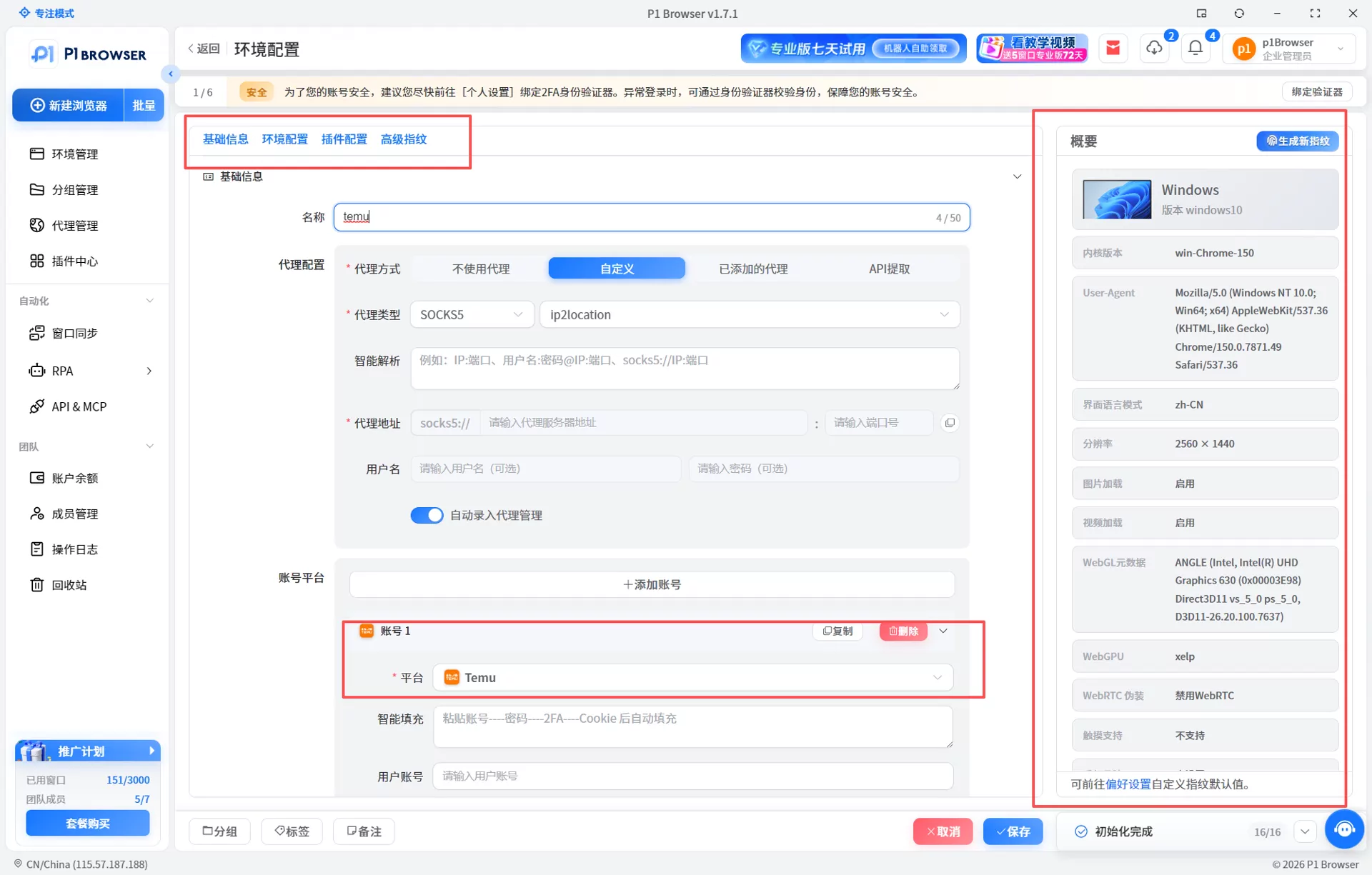
When creating a new profile in P1Browser, configure fingerprint parameters and proxy IPs in sequence to complete the setup of the first Temu multi-store environment.
Compliance Red Lines: Which Behaviors Remain Dangerous Even With Isolation Tools
Tools solve environmental isolation, not operational compliance.The following behaviors will still trigger platform penalties even when operated in an isolated environment:
- Fake Materials: Using fake business licenses, impersonating others' IDs, or using others' payment accounts. Material review is the core link for Temu store entry and periodic spot checks. Untrue materials will result in direct removal.
- Cross-Store Benefit Transfer: Conducting related-party transactions, self-operated procurement, or mutual order brushing between multiple stores. This type of behavior falls under the category of false transactions explicitly prohibited by the platform.
- Duplicate Product Listings: Listing the same product in multiple stores with different links in an attempt to monopolize search display positions. Temu's risk control system compares product similarities.
- Sharing Login Credentials Across Profiles: Using the same store's login account and password across multiple profiles. The platform records login behavior patterns, and abnormal patterns will trigger risk control.
The role of isolation tools is to reduce environmental-level association risks. Compliance in operational behavior still needs to be controlled by the seller. To learn more about environmental management details for multi-account operations, you can checkDoes TikTok Multi-Account Operations Require a Fingerprint Browser, whose isolation principles also apply to Temu.
Frequently Asked Questions
Does Temu allow one seller to open multiple stores?
Temu's official platform has not explicitly prohibited multi-stores. As long as each store's materials are independent, operations are legitimate, and environments are not associated with each other, multi-store operations are feasible. The key is to use the correct isolation method to avoid signal overlap at the device, IP, or material levels.
Can I manage multiple Temu stores by multi-opening windows in a regular browser?
No. Multi-windows or profiles in ordinary browsers only isolate cookies and some local storage. Device fingerprints (Canvas, WebGL, font lists, etc.) and outbound IPs remain shared. Temu's risk control system can detect overlaps in these underlying signals, leading to association penalties.
Can P1Browser guarantee 100% isolation from association?
No tool can guarantee 100% isolation security. P1Browser reduces environmental-level association risks by isolating device fingerprints and network IPs, but the authenticity of store materials and compliance of operational behaviors are equally important. Tools solve technical-level isolation and cannot replace compliant operations.
What are some recommendations for team configuration in multi-store operations?
It is recommended that each store profile correspond to one independent operator to avoid multiple people sharing the same profile for login. When a team manages multiple stores, you can use P1Browser's batch operation feature to improve efficiency while maintaining relatively independent operational behaviors between profiles to avoid triggering risk control with大量 repeated actions in a short time.

