


For cross-border e-commerce sellers, as the number of stores increases, how to efficiently manage multiple Shopee accounts has gradually become an important part of daily operations.
If you manage only one Shopee store, using a standard Chrome or Edge browser is usually sufficient. However, when the same computer needs to manage multiple buyer accounts, seller accounts, or stores in different markets, it is easy to encounter issues such as login confusion, shared Cookies, overlapping browser environments, and operational data from different accounts becoming mixed together.
More importantly, when determining the access environment, websites typically observe more than just the IP. Information such as browser Cookies, Session, User-Agent, screen resolution, time zone, WebGL, and Canvas may all constitute a complete browser environment profile.
I. Can You Have Multiple Shopee Accounts?
Before getting started with management Shopee multiple accountsBefore proceeding, first understand the platform's account rules.
Registration and verification requirements may vary by market, account type, and business model. Therefore, before creating a new account, sellers should first confirm the latest official Shopee policies for their region and complete phone number, identity information, and any other required verification as specified by the platform.
It is particularly important to note that“Having multiple accounts” and “using multiple accounts in violation of platform rules” are two different things.
For example, cross-border brands may need to create different stores for different markets, while e-commerce teams may need different employees to manage different stores. These needs do not in themselves constitute violations. However, using multiple accounts to repeatedly claim promotions, manipulate campaigns, evade platform penalties, or carry out other prohibited activities may create account risks.
Therefore, the first principle of operating multiple accounts is not “how to evade platform detection,” but ratherfirst ensure that the business model and operating methods comply with Shopee's rules, and then establish a clear account management environment.
II. Why Are Shopee Multiple Accounts Easily Associated Through Their Environments?
Many beginners assume that using a different IP address for each Shopee account is enough to completely separate the accounts.
In fact, the access environment seen by a website involves far more than just the IP.
1. IP Address
An IP address can reflect the network connection environment and approximate geographic location. If multiple accounts remain active in the same network environment over an extended period, they may develop identical network environment characteristics.
2. Cookies and Sessions
Cookies are used to save login status, website preferences, and other browsing information, while sessions are closely related to the current login status.
If multiple accounts share the same browser environment for an extended period, cookie and session data can easily become mixed together, which not only makes account management more difficult but may also lead to operational errors.
3. Browser Fingerprinting
Browser fingerprinting is a very important concept in multi-account management.
It is typically composed of various types of information, including the User-Agent, operating system, screen resolution, time zone, language, Canvas, WebGL, and hardware-related parameters.
Therefore, even if the IP is changed, if the other browser and device environments remain highly similar, the two access environments cannot simply be understood as completely independent.
III. What are the management methods for multiple Shopee accounts?
Currently, the common methods for managing multiple accounts mainly include separate devices, multiple browser instances, virtual machines, and fingerprint browsers.
| Management method | Cost | Environment isolation | Scalability | Suitable scenarios |
|---|---|---|---|---|
| Separate devices | High | High | Low | A small number of accounts |
| Chrome / Edge Multi-Profile | Low | Relatively low | Medium | Beginners and a small number of accounts |
| Virtual machine | Medium to High | High | Medium | Teams requiring an independent system environment |
| Fingerprint browser | Medium | High | High | Cross-border e-commerce and multi-account teams |
Separate phones or computers
The most direct approach is to have different accounts use different devices. The advantage is that the environments are naturally isolated, but the drawback is equally obvious: as the number of accounts increases, the cost and management difficulty of purchasing and maintaining a large number of devices can rise rapidly.
Chrome or Edge browser profiles
Both Chrome and Edge allow you to create multiple browser profiles. Different profiles can separately store cookies, browsing history, bookmarks, and login information.
This is highly effective for avoiding logging into the wrong account, but they still run on the same computer and operating system, so they cannot simply be considered fully independent device environments.
Virtual machines
Virtual machines can create multiple independent operating system environments on a single computer, providing a relatively high level of isolation.
However, virtual machines typically require substantial RAM, CPU, and storage resources. As the number of accounts increases, running multiple virtual machines simultaneously may significantly increase the burden on the device.
Fingerprint browser
The core idea of a fingerprint browser is to place different accounts in different browser Profiles, with each Profile having relatively independent Cookies, login status, browser parameters, and proxy settings.
For cross-border e-commerce teams that need to manage multiple Shopee stores, this approach makes centralized management easier and eliminates the need to prepare a physical computer for each account.
IV. Why Do Shopee Sellers Need to Prioritize Account Management?
For sellers, the real challenge of operating multiple stores is often not the “login” itself, but the subsequent day-to-day management.
For example, the same team may be responsible for multiple markets, different brands, or different product lines at the same time. If all stores use the same browser environment, Cookies, login information, and workflows can easily become disorganized.
In addition, as the team grows, directly sharing the master account password also increases the cost of account security management.
Therefore, in addition to isolating browser environments, businesses should also establish a clear account permission management system. For example, they can use the team or sub-account features officially provided by Shopee to assign operating permissions according to employees’ responsibilities, rather than having everyone share the master account.
V. How to Use the P1 Fingerprint Browser to Manage Multiple Shopee Accounts?
When the number of Shopee accounts increases from 2~3 to a dozen or more, relying solely on regular browser Profiles for management gradually becomes cumbersome.
The P1 fingerprint browser can place different accounts in separate, independent browser environments, allowing sellers to centrally manage multiple Profiles.
First step: Create an independent environment for each Shopee account
It is recommended to create the management structure according to the principle of “one account per Profile.”
For example, you can name them using “brand + market + store” so that team members can immediately tell which account is currently being operated.
Second step: Configure the browser environment
After creating a Profile, you can configure the operating system, browser, language, time zone, and other browser environment parameters according to your actual business needs.
After the environment is created, it is recommended to keep it stable and avoid frequently modifying large numbers of parameters. A stable and clearly defined operating environment is generally more suitable for long-term management than frequently changing settings.
Third step: Configure the proxy IP
If your business requires different network environments, you can configure the corresponding proxy for each Profile.
It should be noted that the proxy IP and browser Profile are two different concepts. The proxy is mainly responsible for the network connection, while the Profile is responsible for isolating the browser environment and login data.
Therefore, “changing the IP” should not be understood as a complete multi-account isolation solution.
Step Four: Log in to the corresponding Shopee account
After completing the Profile setup, log in to the corresponding Shopee account only within the designated Profile.
For example:
Profile A → Shopee Store A
Profile B → Shopee Store B
Profile C → Shopee Store C
This one-to-one management approach can effectively reduce account mix-ups in daily work.
Fifth Step: Create Team Management Guidelines
For teams with multiple members, it is recommended to establish standardized Profile naming conventions, assign account owners, and define operating permissions.
For example, Profiles can be named according to 「Market-Brand-Store-Owner」, with account permissions and login information checked regularly.
What are the common mistakes in Shopee multi-account operations?
Error: Multiple accounts sharing the same browser Profile
This is the most common issue. Cookies, Sessions, and login data may become mixed together, increasing the risk of operating the wrong account.
Mistake two: Changing only the IP while ignoring the browser environment
An IP is just one dimension of the access environment. Changing only the IP does not mean that other browser parameters have also changed.
Mistake three: Switching accounts too frequently
If staff repeatedly log in to and log out of a large number of accounts within a short period, this not only reduces work efficiency but can also easily lead to confusion in account and order operations.
Mistake: Multiple people sharing the main account
If a team creates a large number of main accounts simply to assign work, management costs can be very high. A more reasonable approach is usually to make use of the sub-account and permission management features provided by the platform.
Mistake Five: Abusing Promotions Through Multiple Accounts
Regardless of which browser is used, you should not use multiple accounts to repeatedly claim new-customer offers, manipulate promotional activities, or circumvent platform penalties.
VII. Which Shopee users is the P1 fingerprint browser suitable for?
If you use only one Shopee account, a regular browser can usually meet your needs.
However, if you operate multiple brands, markets in different countries, or multiple Shopee stores, and require collaboration among multiple people, a professional multi-account management tool will be more valuable.
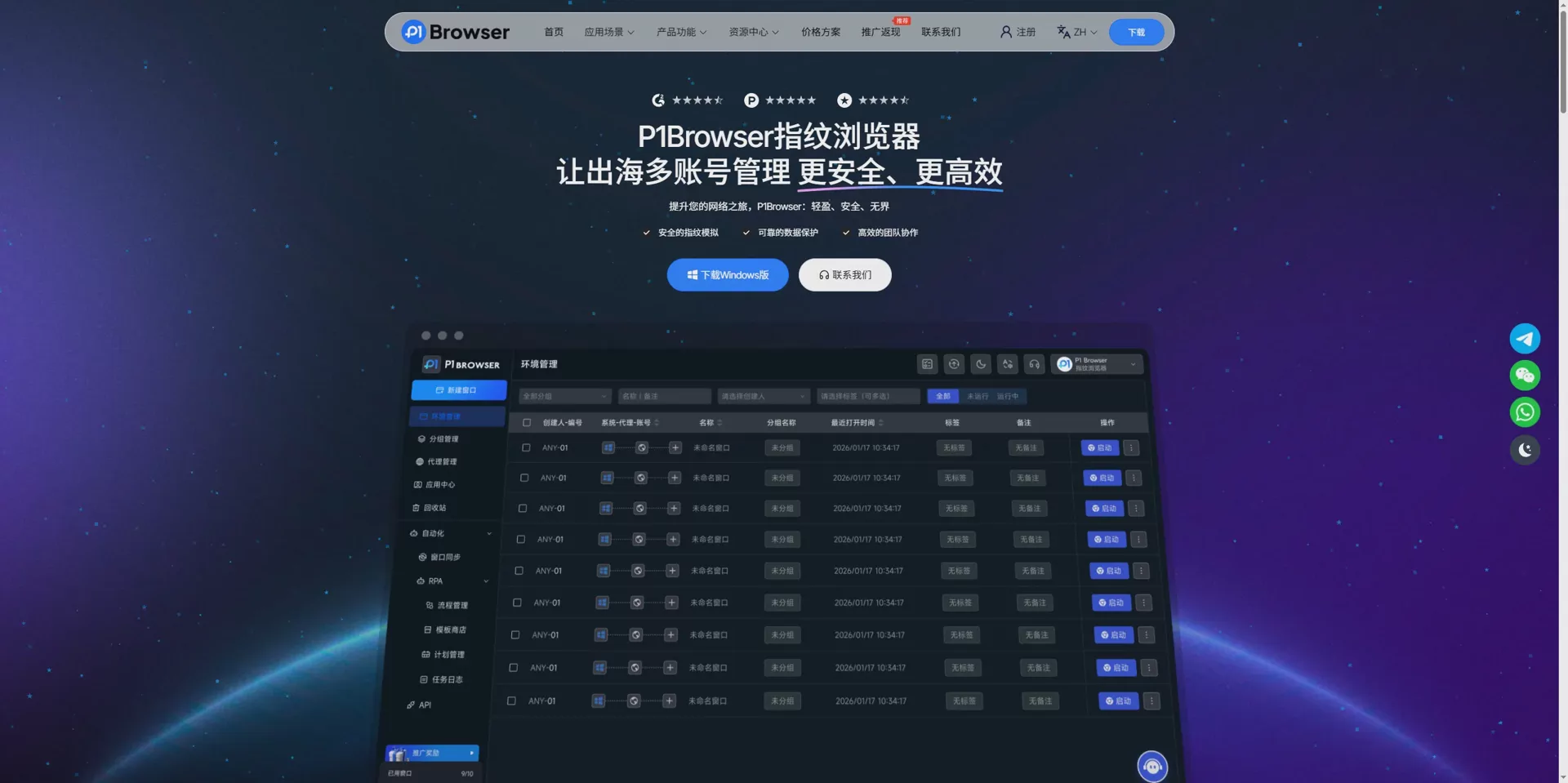
P1 fingerprint browserSuitable for the following types of users:
- Cross-border e-commerce sellers
- Shopee multi-store operations teams
- Teams expanding brands overseas
- Overseas community and digital marketing teams
- Businesses that need to manage a large number of browser account environments
The Core of Shopee Multi-Account Management: It Is Not “Evading Detection,” but Establishing Proper Standards
It must be emphasized that an anti-detect browser is not a tool that can make accounts “absolutely safe” or “never restricted.”
No third-party tool can replace the platform’s rules themselves.
A truly sustainable approach to multi-account operations should be built on three foundations:A compliant business model, clear account isolation, and stable daily operating procedures.
An anti-detect browser addresses the issue of “browser environment management”; a proxy addresses the issue of “network connection environment”; while platform policies and team management systems determine whether accounts can operate stably over the long term.
FAQ: Common Questions About Shopee Multi-Account Management
Q1: Can Shopee manage multiple accounts?
Whether multiple accounts can be created and operated depends on the latest official Shopee rules in the relevant region. Different accounts should be registered and verified in accordance with platform requirements. Multiple accounts should not be used for offer abuse or other policy violations.
Q2: Can multiple Shopee accounts be managed on the same computer?
Yes, but it is recommended to manage different accounts in separate browser Profiles or independent environments to reduce the risk of mixing Cookies, Sessions, and login information.
Q3: Can Shopee multi-account isolation be achieved by using only proxy IPs?
This is not a recommended way to understand it. An IP is only one part of the access environment. Browser Cookies, Sessions, User-Agents, Canvas, WebGL, time zone, and other parameters may also constitute the complete browser environment fingerprint.
Q4: Can an antidetect browser guarantee that Shopee accounts will not be restricted?
No. Antidetect browsers are primarily used to manage and isolate browser environments and cannot guarantee that accounts will not be restricted by the platform. Sellers must still comply with Shopee’s platform policies.
Q5: How should a Shopee multi-store team be managed?
It is recommended to adopt a “one store, one environment” management approach, while using the team permissions or sub-account features provided by the platform and establishing standardized systems for Profile naming, permission allocation, and account records.
Conclusion
The core of operating multiple Shopee accounts is not merely “how to log in to more accounts,” but how to maintain a clear, secure, and highly efficient workflow even after the number of accounts increases.
For a small number of accounts, Chrome or Edge’s multi-Profile functionality may already be sufficient; for cross-border e-commerce teams that need to manage multiple Shopee stores, brands, and markets, a fingerprint browser can provide a more centralized approach to environment management.
If you are looking for a tool suitable for multi-account operations in cross-border e-commerce, you can learn more about P1 fingerprint browser, which enables you to create a clearer multi-account management process through independent browser Profiles, proxy configuration, and team collaboration features.
Finally, a reminder:Tools can only improve account management efficiency and environment isolation; they cannot replace platform rules. For long-term Shopee store operations, compliant practices, genuine business activities, and stable operating habits will always be the most important foundation.

