


Why might a Google Ads account be suspended?
A Google Ads account may be suspended for various reasons. You can findthe Google Ads Help Centerfor detailed information about suspended accounts. Generally, if your account is suspended, Google will notify you by email. The email will include the specific reason for the suspension and relevant information on how to resolve the issue. You can also check the suspension details in the notifications section of your Google Ads account.
Google advertising policies
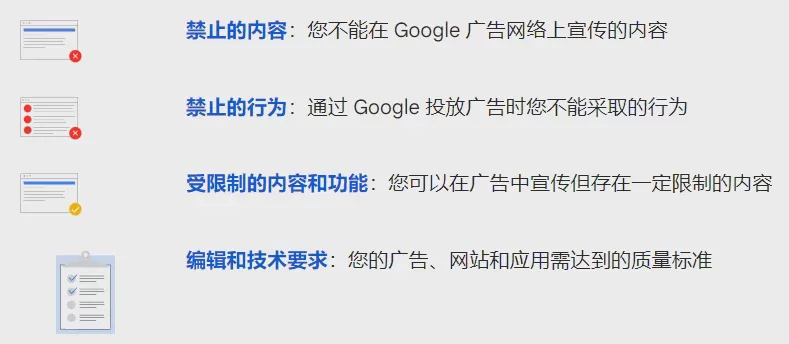
Google'sadvertising policiesThere are four main categories: prohibited content, prohibited practices, restricted content and features, and editorial and technical requirements. Violating any of these may result in your advertising account being suspended.
Source: Google Ads policies
Prohibited content
This policy clearly specifies which types of content are not allowed to appear in Google ads, including but not limited to illegal products or services, dangerous or harmful products or services, and inappropriate content.
1. You sell illegal drugs or prescription drugs in your ad, which violates the prohibited content section on illegal products or services.
2. You promote dangerous items in your ad, such as firecrackers or other explosives, which violates the prohibited content section on dangerous products.
3. Your ad contains vulgar language or inappropriate images, such as threats, harassment, or hate speech, which violates the prohibited content section on inappropriate content.
Prohibited practices
This policy specifies prohibited practices when creating and running ads, including misleading or deceptive practices, misuse related to data collection and privacy, and the use of inappropriate online practices to interfere with the user experience.
1. For example, an advertisement from a lending company claims that it can provide 100% loan approval, but in reality it cannot do so. This constitutes a misleading practice.
2. Your ad collects users' personal information but does not provide a privacy policy or obtain users' explicit consent, which constitutes misuse related to data collection and privacy.
3. Your ad uses a large number of pop-ups or autoplaying audio, disrupting users’ online experience and therefore constituting inappropriate online behavior.
Restricted content and features
Certain types of content, although not completely prohibited, are subject to certain restrictions when used in advertisements. This content includes alcohol, gambling, healthcare-related services, financial services, trademarks, political content, and more.
1. Your ad promotes gambling-related products or services without the required permission from the local government, violating the gambling section of the restricted content policy.
2. Your ad promotes a specific healthcare service but does not provide relevant compliance information, such as proof of a doctor’s qualifications, violating the healthcare-related services section of the restricted content policy.
3. Your ad uses someone else’s trademark, violating the trademarks section of the restricted content policy.
Editorial and technical requirements
Google places great importance on user experience and therefore has certain requirements for the editorial content and format of ads, including ad clarity, accuracy, grammar, and spelling, as well as technical requirements for ad landing URLs, mobile or tablet applications, animations, and more.
1. Your ad uses unclear images or text containing numerous spelling errors, violating the editorial requirements.
2. Your ad links to a website that cannot be accessed properly, or the website is unrelated to the ad content, violating the technical requirements.
3. Your ad uses an animation that is too long and exceeds Google’s limit on animation length, violating the technical requirements.
Payment issues
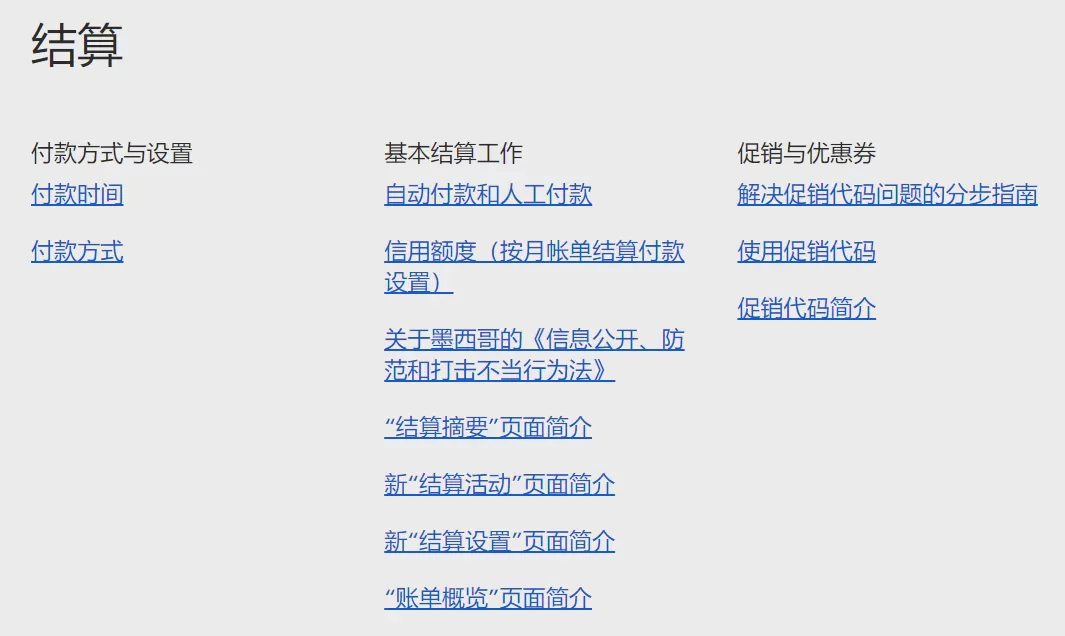
Google has a detailed payment policy, including but not limited to using only Google-supported payment methods and not using third-party payment information. Violating these policies may also result in your account being banned.
Source: Google Ads Help
Invalid or expired payment information
1. Entering an incorrect credit card number prevents Google from processing the charge, resulting in your account being banned.
2. You may have forgotten to update your expired credit card information, preventing Google from processing the charge and resulting in your account being banned.
3. Entering the security code incorrectly prevents Google from processing the charge, resulting in your account being banned.
Payment declined by the bank
1. Your account may have insufficient funds, causing the bank to decline Google's charge request
2. Your credit card's daily spending limit may be too low, causing the bank to decline Google's charge request
3. The bank's anti-fraud system may have incorrectly flagged the transaction, causing the bank to decline Google's charge request
There is an outstanding unpaid balance
1.Overlooked the unpaid balance in your account and failed to top up in time, resulting in the account being suspended.
2.Forgot about the recurring charges on your account, resulting in an unpaid balance and, consequently, the account being suspended.
3.Your account may have been suspended because an inaccurate understanding of the Google Ads billing cycle resulted in an unpaid balance.
Suspected fraudulent payment
1.Used stolen credit card information to make a payment
2.You may have changed your payment method frequently, causing Google to suspect fraudulent payment activity.
3.Made high-value payments to multiple Google Ads accounts within a short period of time
Other terms and usage requirements
1.Created multiple Google Ads accounts in an attempt to circumvent advertising restrictions by publishing the same ads in each account. This may violate Google's “False identity” policy.
2.You may have attempted to increase the number of clicks and improve your ad ranking by clicking your own ads or asking your friends and family to click your ads. This may violate Google's “Click fraud” policy.
3.You may have attempted to use automated tools to create, modify, or delete ads, which may violate Google's “Inappropriate use” policy.
4.You may have used automated tools, such as scripts or bots, to automatically click your ads in order to increase the number of clicks. This may violate Google's “Invalid traffic” policy.
5. You may have attempted to use a VPN or low-quality proxy server to falsify the user's geographic location, which was detected by Google's systems and may also violate the "invalid traffic" policy.
What happens after a Google Ads account is suspended?
When your Google Ads account is suspended, the most immediate impact is that all your ads will stop showing immediately. This means your products or services will no longer be displayed across Google's advertising network, preventing you from attracting potential users and potentially causing sales to decline. At the same time, you may lose access to performance data for your ads, including key metrics such as click-through rate, conversion rate, and sales. This data is essential for adjusting and optimizing your advertising strategy. In addition, if your ads had already achieved a certain Quality Score before the suspension, the suspension may cause these scores to be reset or reduced. Quality Score is an important factor Google uses to determine your ad ranking and cost per click (CPC).
On the other hand, if you have already established an advertising strategy, such as keyword targeting or audience targeting, having your account suspended will disrupt these strategies. Once your account is restored, you will need to set up these targeting strategies again. However, even if you successfully resolve the issue that caused the account suspension, you will still need to wait for Google to review your account and ads again. During this period, your ads will remain unable to run. Even worse, if Google determines that your account has serious issues, your ads may be permanently prevented from running.
Therefore, it is crucial to avoid violating Google Ads policies to prevent your account from being suspended. If your account is suspended, you need to identify the problem and take corrective action as soon as possible, while also preparing to deal with the impact of the interruption to your advertising campaigns.
How to resolve a suspended Google Ads account
Check the reason
When Google notifies you that your account has been suspended, it usually clearly states which policy was violated. This is the first step in resolving the issue. If no specific reason is provided, you can review Google's advertising policies to determine which policies your ads or website may have violated.
Resolve the issue
You need to carefully review all your ads and website content to identify any potential policy violations. This may include ad copy, images, landing pages, and even certain content on your website. The following are some basic steps, but the specific actions may vary depending on your account and the details of your ads.
Review your ads and website
-
Log in to your Google Ads account, then click the "Ads & extensions" tab.
-
Review all of your ads, including text, images, videos, and more. Check every element, including headlines, descriptions, display URLs, final URLs, and more.
-
Compare your ads with Google's advertising policies, especially the policy area you were notified of violating, to see whether your ads contain any violations. For example, if you violated the "Misleading content" policy, you need to check whether your ads contain information that misleads users.
-
Visit the final URL of your ad, meaning your website or landing page. Check all the content on the page, including text, images, links, and more.
-
Compare your website with Google's advertising policies to see whether it contains any violations. For example, if you violated the "Unacceptable business practices" policy, you need to check whether your website clearly displays your business model, details about your products or services, contact information, and more.
Modify the violating content
-
Once you have identified content that may violate the policies, you need to modify it. In your Google Ads account, find the ad that needs to be modified under the "Ads & extensions" tab, and click Edit.
-
Based on the results of your review, modify the relevant content of the ad. For example, if your ad copy contains information that misleads users, you need to change that part of the copy to make it truthful and accurate.
-
If your website contains content that violates the policies, you also need to modify it. This may require assistance from your website developer or content editor. For example, if your website does not clearly display your business model, you need to add the relevant information.
-
After making the modifications, save your ad and submit it for review again. If you modified your website, you may need to update the final URL in your ad before submitting it for review again.
Remove malware or unwanted software
-
Google will tell you which URLs have issues in the notification. You need to confirm whether these URLs belong to you and whether they may be infected with malware or unwanted software.
-
Use a reliable security tool, such as Google's Safe Browsing tool, to scan your website. This tool can help you identify any malware or unwanted software that may exist on your website.
-
If your website has been infected with malware or spam, you need to remove the malicious content. This may involve deleting malicious code, updating the website software, changing passwords, and taking other measures.
Submit a Request
After resolving the issue, you can submit a review request in your Google Ads account. In the request, you need to explain in detail how you resolved the issue and what measures you will take to prevent it from happening again in the future.
Here is a template for submitting an appeal that you can use as a reference:
Chinese Version
Subject:Request to Reinstate a Suspended Google Ads Account
Content:
Dear Google Ads Team,
I am the holder of account ID (enter your account ID). I recently received a notification that my account had been suspended because the ad content was misleading to users.
After receiving the notification, I immediately read Google's advertising policies carefully and conducted a comprehensive review of my ads and website. I found that some descriptions in my ads could indeed mislead users.
To resolve this issue, I have taken the following measures:
I have deleted or modified all advertising descriptions that could potentially mislead users. My ads now describe my products and services truthfully and accurately, without any exaggerated or false information.
I have made modifications to my website to ensure that all product information is truthful and accurate, with no content that could mislead users.
I have attached screenshots of the modified ads and website to the email for your reference.
I sincerely hope that my account can be reinstated. I will strictly comply with Google's advertising policies to prevent this issue from occurring again in the future.
If you need more information or require me to provide any additional evidence, please feel free to contact me. Thank you for your understanding and assistance.
Best regards, (Your Name)
Attachments: Screenshots of the modified ads and modified website
English version:
Subject:Request to Reinstate Suspended Google Ads Account
Content:
Dear Google Ads Team,
I am the holder of Account ID (insert your account ID). I recently received a notice that my account has been suspended due to misleading ad content.
Upon receiving the notice, I immediately reviewed Google's advertising policies and conducted a thorough review of my ads and website. I found that indeed, there were descriptions in my ads that could potentially mislead users, such as exaggerating product effects and making false promises.
To resolve this issue, I have taken the following measures:
I have deleted or modified all ad descriptions that could potentially mislead users. Now, my ads accurately describe my products and services without any exaggeration or false information.
I have made modifications to my website to ensure that all product information is true and accurate, with no content that could mislead users.
I have attached screenshots of the revised ads and website in this email for your reference.
I sincerely hope that my account can be reinstated. I will strictly adhere to Google's advertising policies to prevent such issues from happening again in the future.
If you need more information or require other evidence, please feel free to contact me. Thank you for your understanding and assistance.
Best regards, (Your Name)
Attachments (Attachment names): Screenshots of revised ads, Screenshots of revised website
Application rejected
If your application is rejected, you can contact the Google Ads support team directly. They can help you understand why your account was suspended and what you need to do to restore your account. The Google Ads support team's working hours may vary by region. If you contact them outside of business hours, you may need to wait for a response.
How to avoid Google Ads account suspension
Comply with policiesGoogle has a detailed set of advertising policies, including prohibitions on misleading content, false advertising, illegal content, and more. Ensure that both your ads and website comply with these policies.
Genuine and accurateEnsure that yourad content is genuine and accurateand does not contain misleading information. Do not exaggerate the effectiveness of your products or the quality of your services.
Appropriate keyword usageEnsure that thekeywordsyou use are relevant to your ad and website content. Avoid using irrelevant keywords to attract traffic.
Avoid malware and viruses: Ensure your website is secure,with no malware or viruses. Google regularly checks website security.
Pay fees promptly: If your account has unpaid fees, Google may suspend your account. Make sure yourpayment informationis up to date, and check your account balance regularly.
Do not engage in fraudulent activities: such as clicking your own ads or using automatic clicking tools.
Regularly check and update your ads: Google's policies may change, so it is important to regularly check and update your ads to ensure they comply with the latest policies.
Have multiple advertising accounts:Use a fingerprint browser to manage multiple Google Ads accounts and avoid linking between ad accounts. At the same time, please don't forget to useP1Browser fingerprint browser to check whether your local device information can be concealed.
Frequently Asked Questions
Q: What does it mean when a Google Ads account is suspended?
This means you will be unable to create or run any new advertising campaigns on that account. Ads that are already running will also stop being displayed, which may affect your business.
Google Ads accounts are usually suspended for violating Google's advertising policies. This may include, but is not limited to, publishing misleading or false advertisements, using prohibited keywords, failing to pay bills on time, and engaging in fraudulent activities.
After your account is suspended, you can resolve the violations and appeal to Google. If Google accepts your appeal, your account may be reinstated. However, if your account is permanently suspended due to serious violations, you will no longer be able to use it to run ads.
Q: Will my website traffic and rankings be affected while my Google Ads account is suspended?
The suspension of a Google Ads account only affects your paid advertising campaigns, meaning that your ads will no longer be displayed in Google's search results or on its partner websites. This may lead to a decrease in website traffic because you will lose visitors from paid advertising.
However, this will not directly affect your website's ranking in Google's organic search results. Google's organic search rankings are based on its search algorithm and SEO (search engine optimization) factors, which are unrelated to your paid advertising campaigns.
However, it is important to note that if your website or advertising campaigns violate Google's policies, this may negatively affect your SEO. For example, if your website contains malware, Google may mark it as unsafe, which can lower your search ranking. Therefore, resolving any issues that may lead to account suspension is also an important part of maintaining good search rankings.
Q: How long does the appeal process take?
The time it takes to submit an appeal to Google varies depending on the circumstances. Once you submit an appeal, Google's team will review it. This process may take several business days, but in some cases it may take longer.
Q: Can I immediately create a 2nd account to resolve the suspension of my Google Ads account?
In fact, if your account is suspended for a serious policy violation, Google may suspend all Google Ads accounts associated with that account. This means that even if you create a new account, it may also be suspended as soon as Google discovers that it is associated with the suspended account.
The best way to resolve the suspension of your Google Ads account is to identify the reason why the account was suspended and then address the issue. Once the issue has been resolved, you can submit an appeal to Google requesting that your account be reinstated.
Q: My competitors are doing the same thing as I am. Why was only my Google Ads account suspended?
Google Ads policies apply to all advertisers, but due to its vast scale, Google may not immediately detect all violations. This may explain why some violations temporarily go undetected or unaddressed. However, this does not mean that such behavior is permitted. Instead, you should focus on understanding and complying with Google's policies to ensure that your advertising campaigns can run smoothly. If your account is suspended, you should try to identify the reason and resolve the issue so that your account can be reinstated.

