


P1Browser: The Best Way to Share Accounts
Sharing a P1Browser account can help reduce costs and improve team collaboration, but it also comes with certain risks. Whether you share an account with friends or colleagues, improper sharing practices may lead to security vulnerabilities or account suspension. In this guide, we will explain how to safely share your P1Browser account while ensuring the security of your data and account.
Main Risks of Sharing a P1Browser Account
Sharing a P1Browser account may seem like a simple way to improve work efficiency or reduce expenses, but it also introduces various risks.
Security Vulnerabilities
When you share your login credentials with others, you increase the risk of unauthorized access. If the person you share them with is not cautious enough or lacks adequate security protection, hackers may exploit vulnerabilities to steal your account. Sharing passwords through insecure channels or reusing the same password across multiple platforms will increase the likelihood of account exposure. Even someone you trust may unintentionally cause security issues.
Violating OpenAI Terms of Service
Sharing a ChatGPT Plus account may violate OpenAI's Terms of Service. For example, sharing the account with unauthorized users may result in penalties or even account suspension. Pay particular attention to the fact that OpenAI has clear policies regarding account sharing, with even stricter requirements for commercial use or team collaboration. Therefore, be sure to review the relevant policies carefully before sharing.
Privacy Risks
Sharing a P1Browser account may expose your personal or business confidential information. Since interaction records with P1Browser are saved, anyone who gains access to the account may inadvertently view conversation content that you would not want others to see. Without adequate protective measures, private information could be exposed to unrelated parties.
How to Share a P1Browser Account Safely
If you decide to share a P1Browser account, you must implement appropriate protective measures to safeguard the account and data. The following are best practices:
Share Only with People You Trust
The primary rule for sharing is to share the account only with people you completely trust. Whether they are colleagues or friends, make sure they understand the importance of protecting login credentials. You should also require them to maintain good security practices and not share your credentials with anyone else.
Use a Password Manager for Secure Sharing
Password managers such as LastPass, 1Password, or Dashlane can securely transmit login information without directly revealing the password. These tools encrypt credentials, support secure cross-platform sharing, and effectively prevent unauthorized access to login information.
Enable Two-Factor Authentication (2FA)
Two-factor authentication (2FA) is an important line of defense for protecting your account. Once 2FA is enabled, the login process has an additional layer of security. Even if someone obtains your password, they still cannot log in without the second verification code, which is usually sent to your phone via text message, significantly reducing the risk of account theft.
Monitor Account Activity
Regularly review your account activity and watch for any unusual or unauthorized login attempts. If you notice anything suspicious, change your password immediately and disable unauthorized devices. The OpenAI platform also provides a feature for checking recent login activity, which can help you identify unusual access as early as possible.
Common Mistakes When Sharing a P1Browser Account
Even with good intentions, a moment of carelessness when sharing an account can lead to problems. The following is a list of common mistakes and ways to avoid them:
Do Not Share with People You Do Not Trust
Only share your login credentials with people you trust completely. If you question whether the other person can properly respect your privacy and account security, it is best not to share them. Sharing an account with strangers or third parties greatly increases the risk of account misuse and information leaks.
Limit the Number of Devices Allowed to Log In
When sharing an account, try to control the number of logged-in devices. The more devices that can log in, the higher the likelihood of problems. Properly manage the devices with access permissions to prevent the account from being misused.
Avoid Sending Personal and Confidential Information Through the Account
When others have access to the account, do not send personal data or sensitive information while using P1Browser. If a conversation contains confidential data, it is best not to share the account, or to be especially cautious during conversations to prevent important information from being exposed.
Do Not Use Third-Party Sharing Services
Some third-party platforms on the market claim to provide P1Browser account-sharing services, but these platforms often lack comprehensive security measures. Using such services could put your account at risk and may also violate the OpenAI Terms of Service. Always use legitimate security measures such as password managers and two-factor authentication when sharing access.
Alternatives to Sharing a P1Browser Account
If you want to collaborate on P1Browser without sharing login credentials, consider the following safer alternatives:
Choose a Team or Business plan
OpenAI offers Team and Business plans that allow multiple people to access the service legally and securely without sharing credentials. These plans are ideal for teams that need access at scale.
Export and share ChatGPT content
You can export conversations from P1Browser and share them with others without granting access to the account. Copying the text or exporting it as a PDF allows you to share the content while keeping the account secure.
Use the P1Browser anti-detection browser
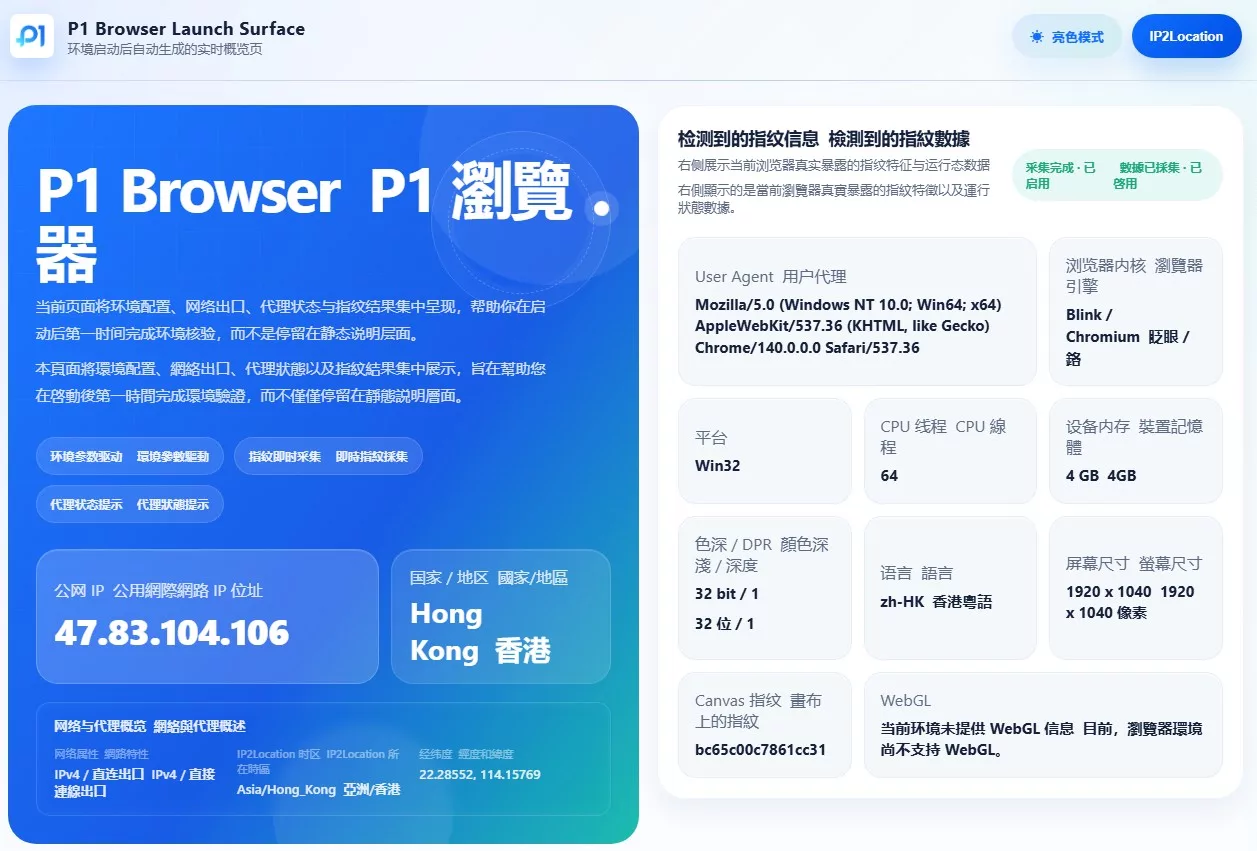
P1Browser is a powerful tool that can create multiple independent browsing environments and support simultaneous logins to multiple P1Browser accounts. Each environment can be customized according to parameters such as IP address, user agent, time zone, and screen resolution, ensuring that accounts remain isolated from one another and reducing the risk of detection by platforms.
With P1Browser, you can create an independent operating environment for each account, eliminating the interference and security concerns caused by sharing login credentials. This method is particularly suitable for teams and businesses that need to manage multiple accounts, without worrying about account bans or information leaks.
For example, in P1Browser, you can create a new browsing environment, log in to a ChatGPT account, and then assign team members permission to use that profile. Each member can open P1Browser on their own device and securely connect to and use the shared P1Browser account without exposing login credentials at any point.
To make the simulated environment more closely resemble that of a typical user and eliminate signs of abnormal activity, it is recommended to use BrowserScan after configuring P1Browser. BrowserScan can detect whether the environment contains abnormal fingerprints or inconsistent parameters, further improving security and stability.
P1Browser
Enable multi-user access through the ChatGPT API
For businesses and developers, the P1Browser API can be used to integrate the service into their own applications or workflows. With just a single API key, multiple users can connect and use the service without sharing personal account credentials.
Conclusion
As P1Browser becomes increasingly popular among individuals and teams, the need to share accounts is also growing, but it brings potential compliance and security risks. When sharing a P1Browser account, finding the right balance between security, cost, and compliance is the top priority. We hope this comprehensive guide provides practical advice, helping you fully realize the value of P1Browser while avoiding unnecessary risks and losses.
Frequently Asked Questions
Will my ChatGPT Plus account be banned if I share it?
Yes. Account-sharing practices that violate OpenAI's Terms of Service may result in the account being suspended or permanently disabled. Be sure to comply with the platform's rules regarding account sharing.
What is the safest way to share a ChatGPT Plus account?
Use a password manager, enable two-factor authentication, share only with people you trust, and monitor account activity regularly. You can also use the P1Browser anti-detect browser to further strengthen overall security.
What should I do if I discover unauthorized access to my account?
As soon as you notice unusual access, change your password immediately, confirm that two-factor authentication is enabled, and carefully review your login history. If necessary, you can also contact OpenAI Support for assistance.

