



Introduction: The New Landscape of Cross-Border Risk Control in 2026—Traditional Methods Have Completely Failed
In 2026, the risk control systems of mainstream platforms such as Amazon, TikTok, and Facebook have been fully upgraded to50+ dimensional fingerprint recognition + AI behavior modelingsmart review mechanisms. The basic anti-association approach traditionally used in the industry—“clearing the cache + changing the IP”—now has a recognition success rate of less than 30%, and the account suspension rate for cross-border sellers and social media operators has risen sharply year over year. Traditional operational thinking can no longer adapt to the new risk control rules.
Core Highlights: P1Browser is equipped with a self-developed sandbox kernel and AI biometric fingerprinting technology, achievinghardware-level environment isolation + real-person behavior simulation..., fundamentally disrupting platform risk-control decision-making logic, it is the core security tool for multi-account matrix operations targeting overseas markets in 2026.
I. Upgrade in Understanding: The Core Value of the P1Browser Fingerprint Browser (A New Interpretation for 2026)
1.1 Core Positioning: Not Merely a Multi-Instance Tool, but a Professional Virtual Device Simulator
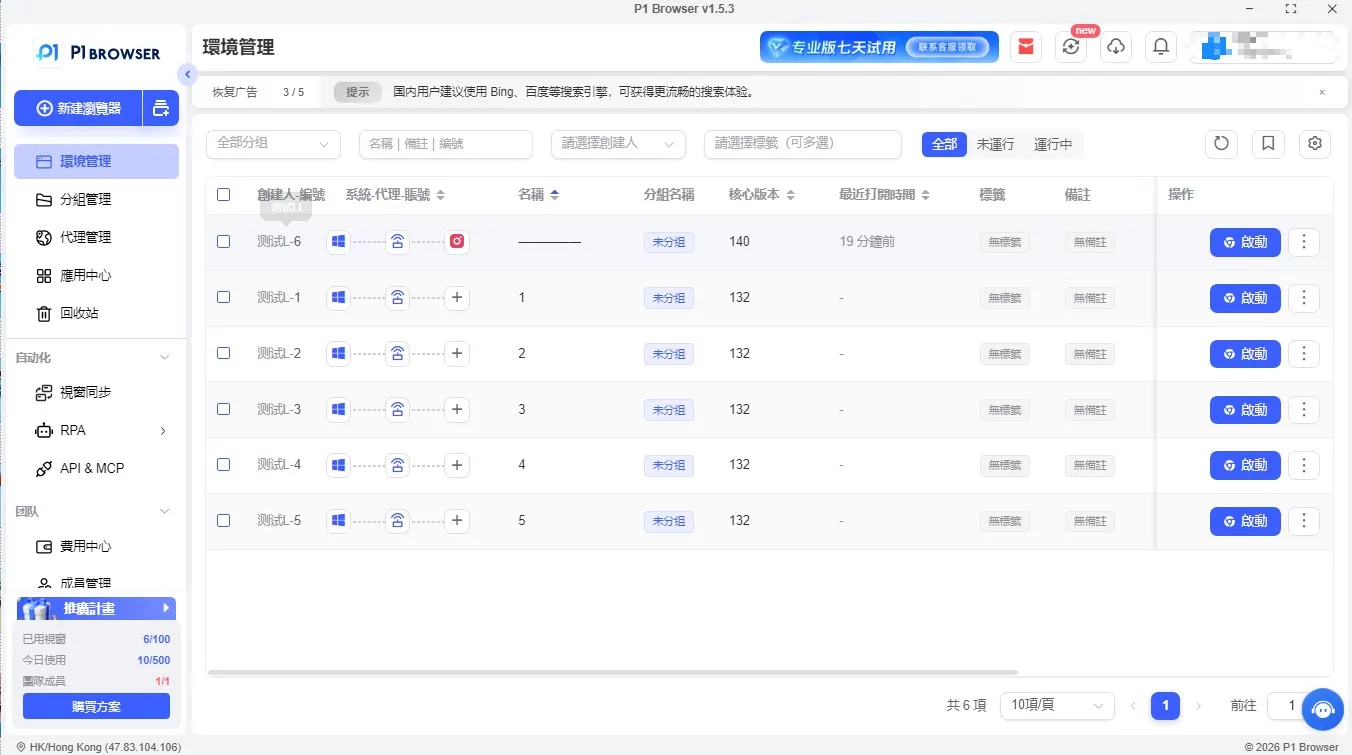
Through independent sandbox virtualization technology, P1Browser generates dozens or even hundreds of sets ofcompletely isolated and mutually non-interferingvirtual browsing environments within a single physical device. Each environment has its own complete device parameters and browsing fingerprint. The platform backend identifies them as real devices from different regions, with different models and different usage patterns, fundamentally severing the association links between accounts and preventing arbitrary bans and traffic restrictions.
1.2 Competitive Advantages of the 2026 Browser Engine (Distinct from Ordinary Fingerprint Browsers on the Market)
-
Proprietary Browser Engine with Anti-Penetration Protection:Built on the in-depth optimization of a customized Chromium engine, it effectively blocks emerging risk-control detection methods such as WebRTC real IP leakage, Canvas fingerprint penetration, and hidden parameter tracing, eliminating the risk of exposing underlying parameters.
-
AI Fingerprint Logical Consistency:It abandons the industry's low-end practice of randomly piecing together parameters and intelligently generates matched parameters that conform to real device patterns. For example, Windows systems are paired with dedicated GPU models, while regional time zones are matched with corresponding language environments, completely resolving abnormal flagging caused by conflicting parameters.
-
One-Click Environment Cloning and Synchronization: Supports compliant replication of mature, stable account-operation environments, fully synchronizing configurations such as fingerprints, proxies, cache, and Cookie settings, substantially reducing the cost of setting up multi-account environments and improving operational efficiency.
-
Team-level permission control: Equipped with a professional RBAC role-permission system, it enables the isolation of multi-level permissions for operations, reviews, and management. When an employee leaves, environment permissions can be revoked with one click, ensuring the security of team account assets.
Pitfall Avoidance Guide: Five Common High-Frequency Anti-Association Misconceptions in 2026 (Primary Causes of Account Bans)
2.1 Misconception One: Changing only the IP while ignoring fingerprint parameter consistency
Incorrect approach: Multiple groups of accounts share the same browsing environment, with only the proxy IP being switched. The platform can easily identify device associations through more than 20 hidden fingerprint attributes, including Canvas, WebGL, font lists, and hardware information.
Correct solution: Follow P1Browser’s core principle of “one account, one environment.” Each operating environment independently generates a dedicated fingerprint, with the IP and device fingerprint permanently bound throughout the process, without cross-use or mixing.
2.2 Misconception two: Blindly randomizing parameters, causing fingerprint logic conflicts
Incorrect approach: Using low-end tools to randomly generate parameters can produce logical contradictions such as “macOS paired with an Android GPU” and “a Chinese time zone paired with an English system language,” leading AI risk control systems to identify the device as fabricated and the account as a high-risk anomaly.
Correct approach:Through P1Browser’s AI-powered fingerprinting system, automatically match the geographic location, time zone, language, and device model corresponding to the IP, ensuring that all hardware and software parametersform a logically complete loop and align with real user habits。
2.3 Misconception Three: Mixing IPs Arbitrarily and Ignoring ASN and IP Attribute Checks
Incorrect practice:Using data center IPs or shared IPs over an extended period, or switching between multiple groups of IPs within the same Autonomous System Number range, allows platforms to directly identify coordinated operations through IP databases and range data.
Correct approach:Prioritize high-purity static residential IPs, followed by stable, clean data center IPs; P1Browser supports IP activity trail tracing and can proactively filter out risky IPs that have been flagged or downgraded. Each environment is independently bound to a dedicated IP, without frequent arbitrary switching.
2.4 Misconception Four: Operational Patterns Becoming Formulaic and Triggering AI Behavioral Risk Controls
Incorrect practice:Having multiple accounts log in in batches at fixed times, follow exactly the same operating steps, and remain on pages for identical durations creates highly mechanical activity patterns that AI risk controls can easily identify as coordinated batch operations.
Correct approachEnable P1Browser’s built-in human behavior simulation, randomizing login times, mouse movements, page browsing durations, and clicking rhythms to completely eliminate traces of mechanical operation.
2.5 Pitfall Five: Shared team environments and cross-contamination of data
Incorrect practice: Multiple people share the same set of browsing environments, leaving Cookies, browsing caches, and browsing history cross-contaminated, creating hidden associations and even posing a risk of information leakage.
Correct approach: Use P1Browser Team Edition to achieve independent environment isolation and operation log auditing. Each member can access only authorized environments, and all operations are logged throughout the process, making them searchable and traceable.
III. Practical Tutorial: The Complete P1Browser Process from Installation to Secure Operation (2026 Latest Version)
3.1 Step One: Official Installation and Primary Account Activation (Security Fundamentals)
1. Visit the official P1Browser website and download the appropriate genuine Windows or macOS installer according to your computer’s operating system. Reject third-party modified installation packages to avoid the risk of malicious program implantation.
2. When registering the primary account, use a dedicated email address, set a high-strength password, and enable two-factor authentication to protect backend management permissions and the security of environment assets.
3. Select the appropriate version based on your individual, small-team, or enterprise scale to match the required number of isolated environments and team permission features.
3.2 Step Two: Create a Standard Secure Environment (Determines Long-Term Account Stability)
3.2.1 Basic Parameter Configuration (Required, Zero-Error Standard)
Name environments according to the “Platform-Region-Account Attributes” convention for easier classification and management later; for mainstream cross-border and social media platforms, prioritize customized Chromium-based engines to ensure compatibility and security; select “AI Smart Generation” for fingerprint generation, with no need to manually adjust parameters, eliminating human error.
3.2.2 Proxy IP Configuration (Key to Preventing Association)
1. Go to the proxy settings interface and prioritize static residential IPs, which offer the highest stability and security and are suitable for long-term account management; clean data center IPs can be used as a supplementary option.
2. Enter the correct IP address, connection port, and authentication information, then complete the connectivity test to ensure that the IP is clean and has no history of policy violation flags.
3. Enable the “Bind Environment to IP” function. Keep each environment permanently associated with a single IP without switching arbitrarily to maintain stable device logins.
3.2.3 Advanced Fingerprint Optimization (Advanced Protection Added in 2026)
Enable automatic geolocation matching so that the time zone, system language, regional parameters, and IP location correspond exactly; enable light noise optimization for Canvas and WebGL to generate a unique rendering fingerprint; disable the WebRTC channel for leaking real information to completely isolate the actual device information on the local machine; randomly generate natural-looking resolution and system font parameters to recreate the state of a real user device.
3.3 Step Three: Launch the Environment and Log In to the Account (Compliant Operation Standards)
1. After saving the parameters, launch the independent isolated window and confirm that the environment parameters have loaded properly and the proxy connection is stable.
2. Avoid frequent actions when logging in to the account for the first time. First simulate a real person browsing the page for several minutes, then log in to reduce risk-control alerts.
3. After the new account login becomes stable, do not casually change the password, binding information, or personal data in the short term. After steadily maintaining the account for one to two weeks, gradually complete the content.
3.4 Step Four: Multi-Environment Grouping and Team Permission Management
Group and categorize environments by e-commerce platforms and social media platforms to facilitate quick switching and management. Team administrators can assign operating permissions according to job responsibilities, strictly distinguishing configuration rights, usage rights, and review rights. Keep operation logs enabled over the long term, regularly review abnormal operations, and promptly mitigate risks.
Advanced Anti-Association Strategies for 2026: Tools + Standards for Building an All-Around Security System
4.1 Completely Independent Account Data to Eliminate Soft Associations
Equip each group of operating accounts with an independent email address, independent personal data, independent payment collection information, and independent binding information. Ensure that all registration and backend data is not duplicated or cross-linked, completely avoiding hidden associations caused by platforms comparing backend data.
4.2 Differentiate Operating Behaviors to Counter AI Group-Control Detection
Stagger the login times of each account to avoid going online in concentrated periods; vary the daily operation duration, browsing paths, and interaction rhythms; differentiate store content, post copy, and product information to prevent batch flagging caused by homogenized content.
4.3 Regularly Maintain the Environment for Long-Term, Stable Account Management
Regularly clear excess cache and residual Cookies from the environment to prevent data accumulation; periodically update fingerprint parameters to keep the device state fresh while maintaining logical stability; regularly check proxy IP status, promptly replace unstable or low-quality IPs, and maintain long-term account security.
Five. Frequently Asked Questions in 2026
Q1: Which overseas platforms is P1Browser suitable for?
Fully compatible with Amazon, TikTok, Facebook, Instagram, Shopee, Lazada, and other major e-commerce and social platforms worldwide, covering the vast majority of overseas business operation scenarios.
Q2: Is it necessary to use an additional proxy IP?
The Personal and Professional versions can be paired with high-quality residential proxy IPs independently; the Enterprise version can connect to officially partnered clean IP resources and match stable nodes with one click, without complicated separate configuration.
Q3: Can the environment of a banned account be reused?
Direct reuse is not recommended. The environment of a banned account may retain risk-control markers. It must undergo a complete fingerprint reset, be assigned a brand-new proxy, and have all environment data cleared before it can be used for a new account, effectively reducing the risk of association.
Conclusion: For overseas operations in 2026, security is the core competitive advantage
Platform risk control will only become increasingly rigorous, and a mindset of counting on luck is the biggest hidden risk in multi-account operations. Under the brand-new AI risk-control system in 2026, onlyunderlying technical protection + standardized operating procedurescan enable long-term, stable, and compliant multi-account matrix operations.
Core Summary: P1Browser addresses account-association challenges at the device-foundation level through its self-developed sandbox kernel and AI biomimetic fingerprint technology, giving every group of overseas accounts an independent, authentic, and stable device identity, and becoming an essential secure operations tool for overseas teams in 2026.

