



For cross-border sellers, email is more than just a tool for sending and receiving everyday messages. During overseas business operations, a stable email account system often supports multiple important functions, including account registration, business communication, customer contact, platform verification, and team collaboration.
Whether registering an Amazon seller account, creating a TikTok Shop account, or managing Instagram and Facebook advertising accounts, email is involved in nearly every stage of the overseas business process.
At the beginning of their operations, many sellers may only need a personal email account to meet their needs. However, as the brand grows and the team begins handling different markets, platforms, and business functions, the number of email accounts can increase rapidly.
For example, a cross-border team may need:
- Official brand email address, used for contacting overseas customers
- Advertising operations email address, used to manage promotional accounts
- Platform registration email address, used to link different business accounts
- Customer service email, used to handle after-sales issues
- Individual work email addresses for team members, used for internal collaboration
When one email address becomes multiple accounts, new issues arise as well: How should email addresses be created properly? How should different accounts be managed? How can confusion during multi-person collaboration be avoided?
As an important email service under Microsoft, Outlook is widely used by overseas businesses and cross-border teams thanks to its stability, enterprise collaboration capabilities, and integration with the Microsoft ecosystem.
Based on the practical needs of cross-border operations, this article provides a detailed overview of the Outlook email registration process, account management methods, and the issues that enterprise teams need to pay attention to in multi-email environments.
I. Why are more and more cross-border sellers choosing Outlook email?
For many cross-border businesses, email is an important piece of infrastructure connecting them with overseas markets.
In the past, some sellers may have focused only on sales platforms themselves, such as Amazon, eBay, or independent websites, while overlooking the role of email in the overall business system.
In reality, however, many key operations in overseas business need to be completed through email.
For example:
When registering accounts on overseas platforms, email is required to receive verification information; when an advertising account triggers a security alert, email is needed to view the notification; and when communicating with overseas customers, a professional corporate email presence is also necessary.
Therefore, a stable and reliable email system is very important for the long-term operation of overseas business.
Outlook is more than just an email service; it is also an important gateway to the Microsoft ecosystem.
One of Outlook’s biggest strengths is its deep integration with the Microsoft ecosystem.
In addition to basic email functionality, Outlook can connect with Microsoft’s office services, such as calendars, file collaboration, and enterprise productivity tools.
For cross-border teams, this ecosystem advantage means that email is not merely a way to communicate, but can also become part of the company’s internal collaboration system.
For example, an overseas operations team can use different email accounts to manage different areas of the business:
- The marketing department handles overseas promotion and communications
- The sales team manages customer contacts
- The operations team manages platform accounts
- The customer service team handles after-sales support
Clearly defining the purpose of each email account can make internal business management more organized.
II. Practical applications of Outlook email in overseas business
When registering email accounts, many cross-border sellers focus only on whether they can receive verification codes. In reality, however, email plays a far more extensive role in overseas business than they might imagine.
As a business grows, a single email account often takes on multiple roles, so businesses need to plan their email structure appropriately based on their business needs.
1. Used to register for and manage overseas platform accounts
When entering overseas markets, cross-border sellers need to register on numerous different platforms.
For example:
- E-commerce sales platforms
- Social media accounts
- Advertising platforms
- Data analytics tools
- Business service platforms
These platforms typically require an email address to be linked for account verification, security alerts, and ongoing management.
Therefore, a well-structured email system can help businesses better distinguish between accounts for different business purposes and avoid management confusion later on.
2. Used to communicate with overseas customers
For brands targeting overseas markets, email is also an important channel for building a professional image.
Compared with a personal email address, a more standardized email name is more likely to inspire trust among overseas customers.
For example:
support@品牌名.com
sales@品牌名.com
marketing@品牌名.com
These email addresses help customers quickly understand whom they are contacting, improving communication efficiency.
3. For Internal Team Collaboration
As a business grows, email management is no longer just an individual concern; it becomes a team collaboration issue.
Different employees are responsible for different markets and business areas, so they need to clearly know:
- Which email address corresponds to which platform
- Which team member is responsible for maintaining it
- Which email addresses are used for advertising operations
- Which email addresses are used for customer service
Establishing a clear email system can reduce team operating costs.
How to Register an Outlook Email Account?
Registering an Outlook email account is not complicated, but for cross-border sellers, it is more important to plan the account properly during the initial registration process.
Many users simply create email names at random, only to discover that their email categories are confusing and difficult to manage after the business expands.
Therefore, it is recommended to clarify the purpose of the email before starting the registration process.
First, determine the purpose of the email and plan the account structure, then create an independent email environment
Before creating an email account, you can first categorize your accounts according to your business needs.
For example:
- Brand operations email
- Advertising email
- Customer service email
- Marketing email
Planning your email usage in advance can help prevent a large number of accounts from becoming mixed together later.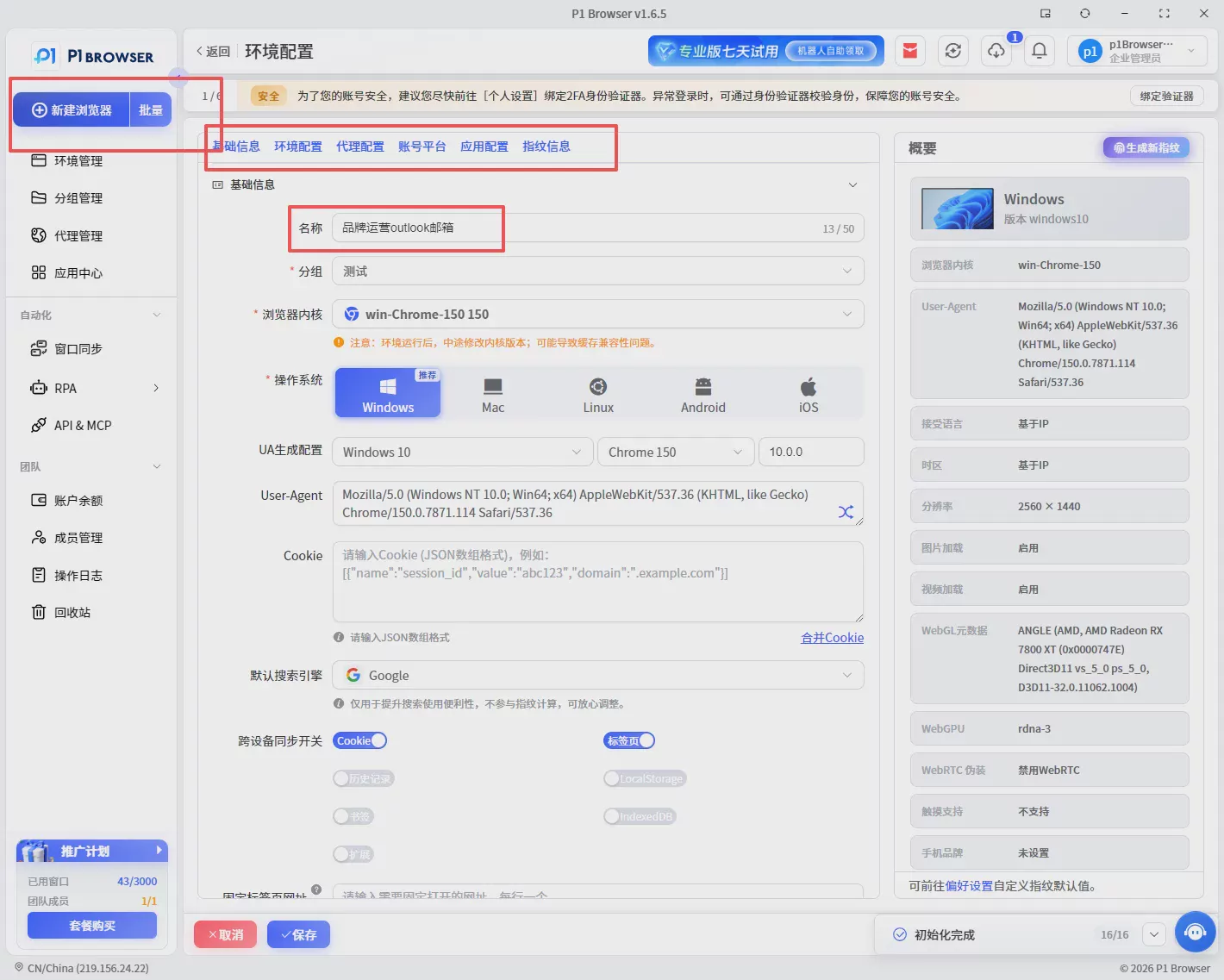
The second step: Create an Outlook account
After entering the Outlook registration page, select the option to create a new email account.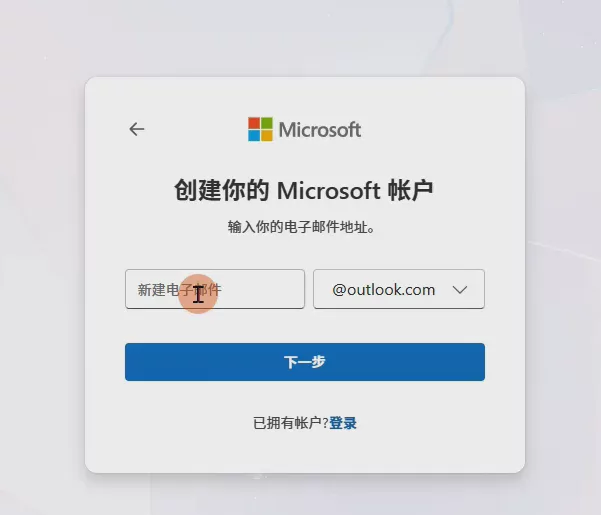
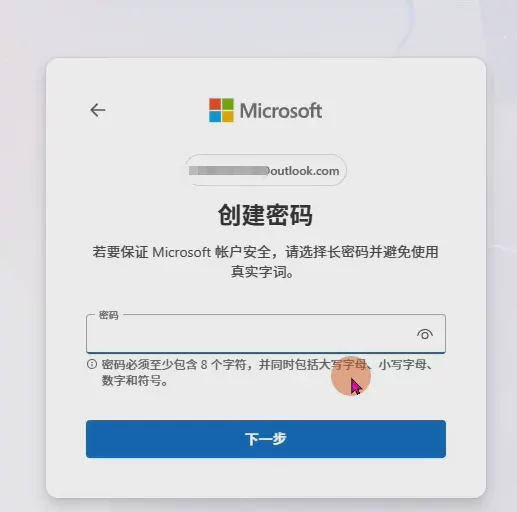
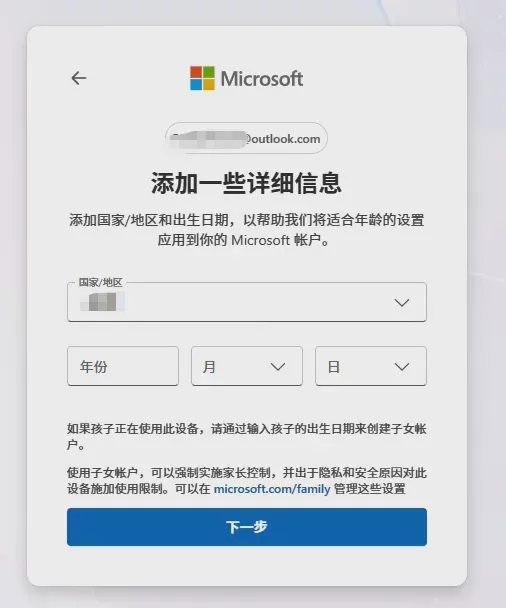
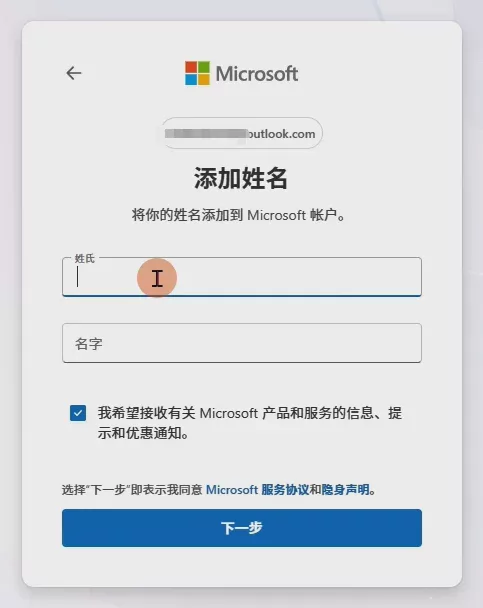
Users need to set an email address, password, and relevant security information.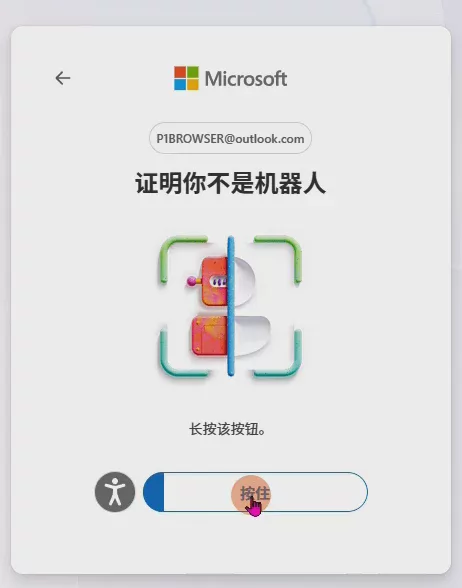
Prove that you are not a robot
Your email account is now registered! When choosing an email address, avoid using random strings of characters without any discernible pattern. Instead, plan it around your brand, business, or position.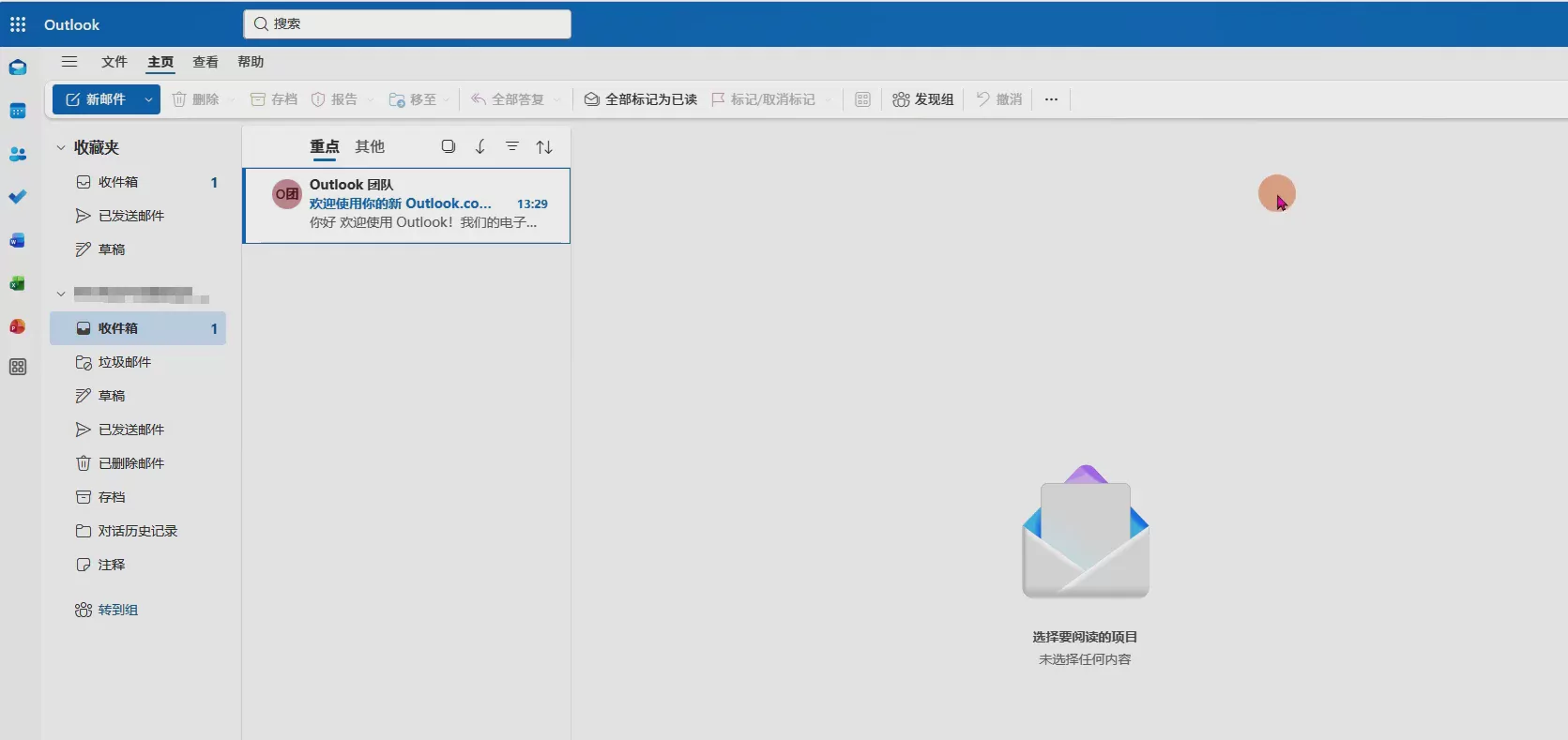
Third Step: Complete Account Verification and Basic Settings
After completing registration, follow the on-screen prompts to complete the verification process.
It is also recommended that you promptly improve your account security settings, such as setting up recovery methods and checking your account information.
These basic settings can help with the long-term management of your email account.
What should you pay attention to when registering an Outlook email account?
Although the Outlook email registration process is relatively simple, for cross-border sellers, the real concern is not “how to complete the registration,” but how to ensure that the email account can provide stable, long-term support for overseas business operations.
Many account management issues do not arise during registration but gradually develop during subsequent use. For example, unclear email purposes, shared accounts, and unclear account associations across different business operations can all increase team management costs.
1. It is not recommended to create email accounts without proper planning
When registering an email account, many individual users usually consider only their current needs and simply choose a name at random.
For cross-border teams, however, email accounts are often used over the long term. Without proper planning from the beginning, a large number of irregularly named accounts can easily accumulate later.
For example:
- Not knowing which email corresponds to which platform
- Being unable to determine who is responsible for an account
- Difficulty handing over accounts after an employee leaves
- Reorganizing the setup after the business has expanded can be costly.
Therefore, when creating email addresses, it is recommended to organize them by brand, market, or business type.
2. Keep email purposes clearly separated
In cross-border business, different email addresses typically serve different functions.
For example, a brand may have:
- Brand email: for official external communications
- Advertising email: for managing promotional accounts
- Customer service email: for handling customer inquiries
- Operations email: for managing platform accounts
If all business activities are concentrated in a single email account, it can easily lead to information overload and make team collaboration more difficult.
3. Pay attention to email security and long-term maintenance
As email is an important gateway to many overseas accounts, its security is extremely important.
Once an email issue occurs, it may affect the platform accounts linked to it, advertising accounts, and business communications.
Therefore, when using email, enterprises need to establish basic management practices:
- Regularly check account security settings
- Save important account information
- Assign a person responsible for the email account
- Establish account management records
For teams operating overseas businesses over the long term, email management should be planned in the same way as managing corporate assets.
五、Why do cross-border teams need to manage multiple Outlook email accounts?
When a cross-border business is in its early stages, one email account may already meet its needs.
However, as the market expands, enterprises typically gradually develop a more complex account structure.
For example, a brand operating in both the European and American markets may need separate teams or accounts responsible for:
- US market operations
- European market operations
- Advertising and promotion team
- Customer service team
- Supply chain communications team
Each department and market may require a separate email address for management.
This approach enables clearer division of responsibilities within the company and facilitates future business expansion.
Multiple email addresses can help companies separate their business operations.
For large cross-border teams, consolidating all business operations into a single email address is not the best choice.
For example, the email address used by the advertising team may primarily receive notifications from advertising platforms, while the customer service email address is mainly used to handle customer inquiries.
Managing email addresses independently based on their different purposes can reduce information interference and improve work efficiency.
Different markets require different operational systems.
Overseas markets are not exactly the same.
The US market, European market, and Asian market all differ in terms of consumer habits, marketing methods, and business processes.
Therefore, many businesses establish different email systems based on the market.
In this way, teams can manage different business operations more clearly.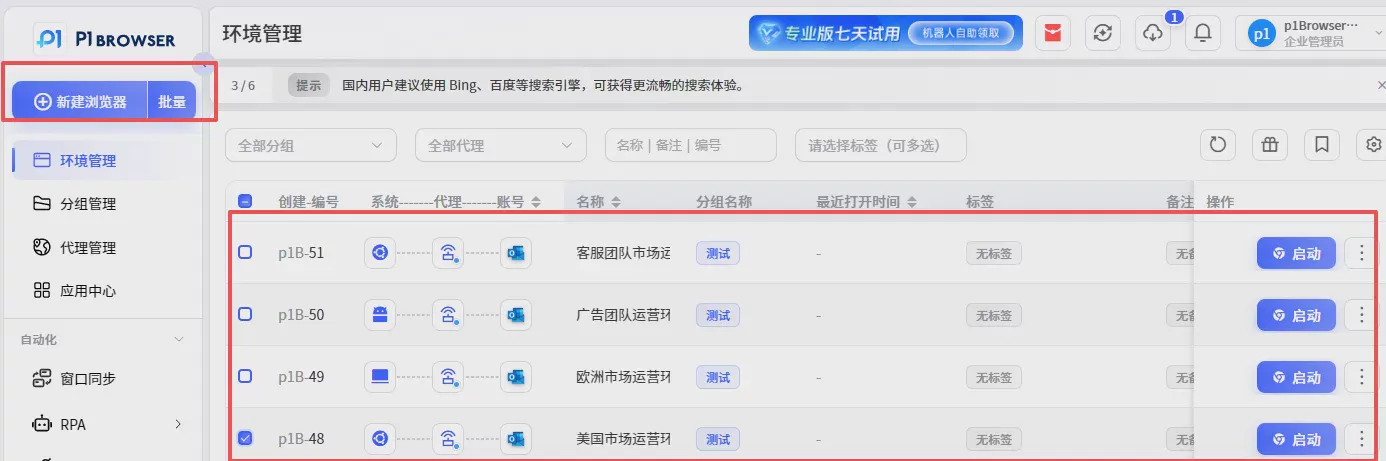
VI. Common Management Challenges in Multi-Email Operations
Having multiple email accounts does not necessarily mean improved management efficiency.
Without a reasonable management approach, increasing the number of email accounts may instead lead to more problems.
1. Operational confusion caused by frequently switching between multiple email accounts
When many teams initially manage multiple email accounts, they log in to different accounts directly in the same browser.
This method may seem convenient in the short term, but problems gradually emerge as the number of accounts increases.
For example:
- Login statuses for different email accounts get mixed together
- Frequent sign-outs and sign-ins are required
- It is easy to perform actions in the wrong account
For teams that need to handle a large volume of overseas business every day, this repetitive process can significantly reduce efficiency.
2. Account permissions are difficult to manage when multiple people collaborate
Cross-border companies typically do not have a single person managing all email accounts.
Marketing staff, advertising staff, and customer service staff may each be responsible for different email accounts.
Without a clear management approach, the following issues can easily arise:
- It is unclear who is responsible for each account
- Activity records are difficult to track
- Handover processes are complicated
Companies need to establish a more standardized account management system rather than relying on individuals' memories to maintain it.
3. Overseas Business Growth Leads to a Rapid Increase in the Number of Accounts
Many sellers continually add new accounts when entering new markets.
For example:
Entering the US market requires a new business email address; entering the European market requires a new local operations email address; and adding a new product line requires another team email address.
Over time, the number of email accounts may grow from a few to dozens or even more.
Without establishing a management system in advance, the cost of organizing them later will continue to increase.
Seven. How Can the P1 Fingerprint Browser Help Businesses Manage Their Overseas Email Environments?
For cross-border teams, the core challenge of email management is not the number of accounts registered, but how to maintain a clear and orderly operating environment for different accounts.
By creating independent browser environments, the P1 Fingerprint Browser helps businesses manage different email accounts by category, enabling teams to handle overseas business more efficiently.
Compared with logging in to multiple email accounts within the same browser environment, independent browser environments can help businesses reduce the management pressure caused by switching between accounts.
Create an Independent Environment for Each Email Account
For example, a cross-border team has multiple business email accounts: each email account has a corresponding browsing environment, and team members can enter the appropriate environment to perform operations based on business needs.
Improve team management efficiency
For teams working collaboratively, a clear account management approach is essential.
With P1, businesses can create separate browsing environments for different operations, making each team member’s responsibilities clearer.
For example:
- The advertising team manages email accounts related to promotions
- The customer service team handles email accounts for customer communications
- The operations team maintains email accounts for platform accounts
This approach helps businesses establish a more standardized process for managing overseas accounts.
Help businesses establish a long-term email management system
For cross-border businesses, email accounts are not one-time-use tools, but part of their long-term business assets.
As the business grows, companies need to continually add new markets, platforms, and team members. Without a stable management approach, it is easy for things to become disorganized as the number of accounts increases.
The P1 fingerprint browser can help businesses categorize and manage different email accounts, making account environments clearer and facilitating future expansion.
For example, after a cross-border brand expands from a single market into multiple national markets, it can establish corresponding browser environments based on different business functions:
- U.S. market operations environment
- European market operations environment
- Advertising team management environment
- Customer service team work environment
In this way, businesses can gradually establish standardized overseas account management processes instead of relying on individual experience for maintenance.
How to Establish a More Efficient Overseas Email Management Process?
For cross-border sellers, registering an email account is only the first step; the subsequent management approach is what truly affects long-term operational efficiency.
A mature overseas business team typically needs to focus on multiple aspects, including email planning, account categorization, personnel collaboration, and security management.
Plan email categorization in advance to avoid confusion later
Many companies do not consider building an email system during the early stages of their business and typically register accounts temporarily whenever the need arises.
Although this approach is convenient in the short term, as the business grows and the number of email accounts increases, management costs can rise rapidly.
A more practical approach is to plan this at the outset of the business.
For example, create email categories based on different purposes:
- Brand email: responsible for external brand communications
- Operations email: responsible for platform account management
- Advertising email: responsible for business related to promotional accounts
- Customer service email: responsible for customer service
Clearly defining the purpose of each email allows team members to quickly find the corresponding account and improves overall work efficiency.
Establish an account record and permission management system
As the number of email accounts increases, managing them solely by memory is no longer sufficient for a business.
The team needs to establish clear records, including:
- Email purpose
- Person responsible
- Associated business
- Creation time
- Usage status
This allows the team to complete account handovers quickly, even when team members change.
Use the Right Tools to Improve Team Collaboration Efficiency
As cross-border business becomes increasingly complex, relying solely on manual account management can no longer meet business needs.
Businesses need to use more professional tools to manage different account environments by category and improve day-to-day operational efficiency.
Teams managing multiple overseas platform accounts, multiple email accounts, and business operations across multiple markets in particular need to establish a stable account management system.
Summary: Outlook Email Is an Important Foundation for Cross-Border Business Operations
For cross-border sellers, email may seem like a basic tool, but it actually runs through multiple aspects of overseas business operations.
From registering accounts on overseas platforms and receiving business notifications to communicating with customers and collaborating with team members, a stable and well-organized email system can help businesses reduce repetitive work in their operations and improve overall efficiency.
As cross-border business continues to expand, businesses need to manage not just one email account, but an entire overseas account system.
How to properly plan email accounts, improve team collaboration efficiency, and manage multiple account environments will all affect the long-term stability of an enterprise.
P1 fingerprint browser helps cross-border businesses manage overseas accounts more efficiently through independent browser environment management, multi-account categorization, and team collaboration capabilities, providing more stable foundational support for global brand operations.
For businesses expanding into overseas markets, establishing standardized account management practices in advance can not only improve current operational efficiency but also lay the groundwork for future business growth.

