



Snapchat has become one of the most popular social media platforms worldwide, particularly among young users in the United States, Canada, the United Kingdom, Australia, and Europe. Today, it is not only a platform for chatting and sharing photos, but has also gradually evolved into an important channel for brand marketing, cross-border e-commerce promotion, content creation, and affiliate marketing.
As more and more businesses and individuals begin establishing a presence on overseas social media, many operators encounter the same question:Can I have multiple Snapchat accounts? If so, how should I manage these accounts safely and efficiently?
In fact, whether you are a content creator, a cross-border e-commerce business, or a social media marketing agency, it is difficult for a single Snapchat account to meet all your business needs. Different brands, different products, different national markets, and even different client projects may require separate Snapchat accounts for operation.
However, creating multiple accounts is only the beginning.
The real challenge lies in managing these accounts, improving operational efficiency, and making team collaboration more standardized.
This article provides a detailed overview of Snapchat multi-account management from multiple perspectives, including account creation, switching methods, usage across different devices, common issues encountered when operating multiple accounts, and the management solutions typically adopted by professional teams. We hope it will help you establish a more efficient Snapchat multi-account operation system.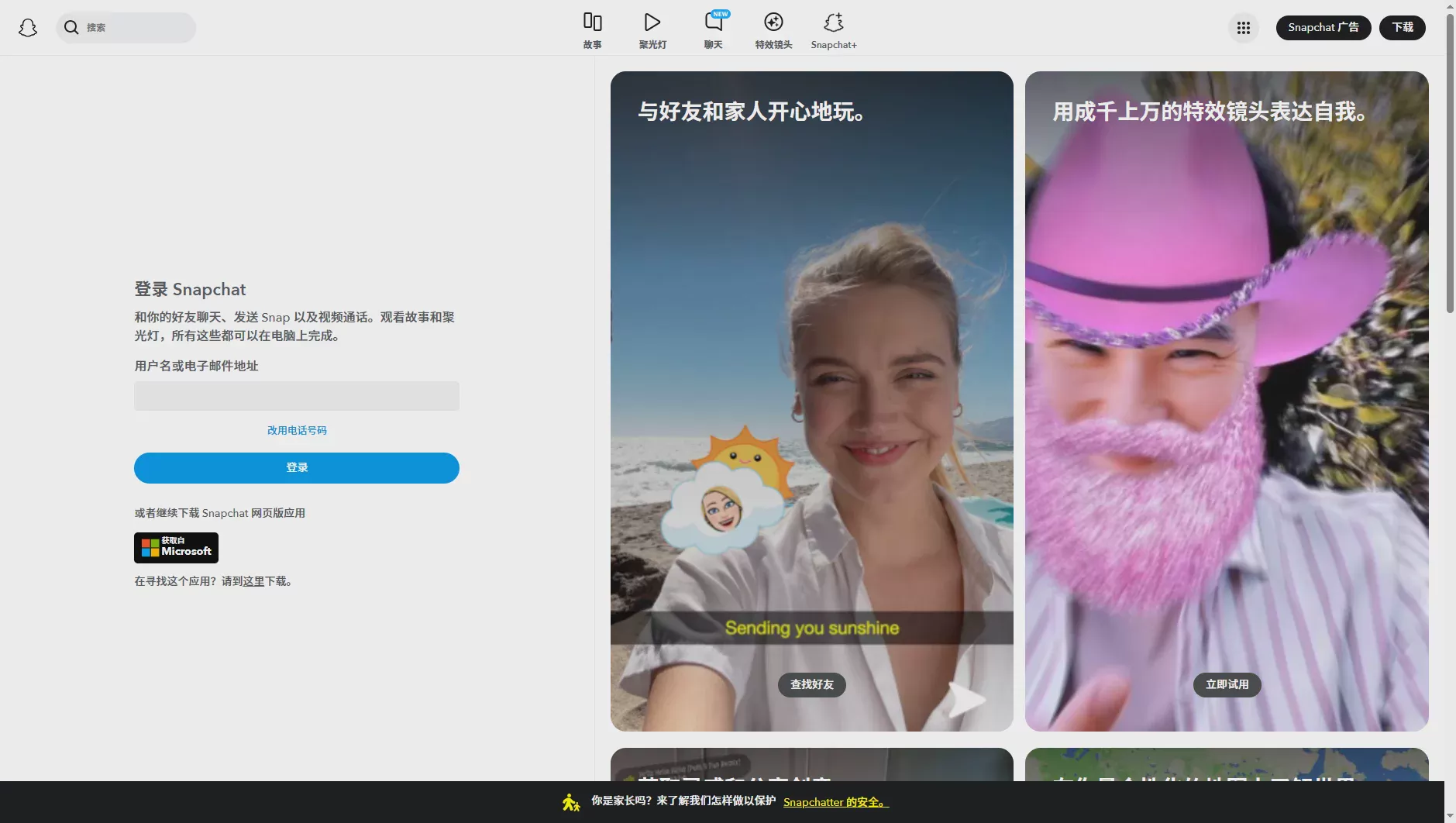
I. Can You Have Multiple Snapchat Accounts?
The answer isyes.
Snapchat has not officially stated that one person can only have one account, so users can create multiple Snapchat accounts according to their needs. However, it is important to note that having multiple accounts does not mean you can ignore the platform’s rules. All accounts must still comply with Snapchat’s Community Guidelines and Terms of Service, avoiding spam marketing, false information, and other violations.
In practice, managing multiple Snapchat accounts has become a very common operating approach.
For example, a cross-border seller may create separate Snapchat accounts for different brands; a marketing agency may manage dozens of client accounts at the same time; and content creators may separate their personal lives from their commercial content to build a clearer brand image.
For ordinary users, one account is usually enough; but for business users, multiple accounts can enable more flexible operating strategies. For example:
- Different accounts are responsible for different brands.
- Different accounts correspond to different national markets.
- Different accounts are used to test different content directions.
- Different accounts serve different client projects.
- Different accounts are used for advertising campaigns and organic content operations.
This approach not only improves operational efficiency but also helps teams plan their content and marketing strategies more clearly.
However, as the number of accounts gradually increases, simply being able to create multiple accounts is far from sufficient. Operators must also consider account categorization, login environments, team permissions, content planning, and long-term maintenance; otherwise, disorganized management can easily reduce overall operational efficiency.
Creating multiple Snapchat accounts is not difficult. The real challenge is how to manage these accounts efficiently and systematically over the long term.
Why Are More and More People Starting to Operate Multiple Snapchat Accounts?
As overseas social media marketing continues to develop, operating multiple accounts has become a common choice for an increasing number of businesses and individuals.
In the past, most users only needed one Snapchat account for daily chats and sharing their lives. Today, however, Snapchat has become an important channel for brand communication, product promotion, private-domain operations, and user growth. Different business scenarios often require different account positioning, so it is difficult for one account to cover all needs.
Below, let’s look at why professional operations teams tend to use multiple Snapchat accounts.
1. Separating Personal Life from Business Operations
For most users, a single Snapchat account for every situation may seem sufficient. However, once individuals begin managing a brand, selling products, or building a personal brand, continuing to mix private life and business content in the same posts often creates a number of problems.
For example, your friends may prefer seeing your travel photos rather than daily product promotions; conversely, users who follow your brand may not necessarily want to see a large amount of content about your private life. As the account’s focus becomes increasingly unclear, content engagement rates are also usually affected.
Therefore, many creators choose to separate their accounts, for example:
| Account Type | Primary Purpose |
|---|---|
| Personal Account | Sharing everyday life, interacting with friends, and private socializing |
| Brand Account | Product promotion, brand marketing, and official announcements |
| Creator Account | Publishing professional content and building personal influence |
| Marketing Account | Campaign promotion, traffic acquisition, and ad testing |
This approach gives each account a clearer positioning and makes it easier to attract the corresponding target audience.
2. Managing multiple brands or clients
For social media marketing companies, one operator may need to manage multiple clients simultaneously.
If all clients use the same Snapchat account, content management will become confusing, and it will also be impossible to establish an independent brand identity.
Therefore, most marketing teams adopt an "one brand, one account" management approach.
For example:
- Client A uses an independent account.
- Client B uses an independent account.
- Client C uses an independent account.
- Client D uses an independent account.
This not only facilitates content planning but also makes it easier for team members to divide tasks and collaborate.
3. Test Different Content Strategies
No marketer can guarantee that the content they publish the first time will achieve the desired results.
Truly mature international social media teams constantly test:
- Different content styles.
- Different publishing times.
- Different target audiences.
- Different brand positioning.
- Different marketing campaigns.
Multiple Snapchat accounts can help marketers conduct A/B Testing (A/B testing) simultaneously and quickly identify the content strategy that is better suited to the target market.
For example:
- Account A primarily publishes product tutorials.
- Account B publishes brand stories.
- Account C shares a user case study.
- Account D posts a limited-time offer.
After analyzing the data for a period of time, the team can determine which content is more popular and further optimize the overall operational strategy.
4. Operate for Different Countries and Regions
Snapchat has different user groups in different countries.
Many cross-border brands create separate accounts for different markets, such as:
- The US market.
- The UK market.
- The Canadian market.
- The Australian market.
- The German market.
Different regions vary not only in language, but also significantly in user interests, cultural backgrounds, and consumption habits.
Independent accounts can help brands publish content that better meets the needs of local markets, improving overall operational performance.
III. What is the difference between multiple Snapchat accounts and a Public Profile?
Many users who are just starting to operate Snapchat often confuse a Public Profile with multiple accounts.
In fact, they are completely different concepts.
A Public Profile is a feature launched by Snapchat for creators and brands. It allows users to display content publicly, attract more followers, and gain more exposure opportunities.
However, a Public Profile does not create a new account.
In other words:
A Public Profile still belongs to the same Snapchat account.
If your goal is simply to:
- Increase brand exposure;
- Gain more followers;
- Publish public content;
Then Public Profile can already meet some of your needs.
But if your needs include:
- Managing multiple brands;
- Serving multiple clients;
- Differentiating between different businesses;
- Establishing different content matrices;
Then using Public Profile alone is far from sufficient, and you will still need multiple independent Snapchat accounts.
| Public Profile | Multiple Snapchat accounts |
|---|---|
| A public profile under one account | Multiple independent accounts |
| Suitable for brand presentation | Suitable for account-matrix operations |
| Unable to distinguish between businesses | Each account has its own distinct positioning |
| Suitable for individual creators | Suitable for enterprises, teams, and agencies |
Many enterprises use both at the same time.
For example, a brand may have multiple Snapchat accounts, with each account creating its own Public Profile to achieve better brand visibility.
How to Create Multiple Snapchat Accounts?
The process of creating multiple Snapchat accounts is not complicated and is essentially the same as registering an account for the first time.
However, before creating them, it is recommended that you plan the role each account will play in the future, rather than deciding how to use it after registration is complete.
First Step: Prepare Registration Information
Typically, you’ll need to prepare:
- An email address or phone number.
- A username.
- A password.
- Date of birth.
It’s recommended that you use easily distinguishable information for each account to make it easier to manage them later.
Second step: Complete the registration
Open the Snapchat app, tap Sign Up (Register)and follow the on-screen instructions to enter your information and complete verification.
Once registration is successful, a new Snapchat account has been created.
Step three: Complete your account profile
Don’t rush to start publishing content.
It is recommended to complete the following information first:
- Profile picture.
- Display name.
- Bio.
- Interest tags.
- Public profile.
A complete profile can enhance the account’s professionalism and make it easier to build a brand image later.
Step Four: Define the account’s positioning
This is one of the steps that many operators overlook most easily.
It is recommended to clarify the account’s future responsibilities before officially starting to operate it, for example:
| Account | Positioning |
|---|---|
| Account A | Brand Promotion |
| Account B | Content Marketing |
| Account C | Product Promotion |
| Account D | Market Testing |
Once the positioning is clearly defined, each account can have its own distinct direction and it becomes easier to develop a stable content matrix.
V. How to Switch Between Multiple Snapchat Accounts?

For users with only one Snapchat account, switching accounts is hardly an issue. But when the number of accounts increases to 3, 5, or even dozens, the way you log in and switch between accounts directly affects overall operational efficiency.
Currently, Snapchat does not provide a mature one-click multiple-account switching feature like some social platforms do. Therefore, most users still need to use the traditional method of logging in to different accounts.
Although this method can meet basic needs, it is not very efficient for teams managing multiple accounts over the long term.
Method One: Log out of the current account and log in again
This is the method used by the vast majority of Snapchat users.
The steps are as follows:
- Open Snapchat.
- Tap your profile avatar.
- Go to the Settings page.
- Scroll to the bottom and select Log Out (退出登录).
- Re-enter the information for another account.
If you only have two accounts and switch between them infrequently each day, this method is sufficient.
However, as the number of accounts increases, repeatedly entering account names, passwords, and verification information every day can consume a significant amount of time.
Method two: Log in to different accounts on different devices
Many operators use the "one device for one account" approach.
For example:
| Device | Account |
|---|---|
| iPhone | Brand account |
| Android phone | Content account |
| Tablet | Market testing account |
This approach can reduce the need to log in and out frequently, but as the number of accounts increases, the cost of devices also continues to rise.
For teams that need to manage more than a dozen or even dozens of accounts simultaneously, this is almost impractical.
Method three: Manage accounts separately using browser environments
For professional teams, a more common approach is to create an independent browsing environment for each account.
In this way, each account has its own browser configuration and data, eliminating the need to repeatedly log in and out every day.
Operators only need to open the corresponding environment to access the corresponding account directly, improving overall work efficiency.
Six. How to manage multiple Snapchat accounts on Android?
Android users have relatively more options.
In addition to traditional login methods, some Android phones also support App Clone or dual-app functionality.
For example, some phone brands offer:
- Dual apps.
- Parallel Space.
- Work Profile.
These features allow two Snapchat instances to be installed on the same phone at the same time, making it possible to log in to different accounts.
However, it is important to note that not all Android phones support these features, and the implementation varies between brands.
If you need to operate a large number of accounts over the long term, relying solely on dual apps is usually still insufficient.
VII. How can you manage multiple Snapchat accounts on iPhone?
Compared with Android, iPhone has stricter app management.
Currently, most iPhone users still need to:
- Log out of the current account;
- Log in to another account;
Or use different devices to manage different accounts.
For ordinary users, this approach is not much of a problem.
However, for marketing teams that need to switch between more than a dozen accounts every day, this approach is clearly less efficient.
What Problems Might You Encounter When Managing Multiple Snapchat Accounts?
Many users believe that the biggest challenge with multiple accounts is registration.
In fact, the real difficulty lies in managing them afterward.
The more accounts there are, the more difficult they are to manage.
The following are issues that most teams will encounter.
1. More and more login information
As the number of accounts increases, you need to record:
- Usernames.
- Passwords.
- Bind an email address.
- Bind a phone number.
- Recovery information.
Without centralized management, it is easy to forget passwords, fail to log in, or end up with disorganized information.
2. Content planning can easily become chaotic
If multiple accounts do not have clear positioning, they are likely to publish duplicate content.
For example:
- All accounts publish the same video.
- All accounts promote the same product at the same time.
- All accounts use exactly the same bio.
This not only affects the brand image but also causes the entire content matrix to lose its purpose.
Mature teams typically create a Content Calendar that specifies what content each account should publish every day.
3. Difficulties with Team Collaboration
When only one person manages an account, the problem is not obvious.
However, when multiple operators jointly manage dozens of accounts, several questions need to be considered:
- Who is responsible for each account;
- Who has login access;
- Who is responsible for reviewing content;
- Who is responsible for compiling data;
Without a unified process, team efficiency will decline significantly.
4. A Chaotic Browser Environment
Many operators overlook this point.
Ordinary browsers typically save:
- Cookies;
- Cache;
- Local Storage;
- Browsing history;
- Device parameters.
If all accounts share the same browsing environment over an extended period, it will result in mixed data.
For example, after one account logs out, another account may still access the same browsing data.
As the number of accounts increases, management costs will also continue to rise.
5. Unable to quickly switch between different projects
For example, a social media manager may need to maintain Brand A in the morning and Brand B in the afternoon.
If the account has to be logged in again each time, the entire switching process becomes extremely cumbersome.
Therefore, more and more professional teams are categorizing accounts by project and establishing separate work environments.
How to Safely Manage Multiple Snapchat Accounts?
Managing multiple accounts is not simply a matter of "registering more accounts."
Truly efficient teams establish a complete account management process.
The following insights are also best practices that many overseas marketing teams have developed over the years.
① Define a clear positioning for each account
Do not have all accounts publish the same content.
Each account should have its own independent direction for development.
② Create an account management spreadsheet
It is recommended to record the following in a standardized format:
- Account name.
- Login email.
- Person in charge.
- Publishing schedule.
- Operational objectives.
This helps prevent account confusion and improve team collaboration efficiency.
③ Create a content publishing plan
Do not decide what to post today at the last minute.
It is recommended to plan content a week or even a month in advance and assign different topics to different accounts.
④ Establish an independent account management environment
As the number of accounts gradually increases, simply using an Excel spreadsheet to record account information can no longer meet the needs of actual operations.
Mature overseas marketing teams typically establish an independent management environment for each account and categorize them by brand, country, project, or client.
The advantages include:
- Finding the corresponding account quickly;
- Reducing repeated logins and logouts;
- Making it easier for team members to hand over responsibilities;
- Improve daily operational efficiency;
- Reduce management complexity.
This is especially important when a team operates multiple platforms simultaneously, such as Snapchat, Facebook, Instagram, TikTok, and X(Twitter). A unified account management approach can save a significant amount of time.
⑤ Establish standardized operating procedures (SOP)
The more accounts there are, the more necessary it is to establish standardized processes.
Many professional teams develop SOPs (Standard Operating Procedure) to ensure that every member operates the accounts according to the same standards.
For example, a complete Snapchat content publishing process might include:
- Determine the content theme for the week;
- Complete the copywriting and content production;
- Review the content;
- Publish it at the scheduled time;
- Track performance data;
- Optimize the next round of content based on the data.
Through SOPs, teams can reduce communication costs while maintaining a consistent brand content style.
Ten. How Does the P1 Fingerprint Browser Help Manage Multiple Snapchat Accounts?
When the number of accounts increases from a few to dozens or even hundreds, many teams begin looking for more efficient management methods.
P1 Fingerprint Browser is a browser environment management tool designed for multi-account operations. It is suitable for work scenarios that require managing multiple online accounts, including social media operations, cross-border e-commerce, advertising campaigns, and affiliate marketing.
For multi-account Snapchat operations, P1’s greater value lies in helping teams establish clear, independent, and easy-to-manage browsing environments.
Create an independent browser environment
In P1, you can create an independent browser profile for each Snapchat account.
For example:
| Browser environment | Corresponding account | Purpose |
|---|---|---|
| Profile 01 | Snapchat brand account | Brand promotion |
| Profile 02 | Snapchat product account | New product promotion |
| Profile 03 | Snapchat content account | Content operations |
| Profile 04 | Snapchat testing account | A/B testing |
Operators only need to open the corresponding Profile to enter the working environment for that account, without frequently switching configurations.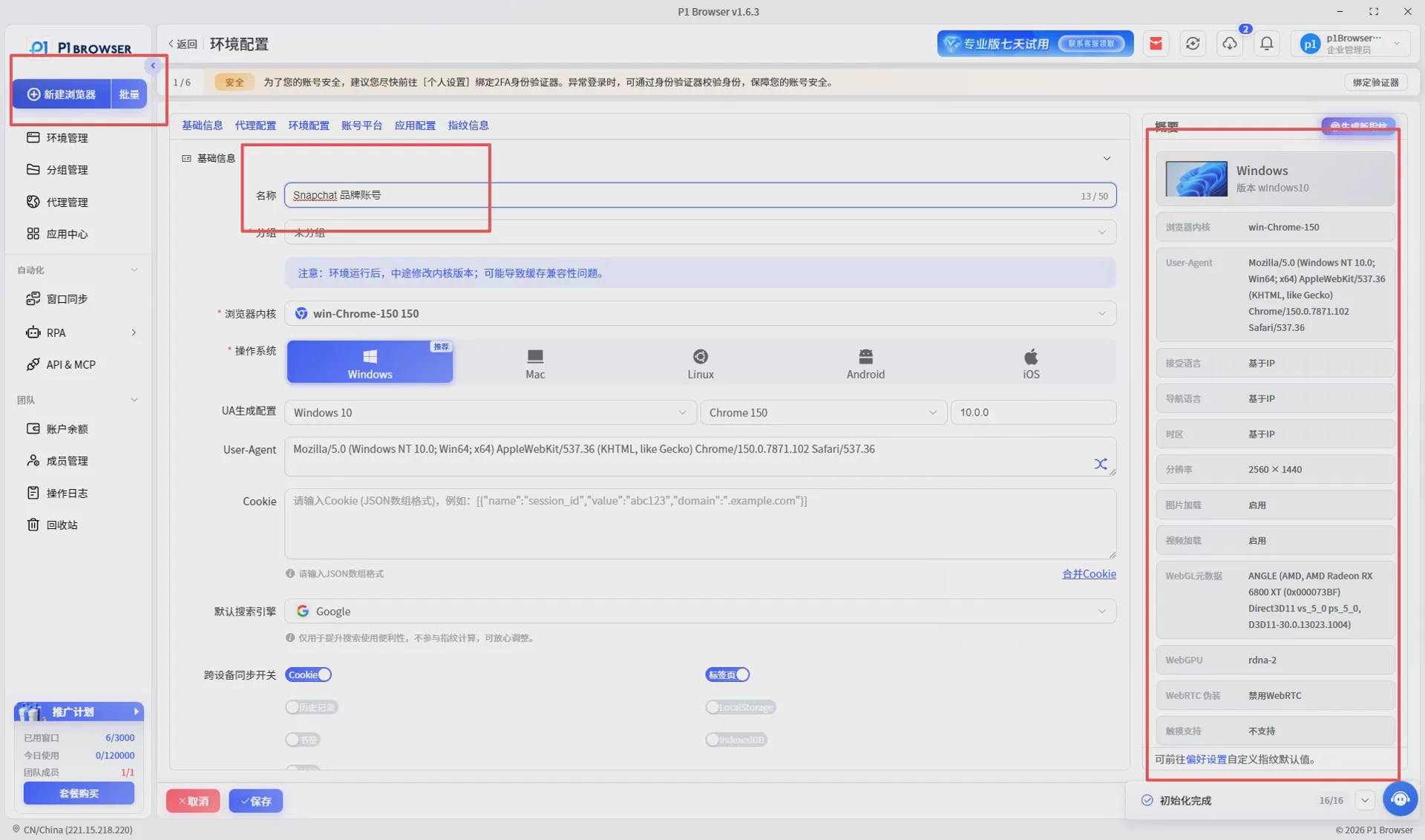
Help teams manage accounts centrally
As the business grows, a project often involves multiple roles, including operations, design, advertising, and customer service.
By managing browser environments centrally, teams can more easily:
- Categorize accounts by project;
- Categorize accounts by brand;
- Categorize accounts by country;
- Categorize accounts by person in charge.
This classification method can reduce management costs and also facilitate the subsequent expansion of a new account matrix.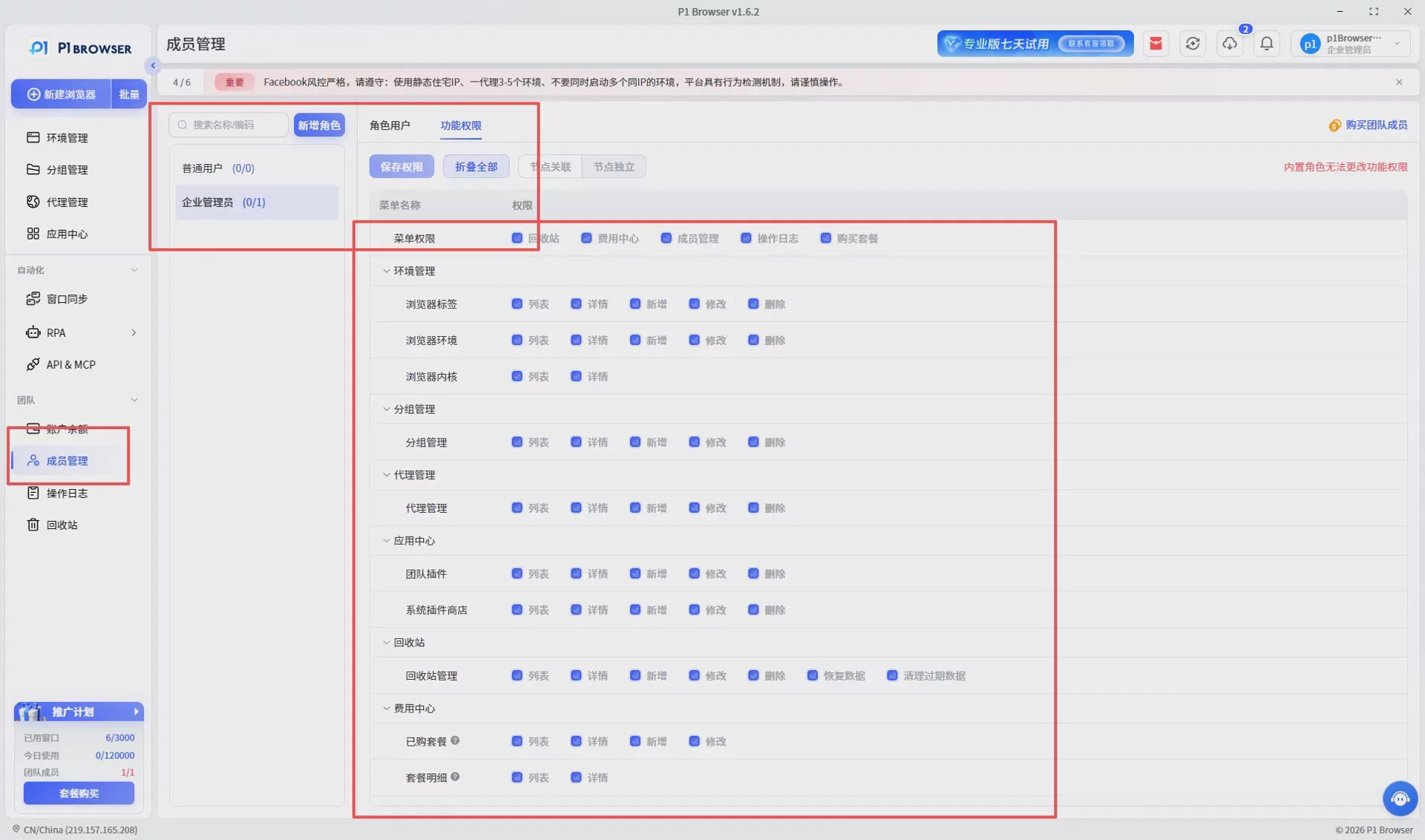
Suitable for multiple international platforms
Many teams do not operate only Snapchat.
In practice, they often need to manage multiple platforms simultaneously:
- Snapchat
- TikTok
- X (Twitter)
If each platform uses a different management approach, it not only increases the learning curve but can also make team collaboration more difficult.
Unified management of browser environments can help operations teams establish more standardized workflows.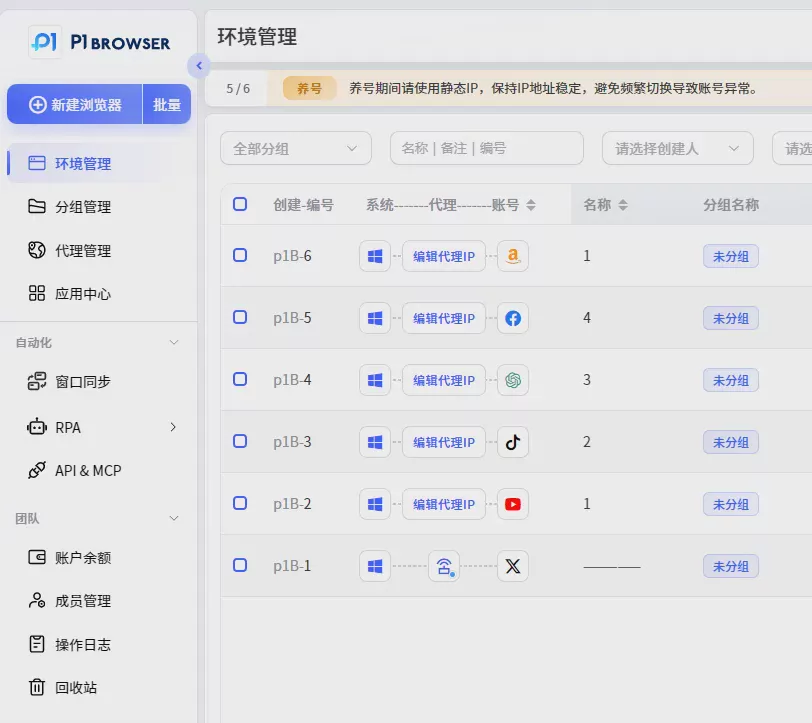
Best Practices for Managing Multiple Snapchat Accounts
In addition to creating multiple accounts, the way they are managed afterward is what truly determines operational results.
The following practices are worth maintaining over the long term.
Keep Each Account’s Positioning Clear
Do not have all accounts publish exactly the same content.
It is recommended to differentiate them by brand, product, audience, or region, so that each account has its own distinctive content.
Establish a Consistent Posting Schedule
Compared with occasional updates, most social platforms favor publishing content consistently and regularly.
It is recommended to prepare a content calendar in advance and maintain a consistent publishing frequency.
Continuously analyze operational data
It is recommended to regularly monitor the following metrics:
- Views
- Engagement rate
- New friends added
- Story completion rate
- Click-through rate (CTR)
Continuously optimize your content based on data instead of operating based on intuition.
8 Common Mistakes Often Encountered When Managing Multiple Snapchat Accounts
Many users can successfully create multiple Snapchat accounts, but during actual operations, common mistakes can reduce efficiency and even affect the normal use of their accounts.
Mistake One: All accounts have exactly the same positioning
If multiple accounts publish exactly the same content and target the same type of audience, it defeats the purpose of building an account matrix. It is recommended to assign each account a distinct role, such as brand promotion, product marketing, customer service, or content marketing.
Mistake two: Failing to keep account information in one centralized record
As the number of accounts increases, it is recommended to create a centralized account management sheet recording the account name, person in charge, login method, creation time, and operational goals to facilitate team maintenance.
Mistake Three: Deciding what to publish at the last minute
A lack of content planning can easily lead to inconsistent updates. It is recommended to prepare a weekly or monthly content calendar in advance to ensure a consistent output.
Mistake Four: Ignoring Data Analysis
Regularly analyzing views, engagement rates, friend growth, and content completion rates can help continuously optimize operational strategies.
Mistake five: Using the same content for all accounts
Even when the topic is the same, it is recommended to adjust the copy, images, and publishing time according to different audiences, so that each account maintains a certain degree of differentiation.
Mistake: Unclear team responsibilities
When multiple people manage the accounts, the person in charge of each account, the review process, and publishing permissions should be clearly defined to reduce duplicate work and communication costs.
Mistake Seven: Lacking a long-term operations plan
Successful social media operations usually rely on long-term accumulation rather than publishing content intensively over a short period.
Error Eight: Lack of a unified management approach
As the number of accounts continues to grow, establishing unified account categorization and management processes is more important than simply increasing the number of accounts.
How to build a Snapchat content matrix?
A content matrix (Content Matrix) is an operational approach frequently adopted by overseas brands. Different accounts consistently produce content around different themes, collectively enhancing brand influence.
| Account Type | Content Direction |
|---|---|
| Brand Account | Company news, brand stories |
| Product Account | Product introductions, feature demonstrations |
| Tutorial Account | Tips and Guidelines |
| Campaign Accounts | Promotions and Limited-Time Offers |
Through a content matrix, you can reach different user groups while reducing the pressure on a single account to handle all the content.
Snapchat Multi-Account Management Tips
- Set a fixed posting schedule.
- Establish a consistent visual style.
- Continuously optimize the account bio.
- Adjust the content direction based on data.
- Regularly remove ineffective content.
- Maintain a consistent update frequency.
- Publish localized content for different regions.
- Continuously test new content formats.
Although these practices may seem simple, consistently following them over the long term can significantly improve the overall quality of account management.
What capabilities should a Snapchat multi-account management tool have?
As teams grow, relying solely on manual records is no longer sufficient. When choosing an account management tool, pay particular attention to the following capabilities:
- Support for creating multiple independent browsing environments.
- Make it easy to categorize accounts by brand, project, or region.
- Support for team collaboration and permission management.
- Make it easy to quickly switch between different accounts.
- Suitable for managing multiple overseas social media platforms simultaneously.
Different teams have different needs, so tools should be evaluated comprehensively based on the number of accounts, team size, and workflow.

