The core of warming up a new Facebook account is to gradually build account history and trust records through continuous normal use.
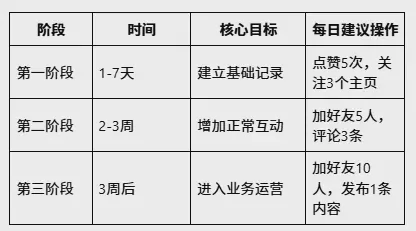
It is generally recommended that the account warming period be 2-4 weeks, divided into three stages: 1-7 days after registration, complete the profile and browse content; weeks 2-3, add a small amount of interaction; after 3 weeks, gradually enter business operations. During the account warming period, it is necessary to maintain a stable login environment, avoid high-frequency operations, and refrain from immediately posting marketing content.
For cross-border sellers and overseas marketers, in addition to account behavior management, they also need to focus on whether the login environment is stable, whether the IP address changes frequently, and whether there is environmental linkage between multiple accounts.
Facebook Account Warming Period Quick Reference Table
What Is Facebook Account Warming?
Facebook account warming refers to the process of gradually building up an account's history and stability through consistent normal use before a newly registered account is formally used for marketing, community operations, or advertising.
Facebook evaluates multiple factors together, including registration information, login device, IP network environment, browser environment, friend interactions, content browsing behavior, and account history.
An account with a normal usage record is more likely than a newly registered account to pass platform reviews, has fewer restrictions on posting content, can participate in group activities more reliably, and carries lower ad account risk.
Therefore, for cross-border sellers who need to operate Facebook accounts over the long term, account warming is an important foundation for account operations.
Things to Note During the Facebook New Account Registration Stage
1. Use Stable Registration Information
When registering a Facebook account, you need to ensure that the basic information is complete and authentic.
Registration Information Recommendations:
- Use mainstream email services such as Gmail and Outlook to register, and avoid temporary email addresses;
- For the phone number, it is recommended to use a number from the target market region;
- Use a real person's photo for the profile picture, and avoid default images such as landscapes or logos;
- Fill in fields such as "Work", "Education", and "Residence" in the profile as completely as possible;
- After registration is complete, enable two-factor authentication (2FA) to increase the account's security level;
- Avoid modifying a large amount of information immediately after registration; frequently modifying registration details may increase the probability of platform review.
2. Maintain a stable login environment
Many sellers easily overlook the login environment. Facebook not only identifies the account itself, but also comprehensively evaluates the login device, browser information, Cookie data, IP address, and geographic location.
For example, logging in with a U.S. IP in the morning, switching to a European IP in the afternoon, and then logging in via an Asian network at night—such short-term environmental changes can easily trigger security verification.
For users who operate multiple Facebook accounts over the long term, it is recommended to create independent browsing environments for different accounts.
How should the Facebook account warming cycle be arranged?
In general, new accounts are advised to go through a gradual warming stage.
First phase: 1-7 days after registration
The main goal is to establish a basic usage history.
Suggested actions:
- Browse the feed for 10-15 minutes every day;
- Like 3-5 posts every day;
- Follow 2-3 Pages you're interested in every day;
- Complete your profile (profile picture, cover photo, bio).
Avoid:
- Mass-adding friends;
- Posting advertising content;
- Joining a large number of groups;
- Sending direct messages.
Phase two: Weeks 2-3
Start increasing normal interactions.
Recommended actions:
- Add no more than 3-5 friends per day;
- Join 1-2 relevant groups per week;
- Comment on 2-3 posts per day (comments must be relevant to the post; do not copy and paste the same comments);
- You may post 1-2 simple life updates.
Note:
Do not perform a large number of actions in a short period of time.
For example, adding dozens or even hundreds of friends in one day, mass-copying comments, or joining groups in bulk—these behaviors are easily flagged as abnormal.
Third stage: after 3 weeks
Once the account is stable, it can gradually be used for business operations.
Recommended actions:
- Add no more than 5-10 friends per day;
- You can start managing the Page and participating in industry group discussions;
- Keep the frequency of posting product content to no more than 1 post per day;
- Communicate with customers.
Note:
For ad placement, it is recommended to start only after the account has been registered for 1 full month. You still need to maintain normal usage habits; suddenly increasing marketing activities is not recommended.
What behaviors should be avoided when warming up a Facebook account?
1. Do not perform a large number of actions in a short period of time
The following behaviors can easily trigger restrictions: adding friends in bulk, sending direct messages at high frequency, joining groups in large numbers, and continuously posting the same content.
Facebook favors genuine user behavior rather than quickly completing a large number of actions.
2. Do not directly copy marketing content
During the initial trust-building stage of a new account, do not immediately post a large number of product links, send bulk advertisements, or repeatedly post the same materials.
It is recommended to first establish a normal interaction history, then gradually enter the marketing stage.
How to avoid account association in multi-account Facebook operations?
For cross-border sellers, Facebook usually isn't just one account. Common scenarios include multiple Facebook personal accounts, multiple ad accounts, multiple brand pages, and multiple market accounts.
If multiple accounts use the same browser, share cookies, use the same browser fingerprint, and have highly consistent login environments, this may increase the risk of account association.
A more reasonable approach is to create independent browsing environments for different accounts, with each environment separately managing browser fingerprints, cookie data, login status, and network proxy configurations.
Frequently Asked Questions (FAQ)
How long does it take to warm up a new Facebook account?
It is usually recommended to warm it up for at least 2-4 weeks. The specific time depends on the account's purpose, operation frequency, login environment, and content interaction. The more important the account, the longer the initial warm-up period.
Why are newly registered Facebook accounts easily banned?
The main reasons include: abnormal registration environment, low IP reputation, incomplete information, acting too quickly after registration, and a large amount of marketing activity in a short time. New accounts need to gradually build a normal behavior record.
Can fingerprint browsers be used for Facebook account warming?
Yes. Fingerprint browsers are mainly used to create independent browsing environments and help manage cookies, browser fingerprints, and login status for different accounts. However, fingerprint browsers cannot replace normal account operations; account security still depends on usage behavior, network environment, and content quality.
Can multiple Facebook accounts be used in one browser?
Not recommended. Multiple accounts sharing the same browser may cause Cookie confusion, login status conflicts, and duplicate environment fingerprints. For multi-account operations, it is recommended to use independent browsing environments for separate management.
What should you do if your Facebook account is restricted?
First, check whether there are any abnormal logins, frequent operations, or use of an abnormal network environment. Then complete verification or appeal according to Facebook's prompts, and adjust your subsequent operating approach to avoid repeatedly triggering restrictions.
What exactly should you do each day to warm up a Facebook account?
During the account warming period, it is recommended to perform the following actions every day:
- Browse the feed for 10-15 minutes;
- Like 3-5 posts;
- Follow 1-2 Pages that interest you;
- After the second stage, you can add 3-5 friends and comment on 2-3 posts.
The key is to keep the operation frequency stable; do not perform a large number of actions on one day and then not log in at all on another.
Can you run ads while warming up a Facebook account?
Not recommended. During the account warming period (the first 2-4 weeks), you should avoid posting any marketing content, product links, or ads. Posting marketing content too early can easily trigger platform review and increase the risk of account suspension. It is recommended to gradually enter the business operation stage after the account has established a normal usage record.
Can multiple Facebook accounts use the same IP?
It is not recommended to manage multiple accounts in the same environment over the long term. Facebook comprehensively evaluates login devices, browser environments, Cookie data, and network environments. If multiple accounts share the same environment for a long time, it may increase the risk of association between accounts. For multi-account operations, it is recommended to manage account environments separately and maintain data isolation between different accounts.
Summary
Facebook account warming is not simply about increasing the number of logins; it is about establishing long-term, stable account usage records.
For ordinary users, maintaining authentic information, normal interactions, and a stable login environment is sufficient.
For cross-border sellers and overseas marketing teams, in addition to account operation strategies, they need to pay more attention to multi-account environment management. Managing different Facebook accounts through independent browsing environments can reduce issues such as Cookie mixing and environment duplication, and improve the long-term operational stability of accounts.
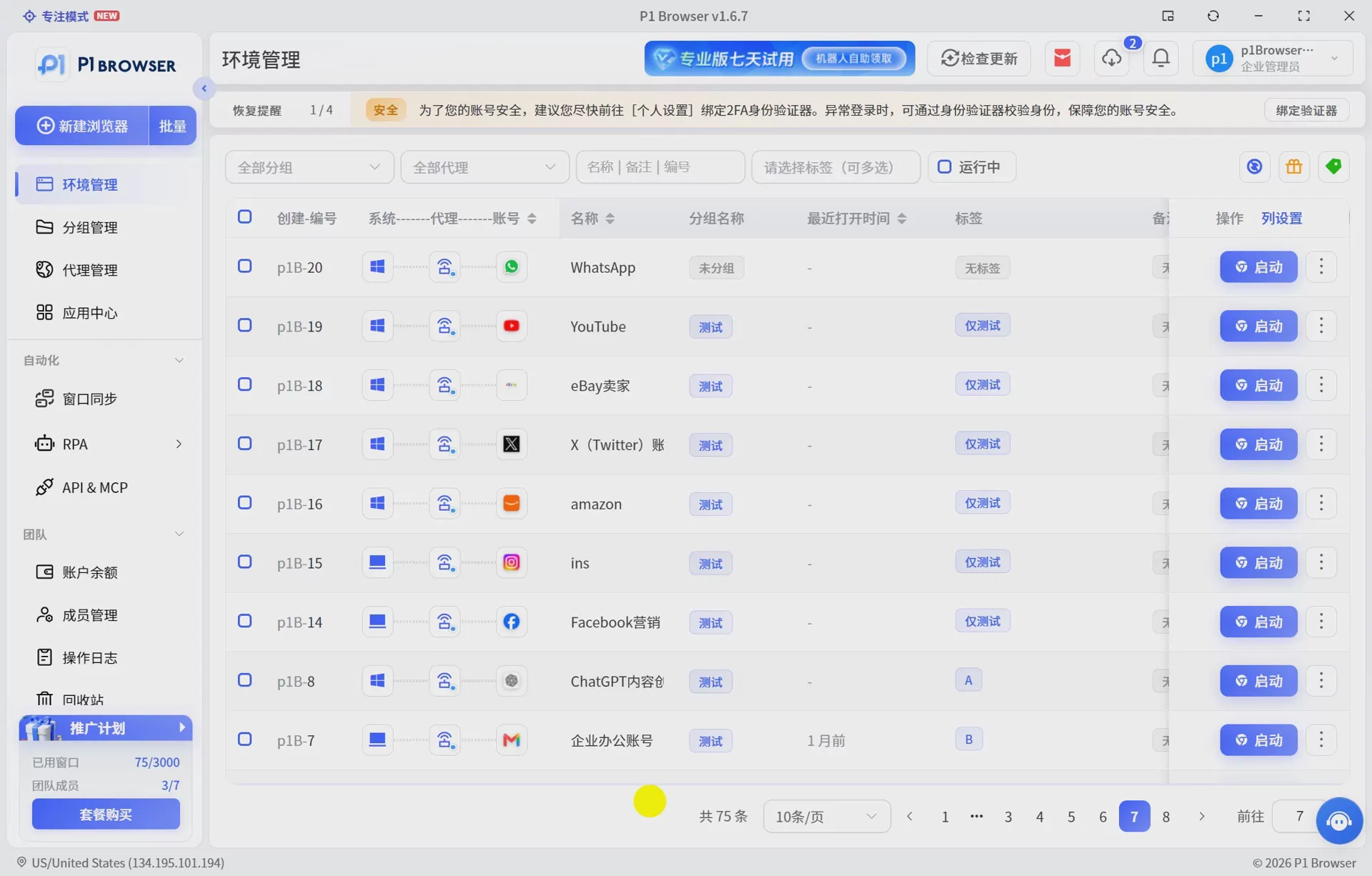
For sellers who need to simultaneously manage accounts on multiple overseas platforms such as Facebook, Amazon, Ozon, and Google Ads, they can use a P1 Fingerprint Browser to create independent browsing environments,and separately manage the Cookies, browser environments, and login status of different accounts to improve multi-platform operational efficiency.