



For cross-border e-commerce sellers, as their brands, product lines, and business scale gradually expand, using only one eBay seller account may no longer meet their actual operational needs. Some businesses create and manage multiple eBay seller accounts based on different brands, product categories, or business directions.
However,eBay multi-account operationsis not simply a matter of registering several email addresses and then opening separate stores to sell products. Each seller account must complete registration, seller onboarding, identity verification, payment setup, and store configuration in accordance with eBay's requirements, while also continuously complying with the platform's relevant policies.
Therefore, for sellers preparing to undertake eBay multi-account management, what truly matters is not “how many accounts can be opened,” but how to establish a clear, stable, and platform-compliant multi-account management process.
This article provides a comprehensive overview of how to operate multiple eBay accounts, covering applicable scenarios, account preparation, seller verification, store settings, team collaboration, browser environment management, and key considerations.
What Is eBay Multi-Account Operations?
The term eBay multi-account operations, refers to an individual seller or business managing two or more eBay accounts simultaneously according to its business needs, with each account handling product listings, order processing, customer service, and store operations separately.
For example, a cross-border e-commerce business operating multiple brands can assign different eBay accounts to different brands. One account can specialize in selling consumer electronics, while another handles household products. The business can also create corresponding operational strategies for different markets.
This approach helps maintain relatively clear positioning among different business lines and also makes it easier for businesses to divide team responsibilities and manage data.
It should be noted that multiple eBay accounts do not mean that you can create fake identitiesEach seller account must provide genuine, accurate, and verifiable information and be operated in accordance with relevant eBay policies.

II. Why Do Cross-Border E-Commerce Sellers Need Multiple eBay Accounts?
1. Differentiate Different Brands
If a business operates multiple brands at the same time, placing different brands in different eBay accounts can make each brand’s positioning clearer.
For example, one account may primarily sell digital accessories, while another focuses on home products. Different accounts can each have their own store name, product categories, brand visuals, and customer service strategies.
2. Manage Different Product Lines
As the number of products continues to increase, concentrating all products in a single account may cause the store’s positioning to become too scattered.
For businesses with significantly different product types, planning different accounts appropriately according to product lines can make product management, inventory management, and marketing strategies clearer.
3. Facilitate Team Division of Responsibilities
As a cross-border e-commerce team gradually grows from one person to multiple people working together, managing multiple accounts can also help the business establish clearer divisions of responsibilities.
For example, Operations Specialist A is responsible for Brand A, Operations Specialist B is responsible for Brand B, and the customer service team manages after-sales service and buyer message management according to each store.
This can reduce the confusion caused when multiple people operate the same account at the same time, and also help reduce errors in handling products, orders, or customer information.
4. Expand into Different Business Directions
When a business begins entering a new product category, if the new business differs significantly from the existing brand positioning, it may consider creating a new eBay seller account based on actual business needs.
However, special attention must be paid to the following:A new account must not be created to circumvent restrictions, selling limits, or platform penalties imposed on an existing account.
III. What needs to be prepared before creating multiple eBay accounts?
Many beginners believe that creating multiple eBay accounts only requires different email addresses. In fact, a complete seller account requires much more information than just an email address.
1. First determine the purpose of each account
Before starting the registration process, it is recommended to determine the brand, product line, target market, and person responsible for each account.
For example:
- Account A: Consumer electronics brand
- Account B: Home goods brand
- Account C: Outdoor products brand
Planning the purpose of each account in advance can help avoid subsequent management issues such as “Which account is responsible for which products?” and “Which employee is responsible for which store?”
2. Prepare authentic registration data
Each eBay seller account requires the appropriate information in accordance with the platform’s requirements, including an email address, contact information, personal or business details, payment information, and any necessary verification documents.
If you are registering a business account, you may also need to provide the business name, registered address, and other business-related information.
Do not use false identities, fabricated business information, or unverifiable details.For businesses engaged in cross-border e-commerce over the long term, authentic, accurate, and consistent information is the foundation for stable account operations.
3. Organize product and inventory data in advance
Before creating a new seller account, it is best to determine the product categories, SKUs, prices, inventory, suppliers, logistics methods, and return policies in advance.
Especially when operating multiple accounts, you need to define the product scope for each account in advance to avoid confusion in inventory management.
IV. What is the difference between an eBay personal account and a business account?
Before starting eBay multi-account operations you also need to choose the account type that best suits your actual business model.
Personal Account
Personal accounts are generally suitable for individual sellers or users who sell products occasionally. The actual registration conditions and verification requirements should be based on the information currently displayed on eBay.
Business Account
If a business conducts commercial sales over the long term, operates a brand, or has multiple people managing the store, it can choose Business Account based on its own circumstances.
Business accounts typically require the preparation of relevant business information and completion of verification in accordance with eBay's requirements.
Is eBay Store another type of seller account?
This is something that many beginners easily confuse.
eBay Store is not the same as a new seller account.Account types and Store subscriptions are different concepts. Sellers can choose whether to subscribe to eBay Store based on their actual business needs.
Therefore, opening an eBay Store does not mean creating a new seller account, and creating a new seller account does not necessarily mean that a Store subscription must be purchased.
Five. How to Create Multiple eBay Seller Accounts?
First step: Register a new eBay account
First, visit the official eBay registration page, select individual or business registration as appropriate, and provide the relevant information requested by the platform.
After completing email or mobile phone verification, you can create a basic eBay account.
Please note that creating a standard eBay account does not mean that seller onboarding has been completed. If you need to sell products, you must also complete the subsequent seller setup.
Step Two: Complete seller onboarding
eBay seller accounts typically need to complete the relevant Seller Onboarding process, including submitting personal or business information, setting up a payout method, and completing the verification required by the platform.
If you manage multiple accounts at the same time, it is recommended that you record the verification status of each account separately.
For example:
- Account A: Verification completed
- Account B: Payout information verification pending
- Account C: Additional business documents pending
This can help prevent management errors as the number of accounts increases.
Third step: Complete identity and business verification
Identity verification is an important step in creating an eBay seller account.
Depending on the account type and actual circumstances, eBay may require the following:
- Name and identity details
- Government-issued identification documents
- Telephone number and address information
- Business registration details
- Bank or payment account details
- Supporting documents required by other platforms
When submitting data, ensure that all information is true, accurate, and consistent. If eBay requests additional data, submit valid documents in accordance with the official requirements.
Step Four: Set Up Your Store and Sales Policies
After completing account registration and verification, you must also complete the relevant store settings before officially listing products.
Common settings include:
- Store name and brand information
- Product listing settings
- Shipping policies
- Return policies
- Payment settings
- Product categories
- Customer service information
If different accounts correspond to different brands or product lines, it is recommended to create shipping and return policies suited to each business separately.
Create an account management sheet
As the number of eBay accounts increases, it is recommended to use a centralized account management sheet for record-keeping.
The following information can be recorded:
- eBay account name
- Registered email
- Account type
- Associated brand
- Primary product line
- Account owner
- Verification status
- Current sales limit
- Store subscription status
Unified management provides a clearer overview of the current operating status of each account.
What should you pay attention to when verifying multiple eBay accounts?
1. Personal identity verification
If eBay requires identity verification, you should use real identity information consistent with the registration data.
For example, data such as names, addresses, and identity verification documents must all be submitted in accordance with the platform's requirements.
Do not use false identity data or inconsistent registration information simply because you are creating multiple accounts.
2. Business Data Verification
If you use a business account for commercial sales, eBay may require the business name, registered address, business registration documents, and other relevant data.
Business data should match the actual registration information to avoid verification delays caused by inconsistencies.
3. Payout Data Verification
Payout settings are also an important part of seller onboarding.
When operating multiple accounts, it is even more important to keep clear records of the payout settings for different accounts to prevent errors during the finance team's daily reconciliation.
4. What to Do If Verification Fails?
If an eBay seller account encounters problems during the verification process, it is not recommended to simply abandon the original account and create a new one to bypass verification.
A more appropriate approach is to:
- Check whether there are any errors in the submitted data.
- Confirm which documents eBay requires you to provide.
- Submit clear and valid supporting documentation as required by the platform.
- Confirm that the name, address, business details, and payment information are consistent.
- If the issue still cannot be resolved, contact eBay’s official customer support.
VII. What Platform Rules Should You Pay Attention to When Operating Multiple eBay Accounts?
The biggest challenge of operating multiple accounts is not the number of accounts, but ensuring that all accounts comply with the platform’s rules.
Do not use a new account to circumvent restrictions on an original account.
If an account is subject to selling restrictions, account restrictions, or platform penalties, you should not create a new account to bypass those restrictions.
Creating multiple accounts should serve a legitimate business purpose, such as managing different brands, product lines, or business teams, rather than circumventing platform policies.
Do not use false registration information.
Operating multiple accounts does not mean that you need to create multiple false identities.
All accounts should use real, accurate, and verifiable information.
Do not engage in fraudulent transactions
Do not use different accounts to purchase goods from one another, create fake orders, manipulate reviews, or artificially inflate sales data.
The purpose of managing multiple accounts should be to reasonably divide business operations, not to manipulate platform data.
VIII. Why does eBay multi-account management require an independent browser environment?
When managing only one eBay account, a regular browser is usually sufficient.
However, as the number of accounts increases, keeping all accounts in the same browser can easily lead to confusion involving cookies, login statuses, and work pages.
For example, when an operator manages multiple eBay Seller Hub accounts simultaneously, frequently logging in and out of different accounts can easily result in logging into the wrong account, modifying the wrong listings, or handling the wrong orders.
Therefore, in eBay multi-account managementcreating independent browser work environments can help teams distinguish between different stores more clearly.
IX. What is a fingerprint browser?
Fingerprint browseris a type of tool used to manage multiple independent browser environments, also commonly known as an anti-association browser or anti-detect browser.
Compared with ordinary browsers, fingerprint browsers can typically create multiple independent Profiles and save different browser data, such as Cookies, Local Storage, and Session, for each one.
For cross-border e-commerce teams, they can be managed according to the model of “one store corresponding to one browser environment.”
For example:
- Profile A → eBay store A
- Profile B → eBay store B
- Profile C → eBay store C
This gives different stores clearer workspaces and reduces account confusion during daily operations.
Tenth: How Does P1 Fingerprint Browser Assist with eBay Multi-Account Management?
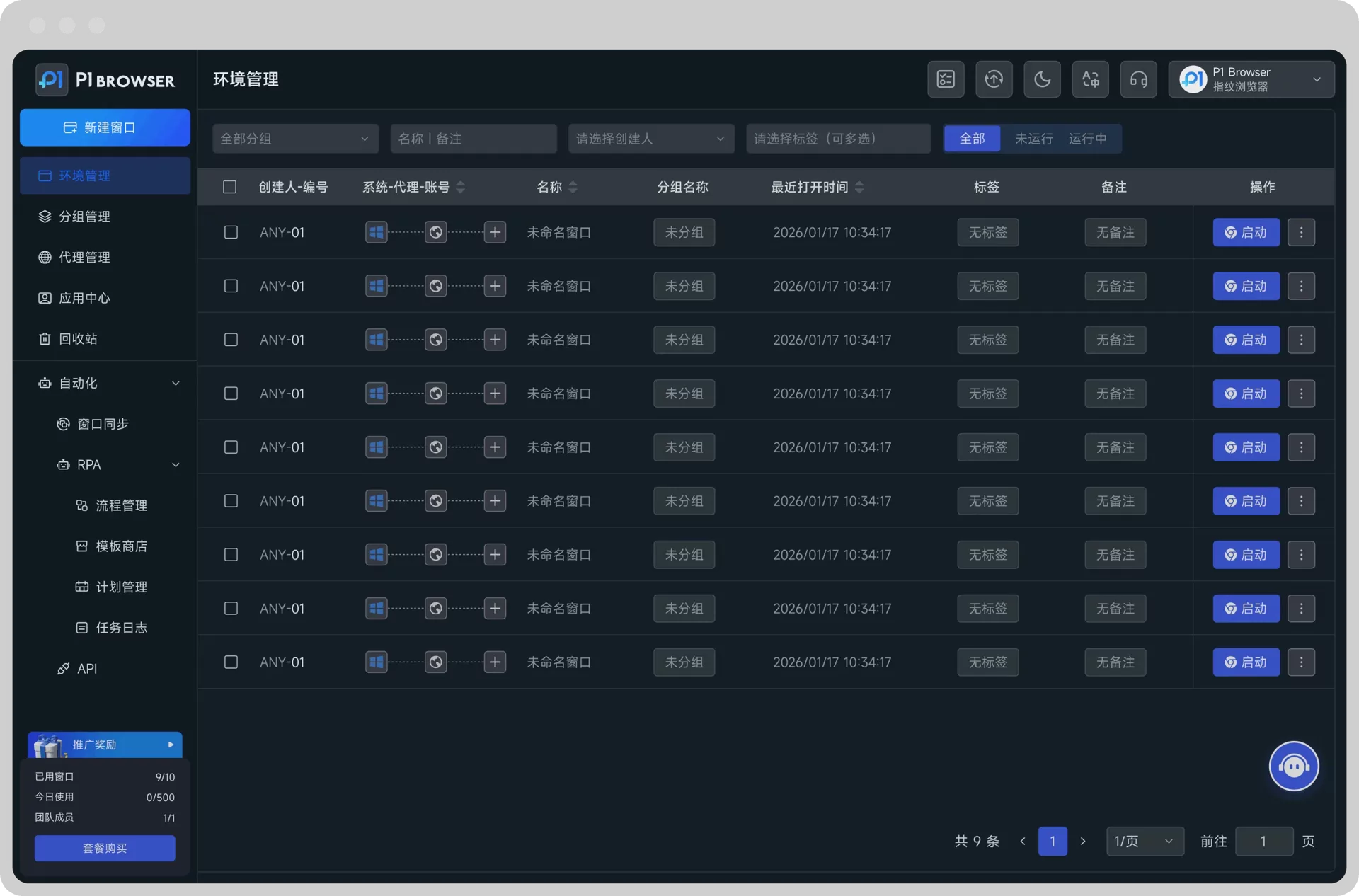
For cross-border e-commerce teams that need to manage multiple eBay stores,P1 Fingerprint Browsercan be used as a multi-browser environment management tool.
Operators can create separate browser environments for different brands or stores, keeping the Cookies, login status, and browser data of different accounts separate.
For example:
- P1 Environment A → eBay Brand A
- P1 Environment B → eBay Brand B
- P1 Environment C → eBay Brand C
When operators need to manage a particular store, they only need to enter the corresponding browser environment, without repeatedly logging out of and back into the same browser.
For cross-border e-commerce teams working collaboratively, this approach also helps create clearer workflows based on brands, stores, or job responsibilities.
It is important to emphasize thatBrowser environment isolation cannot guarantee that an eBay account will not be restricted by the platform, and it should not be used to circumvent platform rules.It mainly addressesmulti-account managementissues related to separating work environments, managing login status, and team collaboration.
How Should an eBay Multi-Account Team Divide Responsibilities?
If a business manages multiple eBay stores at the same time, it is recommended to establish a clear account responsibility system.
For example:
- Store Operations:Responsible for product listings, product optimization, and daily store management.
- Customer Service Representatives:Responsible for buyer messages, after-sales service, and return processing.
- Warehouse Staff:Responsible for inventory, order picking, and order fulfillment.
- Managers:Responsible for sales data, account status, and overall business planning.
At the same time, corresponding account access permissions can be assigned based on employees’ actual job responsibilities, preventing all employees from using the same set of account data.
XII. Frequently Asked Questions (FAQ) About Operating Multiple eBay Accounts
Q1: Can you have multiple seller accounts on eBay?
Yes. eBay allows users to manage multiple accounts based on legitimate business needs, but each account must comply with the platform’s policies. New accounts must not be used to circumvent restrictions or penalties imposed on existing accounts.
Q2: Does each eBay seller account need to be verified separately?
Yes. Each seller account must complete the applicable seller registration and verification processes required by eBay. Specific requirements may vary depending on the account type and actual circumstances.
Q3: Can different accounts be used to bypass eBay’s selling limits?
This is not recommended, and new seller accounts should not be created for this purpose. Multiple accounts should be created based on genuine business needs rather than to circumvent the platform’s selling limits.
Q4: Is a fingerprint browser required for operating multiple eBay accounts?
No. A fingerprint browser is not a mandatory requirement for operating multiple eBay accounts.
However, when a business needs to manage a large number of stores or operate them with multiple people, independent browser environments can help distinguish the Cookies, login status, and workspaces of different accounts, reducing account confusion during daily operations.
Q5: What should I do if eBay account verification fails?
First, check whether the submitted information is accurate and confirm which additional documents eBay requires. Then submit valid information in accordance with the official requirements. If the issue still cannot be resolved, contact eBay’s official customer support instead of creating a new account to bypass verification.
Conclusion: The core of operating multiple eBay accounts is “planning” and “management”
For cross-border e-commerce sellers,operating multiple eBay accountscan help businesses create a clearer store structure based on different brands, product lines, and business directions.
However, operating multiple accounts is not simply a matter of “opening several more accounts.” From account registration, identity verification, and payment setup to product listings, shipping policies, team collaboration, and daily account management, every step requires the creation of clear processes.
In particular, it is important to note that adding accounts should be based on genuine and reasonable business needs, rather than being used to circumvent platform restrictions or penalties. Only by complying with eBay’s rules can a multi-account strategy truly become a management tool for cross-border e-commerce businesses to expand their operations.
As the number of stores gradually increases, standardized workflows can be created through account management sheets, team permissions, and independent browser environments.
For teams that need to manage accounts across multiple cross-border e-commerce platforms, including eBay, Amazon, Facebook, and TikTok Shop, the P1 Fingerprint Browser can help create clear, independent browser work environments, making multi-account operations more organized.
Truly effective multi-account operations are not about finding ways to circumvent the platform, but about creating a clearer and more efficient account management system on a compliant basis.

