



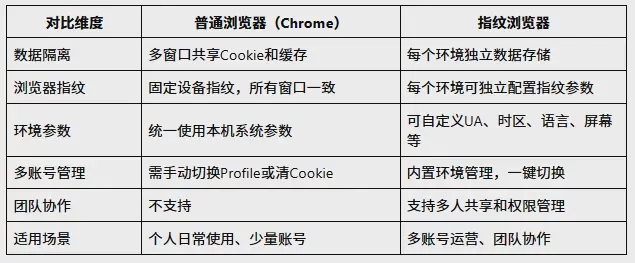
The biggest difference between fingerprint browsers and regular browsers lies in their environment management capabilities.
In regular browsers (such as Chrome), all windows share the same set of Cookies, cache, browser fingerprint, and device parameters. When multiple accounts log in in the same browser, the platform can use this shared data to identify associations between accounts.
Fingerprint browsers, by contrast, create an independent browsing environment for each account, with independent Cookie storage, browser fingerprint, device parameters, and network configuration, achieving true data isolation.
In simple terms, regular browsers mainly solve "how to access the Internet," while fingerprint browsers mainly solve "how to manage multiple independent browsing environments."
The two focus on different issues and suit different use cases.
Core Comparison Quick Reference Table
I. What information exactly does a regular browser store?
Many users think, "If I open several Chrome windows, doesn't that equal several browsers?" In fact, it does not. In most cases, regular browser windows still share the same browser user environment. A complete browser environment consists of multiple parts.
1. Cookies and Website Data
Cookies are the most common type of browser data. Websites use cookies to store login status, user preferences, session information, and website configurations. For example, after a user logs in to a platform, the browser saves the corresponding cookie, and the next time the webpage is opened, the website can restore the login status based on the cookie. If multiple accounts use the same browser environment for a long time, this data may become associated or affect one another.
2. Browser Configuration Data
In addition to cookies, browsers also store a large amount of configuration, such as browser settings, history, autofill information, download records, and extension data. Together, this content forms a user browsing environment.
3. Browser Runtime Parameters
In addition to reading stored data, modern websites may also obtain browser and device environment information, such as browser version, operating system information, screen size, font environment, graphics rendering capabilities, time zone, and language settings. The combination of these parameters forms browser environment characteristics.
II. What Is the Difference Between Running Multiple Regular Browser Instances and Environment Isolation?
This is the issue that many users most easily confuse. Opening multiple browser windows solves "how to open multiple pages at the same time"; environment isolation solves "how to give different accounts independent runtime environments." The two are not the same concept.
Multiple Regular Chrome Windows
Chrome
├── 窗口A
├── 窗口B
└── 窗口C
共享:Cookie、缓存、配置、环境参数
Multiple windows are merely a separation at the interface level.
Independent browser environments
环境A
├── Cookie A
├── Storage A
├── 配置 A
环境B
├── Cookie B
├── Storage B
├── 配置 B
Each environment has its own independent data space — that is what true environment isolation means.
III. Can Chrome Profile solve environment isolation?
Chrome itself provides a Profile mechanism. Simply put, a Profile is an independent set of browser user configurations. For example, Chrome can create multiple Profiles, each with its own independent Cookies, Cache, and History, and data is kept separate between different Profiles.
For individual users, Profiles can already address part of the isolation needs — for example, using different Profiles for work accounts, personal accounts, and test accounts.
However, note that although Chrome Profiles can isolate Cookie, cache, and browser data, they still run in the same device environment, so some underlying environment characteristics (such as GPU-related parameters and graphics rendering characteristics) usually remain highly consistent.This means that for scenarios requiring deeper environment isolation, the capabilities of Profiles are limited.
In addition, when the number of environments increases, Profile management also runs into problems: higher creation and maintenance costs, difficulty in unifying environment configurations, difficulty in multi-person collaboration, and a lack of centralized management capabilities. Therefore, in scenarios that require managing a large number of independent environments, more professional environment management solutions emerge.
What is the biggest difference between a fingerprint browser and a regular browser?
1. Different data isolation capabilities
Multiple accounts in a regular browser may share the same browser data space. In a fingerprint browser, each environment typically has its own independent data storage, including Cookie, LocalStorage, Cache, and browser configuration, so different accounts can remain independent of one another.
2. Differences in environmental parameter management capabilities
Ordinary browsers usually use a fixed device environment (the same computer, the same system, and the same set of browser parameters). Fingerprint browsers can usually configure different environments independently, such as User-Agent, screen parameters, time zone, locale, and some browser fingerprint parameters, allowing different environments to have independent configurations.
3. Differences in management capabilities
When there are only a few accounts, an ordinary browser may be sufficient. But when the number of accounts increases to 10, 50, or even 100, the focus of management shifts from "opening the browser" to "managing browser environments." At this point, you need to consider environment classification, team collaboration, permission management, and bulk operations, which are usually not capabilities provided by ordinary browsers.
V. Which scenarios are suitable for using a fingerprint browser?
Fingerprint browsers are not needed by everyone. For ordinary individual users (browsing web pages, logging into a small number of accounts, daily office work), an ordinary browser is already sufficient. However, for the following scenarios, the need for environment management will be more obvious.
Cross-border e-commerce multi-store operations
Many cross-border sellers need to manage multiple platform stores, different business accounts, and team member accounts at the same time. As the number of accounts increases, a clearer approach to environment management is needed.
Overseas social media operations
When operating multiple social media accounts, different accounts may need to remain independent over the long term.
Ad delivery teams
Ad accounts usually require long-term maintenance, and environment management capabilities affect team operational efficiency.
Enterprise Team Collaboration
When multiple members manage accounts together, it is necessary to clarify account ownership, unify environment management, and reduce operational confusion.
What Should You Look for When Choosing a Fingerprint Browser?
There are many fingerprint browser products on the market, but when choosing one you should not only look at "whether it can run multiple profiles at once". What matters more are the following fundamental capabilities.
1. Is Environment Isolation Stable
The core question is whether data between different environments is truly independent, specifically including:
- Whether Cookie, LocalStorage, and Cache are completely independent;
- Whether browser fingerprint parameters support independent configuration;
- Whether there is a risk of data leakage between different environments.
2. Is Environment Management Convenient
As the number of environments increases, you need to consider:
- Whether environment grouping and tag management are supported;
- Does it support batch operations (batch creation, import, export);
- Does it support team collaboration and permission assignment.
3. Is it suitable for long-term use
A good environment management solution is not just about creating environments; more importantly:
- Whether environment data supports long-term storage and stable recovery;
- Whether it supports cross-device synchronization;
- Product update frequency and technical support response speed.
VII. From Browser Environment Management to Practical Solutions
In the process of engaging with a large number of multi-account operation users, a fairly obvious change is: the problem many users initially encounter is not "not knowing how to log in to accounts," but rather that as accounts increase, their original management approach begins to fail.
With a few accounts, one browser can still handle it; but when the number of accounts grows to dozens, environment management becomes a new problem.
This is alsoWhy P1 focuses on the direction of browser environment isolation.
What P1 aims to solve is not simply adding a few browser windows, but helping users manage multiple independent browsing environments more clearly and efficiently.
For sellers who need to manage multiple overseas platform accounts at the same time, P1 provides a management approach based on independent browsing environments, helping users separately maintain the operating status of different accounts and improve management efficiency during multi-platform operations.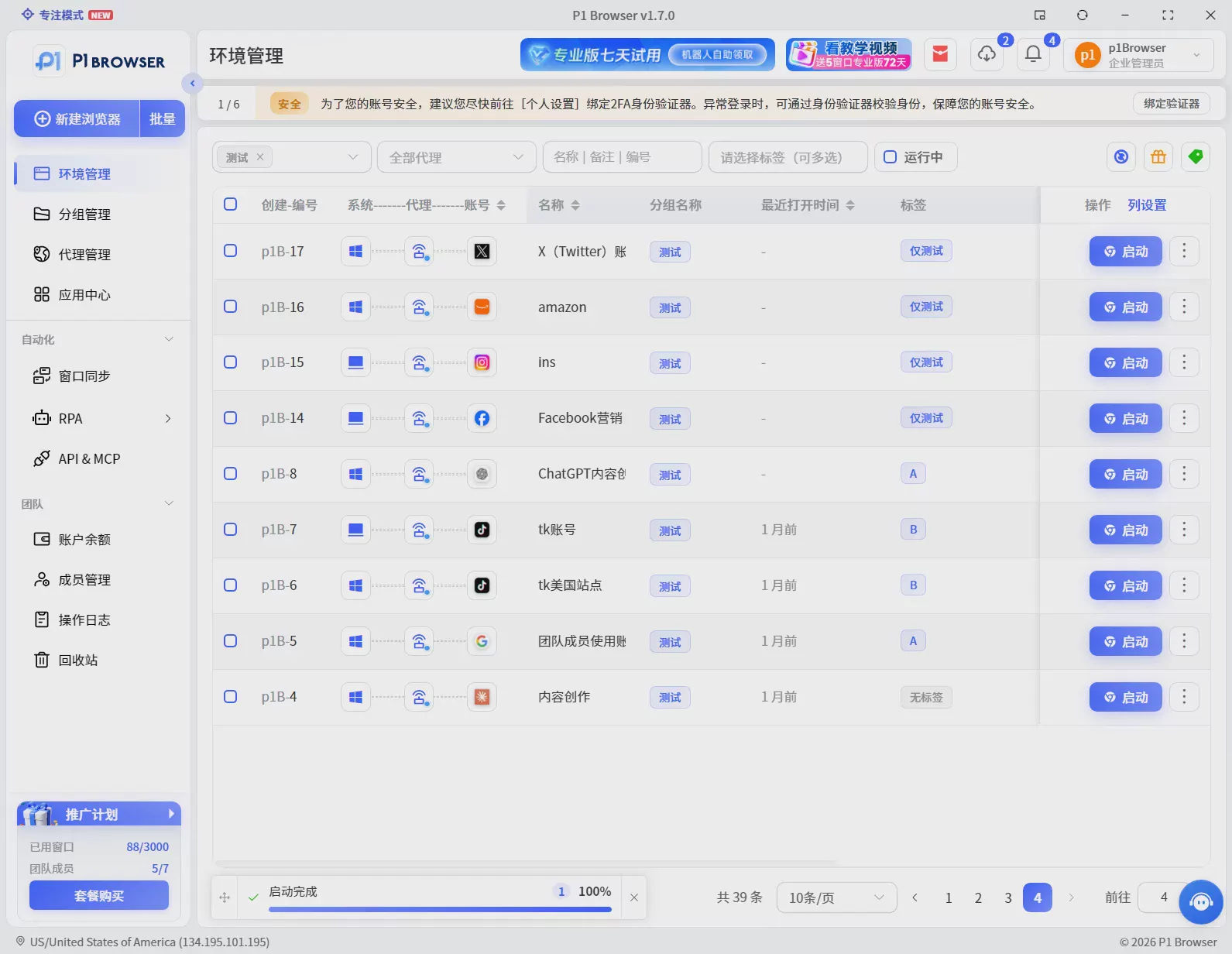
Eight. Summary
The biggest difference between a regular browser and a fingerprint browser is not the ability to open web pages, but the ability to manage the browser environment. Regular browsers are suitable for single-user, few-account scenarios. When a business enters the multi-account, multi-team, and multi-environment stage, the browser itself becomes infrastructure that needs to be managed.
From Cookie isolation to browser Profile to more professional environment management solutions, the browser is gradually evolving from a simple access tool into an important operating environment that carries business identity.
Understanding this change is also the foundation for understanding the future development of multi-account operations tools.
Frequently Asked Questions FAQ
Does opening multiple windows in a regular browser count as environment isolation?
No. Multiple windows in a regular browser share the same set of cookies, cache, browser fingerprint, and device parameters. Platforms can use this shared data to identify that multiple accounts come from the same browser environment. True isolation requires each account to have its own independent data storage and environment parameters.
What is the difference between a fingerprint browser and opening multiple windows in a regular browser?
Opening multiple windows in a regular browser merely opens several windows at the interface level, while the underlying data is still shared. Each environment in a fingerprint browser has independent cookies, browser fingerprints, device parameters, and network configurations, achieving isolation at the operating environment level rather than simple window separation.
Is a free fingerprint browser sufficient?
Free plans can usually create a small number of environments and are suitable for personal testing. However, for scenarios that require long-term operation, team collaboration, and batch management, it is recommended to choose a paid plan with more complete features, focusing on environment stability, management efficiency, and long-term usage costs.
Is a fingerprint browser safe?
A fingerprint browser is itself an environment management tool, and its security depends on the product's own data protection capabilities and how users use it. Reputable products usually store local environment data in encrypted form and do not upload users' private information. However, it is important to note that account security depends not only on the browser tool but also on factors such as account management practices, network environment configuration, and compliance with platform rules. Using tools reasonably and following platform rules is the foundation for ensuring long-term account stability.

