



A fingerprint browser can create many profiles, but that does not mean it supports unlimited multi-profile operation; a virtual machine offers more thorough isolation, but that does not necessarily make it better suited to multi-account operations. The upper limit for running multiple profiles is determined by three layers: local memory and CPU, the correspondence between proxy IPs and accounts, and platform rules and account entities. When choosing between a fingerprint browser and a virtual machine, the key is whether you need isolation at the browser identity level or at the operating system level.
Break Down Multi-Profile Limits into Three Layers First: Local Resources, IPs, and Platform Rules
In fingerprint browsers, multi-profile operation usually refers to creating multiple independent browser profiles. It solves the problem of cookies, cache, local storage, and browser fingerprints being shared across profiles; it does not automatically add network egress, account qualifications, or platform permissions. For basic concepts, refer toWhat Is a Fingerprint Browser? Principles and Use Cases Explained in One Article.
- Local resources:Each environment is still a browser process. With many pages, many extensions, and long periods without closing, it will consume memory first and then affect switching and responsiveness.
- IP-to-account mapping:Each store account requires a stable, dedicated egress IP; if IPs are insufficient or shared by multiple people, the isolation at the browser layer will be negated.
- Platform rules and account entities:The same business license, the same receiving account, and the same operator will not become multiple compliant entities just because the browser environment is changed. Tools can reduce misjudgments caused by inconsistent environments, but they cannot replace platform admission and operational specifications.
Therefore, "how many can be opened" should be split into environment multi-opening and business multi-opening: the former depends on machine and proxy capacity, while the latter depends on account entities and platform rules.
Comparison of isolation principles: system-level isolation and browser identity isolation are not the same thing
A virtual machine virtualizes a complete operating system on top of the hardware, and each instance has its own system disk, network stack, and process space; a fingerprint browser creates independent browser profiles for different accounts within the same operating system, isolating Cookies, cache, storage, some hardware fingerprints, and proxy settings. The two are not substitutes: virtual machines isolate systems, while fingerprint browsers isolate identities. For a more detailed breakdown of isolation mechanisms, seeIntroduction to Browser Fingerprint Identification and Isolation Mechanisms.
| Comparison item | Virtual machine | Fingerprint browser |
|---|---|---|
| Isolation boundary | Operating system, hardware abstraction, network stack | Browser profile, cookies/cache, fingerprint parameters, proxy |
| Account environment | Browser must be configured separately inside the VM | Create environments directly per account |
| Network egress | Can be configured separately, but still requires a proxy or VPN | Proxy is usually bound per environment |
| Underlying signals | System version, drivers, and time zone are determined by the VM | Still runs on the same host machine and relies on the product to handle underlying signals consistently |
| Resource unit | Each instance has its own system memory and disk | One browser process per environment; lightweight, but accumulates when there are many |
| Typical failure points | Same IP, same account entity, cloned virtual machines | Mixed use of proxies, shared configurations among multiple people, contradictory fingerprint parameters |
Isolation-level diagram: which signals are isolated and which may still be shared
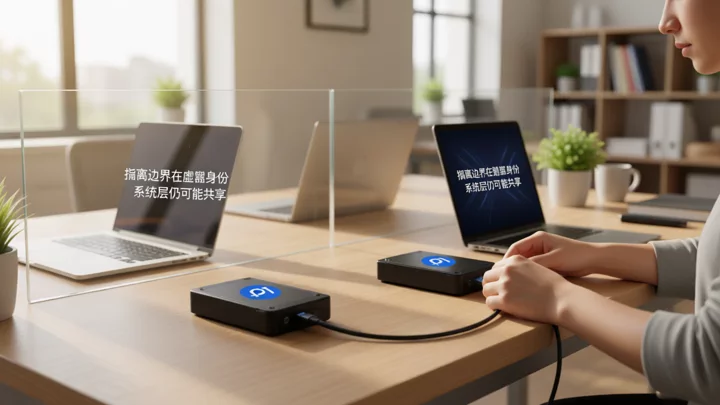
Isolating browser identities does not mean all associated signals disappear. The same operator, same payee entity, same egress IP, and same file transfer path may still appear across environments; virtual machines isolate systems but do not automatically isolate people and funds. Fixing accounts, environments, IPs, and operators into a one-to-one correspondence is more effective than simply increasing the number of environments. For configuration methods of IP and login environments, refer toPractical configuration of IP and login environments for 5 stores online at the same time.
Resource usage: virtual machines are heavier, while fingerprint browsers consume more memory and are more affected by proxies and page complexity
The overhead of a virtual machine is the overhead of a "complete system": each instance must reserve memory, CPU, and disk, and startup, system updates, and snapshots also consume I/O. A fingerprint browser is usually lighter per environment, but total usage when running multiple instances depends on the number of simultaneously open pages, plugins, proxy quality, and kernel count; it is not zero-cost.
| Resource item | Virtual machine | Fingerprint browser |
|---|---|---|
| Memory | Reserved independently per instance; relatively high | One browser process per environment; low to medium, increasing with the number of pages |
| CPU | Higher during startup, system updates, and snapshots | Higher during page rendering and script execution |
| Disk | System images and snapshots take up space | Caches and configuration take up space, usually a small amount |
| Scaling method | Add machines or increase host capacity | Add environments, proxies, and team seats |
When planning, do not purchase based on “unlimited multi-instance” capacity. First set aside 1—2 environments for stress testing, observe the memory curve and switching stability, then increase based on remaining capacity.

Applicable scenarios: check isolation requirements first, then account scale
| Scenario | Preferred solution | Reason | Points to note |
|---|---|---|---|
| Daily operations of 1—3 individual stores | Fingerprint browser + dedicated IP | Lightweight, fast to switch, and environments can be fixed | Do not assign the same IP to multiple entities |
| Requires installing a standalone client, testing software, and isolating highly sensitive backends | Virtual machine | System-level isolation; environments can be snapshotted | Network egress still needs to be configured separately |
| 4—10 stores and multi-user collaboration | Fingerprint browser + team permissions and operation logs | Environments can be mapped to operators | Avoid multiple people sharing one profile |
| 10+ store matrix | Fingerprint browsers as the primary tool, with virtual machines supplementing special steps | Scaled management relies on environments, IP pools, and write timing | First resolve account entities and IPs, then discuss the number of environments |
The decision order is to look at isolation requirements first, then account scale. When you only need to isolate browser identities, virtual machines are usually too heavy; when you need to isolate the entire system or install independent clients, fingerprint browsers are not enough.
Multi-instance scale configuration: how to choose for 1—3, 4—10, and 10+ accounts respectively
- 1—3 accounts, single-person operation:Create the corresponding number of fingerprint browser environments on one computer, bind each environment to a fixed proxy, and maintain a one-to-one correspondence among the four items: account, environment, IP, and operator. First observe CAPTCHA and login stability for one week.
- 4—10 accounts or multi-person collaboration:Add team permissions and operation logs; assign proxies by account, not by person; create an environment list recording account, entity, IP, owner, and last login time.
- 10+ accounts:First handle the account entity, payment collection, IP pool, and inventory write timing, then increase the number of environments. Use virtual machines only in stages that require an independent system or a special client, and do not treat them as the default multi-accounting solution.
The larger the scale, the more you should treat the number of environments as an outcome rather than a starting point.
Boundaries and misconceptions: a virtual machine does not equal anti-association, and a fingerprint browser does not equal passing risk control
A virtual machine does not equal anti-association.It separates operating systems, but the same exit IP, the same payment entity, and the same operator can still lead the platform to place multiple accounts in the same relationship network.A fingerprint browser also does not equal passing risk control, it reduces misjudgments caused by inconsistent browser environments, but cannot promise to pass the platform's overall risk control.
Common failure actions include cloning the same environment for multiple accounts, multiple people sharing one profile, frequent proxy switching, and contradictions between fingerprint parameters and the system time zone. When a CAPTCHA or association prompt appears, first check account notifications, IP records, login behavior, and entity relationships, then determine whether it is an environment issue; when the cause of the handling is uncertain, defer to the platform account notifications and official policies. For related self-checks, seeCan fingerprint browsers be detected?andCan fingerprint browsers pass risk control?.
Frequently Asked Questions
On a computer with 16GB of RAM, how many store environments can a fingerprint browser open at the same time?
There is no fixed number. First check the pages open at the same time, plugins, proxy clients, and system usage; it is recommended to start stress testing with 1—2 environments, observe memory headroom and switching stability, and then increase gradually. Do not estimate directly based on the number of windows.
Do I still need a fingerprint browser if I already have a virtual machine?
If multiple store accounts still need to be logged in inside a virtual machine, browser environment isolation usually still needs to be done within the virtual machine, or a fingerprint browser can be used directly to handle daily multi-account operations. Virtual machines are better suited for isolating an entire system or special clients.
When platform verification or association alerts appear while using a fingerprint browser for multiple accounts, what should usually be checked first?
First check account notifications and platform rules, then verify whether the account entity, payment collection, exit IP, login time, and operator overlap. The tool environment is only one layer; do not assume that changing the environment will solve the issue.
Can fingerprint browsers and virtual machines be used in combination?
Yes. A common approach is to use a fingerprint browser for daily multi-store environments and place the parts that require an independent system or highly sensitive operations into a virtual machine; both should be bound to clearly defined accounts and network exits.
Which isolation method is more suitable when multiple team members are operating?
For multi-person collaboration, fingerprint browsers are preferred because environments, member permissions, and operation logs can be mapped within the same system; virtual machines are suitable for independent system environments for fixed roles and are not suitable for team collaboration that involves frequent switching.

